Big models on small machines: fitting is solved, speed is a bandwidth bill
AirLLM runs a 2.8-trillion-parameter model in under 4 GB of graphics memory, at 292 seconds per token. A MacBook Pro with 128 GB of RAM runs a 284-billion-parameter model at 39 tokens per second. Fitting a big model on a small machine is solved; speed is memory bandwidth divided by the bytes each token reads. Here is how each technique pulls those levers, and when AirLLM is the right tool.
On 5 September 2026 the maintainer of AirLLM, an open-source Python library with about 38,000 stars on GitHub, published version 4.0.0. Its README now says you can run Kimi K3, Moonshot AI’s 2.8-trillion-parameter open-weight model (one whose weights anyone can download), on a graphics card with less than 4 GB of memory. The claim is accurate as far as it goes. The pull request that added Kimi K3 support in July measured a peak of 3.72 GB of graphics memory while the model generated text. It also recorded how long the text took: four tokens, which are words or pieces of words, in 1,168 seconds, or 292 seconds per token. At that rate a one-paragraph answer of a hundred tokens takes about eight hours.
Set that against another result from the same year. Salvatore Sanfilippo, the programmer known as antirez, wrote a small inference engine called ds4 for a single model, DeepSeek-V4-Flash, which has 284 billion parameters. On a MacBook Pro with an M5 Max chip and 128 GB of unified memory (the RAM its processor and graphics cores share; storage is separate), his published benchmarks show it generating 39.35 tokens per second, fast enough for conversation. Both can fairly claim to run a huge model on a small machine. One produces a token every five minutes; the other, nearly forty a second.
The gap is not mainly about model size. Kimi K3 uses 104 billion of its parameters for each token and DeepSeek-V4-Flash uses 13 billion, a factor of eight. The gap in speed is a factor of more than ten thousand. The rest comes from where the weights sit while the model runs, and how many bytes have to move for every word it writes.
My argument in this essay is that running a giant open model on a small machine is two separate problems. Fitting the model is solved, and has been for some time. Speed is not solved by fitting. For a single user it is set by one ratio, memory bandwidth (how fast the chip can read the memory holding the model) divided by the bytes read per token, and every technique worth knowing is a way to improve one side of that ratio. AirLLM improves neither side. That makes it the wrong tool for chat and, used deliberately, a reasonable tool for one narrow kind of batch job. The machines that are genuinely usable in 2026 get there another way: mixture-of-experts models, which use only a small fraction of their weights for each token, held in fast memory.
Fitting is one problem, speed is another
A language model is a very large set of numbers, called parameters or weights, plus a fixed recipe for passing text through them. Text goes in and comes out as tokens. A model with 70 billion parameters stored at 16 bits each, the usual training precision, occupies about 140 GB: Meta’s Llama 3.1 70B is 141.1 GB on Hugging Face. Kimi K3’s checkpoint is 1.56 TB. The machines in this essay have between 16 and 512 GB of memory, and the graphics cards between 8 and 48 GB.
Capacity is whether the weights fit somewhere the machine can reach. Speed is how quickly the machine can use them. The two are easy to confuse because the old answer to both was the same: buy a bigger graphics card. They separate as soon as you notice that a model can sit on a solid-state drive (SSD) and be pulled into memory piece by piece. Then it “fits” on almost anything, and the question becomes how long each piece takes to arrive.
Speed itself has two phases, and they behave differently. When you send a prompt, the model first reads it. This phase is called prefill. All the prompt’s tokens are processed together in one pass through the model, so each weight is fetched once and then used for hundreds or thousands of tokens. The work is dominated by arithmetic, and a faster processor makes it faster. Then the model writes its answer one token at a time. This phase is called decode. Each new token depends on the one before it, so each needs its own pass through the model, and each pass has to fetch the weights again from wherever they are stored. With one user, the arithmetic done per byte fetched is tiny, and the chip spends most of its time waiting for memory. Databricks’ inference team put it plainly in October 2023: generating the first token “is typically compute-bound”, while the decoding that follows is bound by memory.
A long prompt with a one-word answer is almost all prefill. A chat reply, or an agent’s chain of reasoning, is mostly decode. A machine can be excellent at one and mediocre at the other, and a good deal of hardware marketing relies on readers not knowing which is which.
The inference community measures the two phases separately. Prefill throughput is prompt tokens processed per second, and it largely sets the time to first token (TTFT), the wait before anything appears. Decode throughput is output tokens per second; its inverse, the time per output token (TPOT, also called inter-token latency), is how serving teams usually state it. llama.cpp’s benchmark tool labels the two pp, for prompt processing, and tg, for text generation. In this essay, “speed” means single-user decode throughput unless I say otherwise, and “throughput” on its own means one user’s rate, not the total across many simultaneous requests.
The one number that sets the speed
Memory bandwidth is the rate, in gigabytes per second, at which a chip can read data from the memory that holds the weights. Because decode has to read the weights once per token, bandwidth puts a hard ceiling on the speed one user can see:
Maximum single-user decode throughput (tokens per second) ≈ memory bandwidth ÷ bytes read per token. Equivalently, TPOT ≥ bytes read per token ÷ memory bandwidth.
This is not my formula. Baseten’s engineers wrote it down in November 2023 and worked it for Llama 2 7B on an NVIDIA A10: 14 GB of 16-bit weights over 600 GB/s gives about 23 milliseconds per token. The PyTorch team explained why the same month. With one user, every matrix multiplication collapses into a matrix-times-vector product, which does so little arithmetic per byte that memory bandwidth becomes the limit. Their 7B model reached 72 percent of the theoretical ceiling on an A100, and they noted that even a plain memory copy struggles to exceed 85 percent.
The rule predicts real machines well. Jeff Geerling’s public benchmark repository ran the same file, Llama 3.1 70B in the Q4_K_M format (42.5 GB, a little under 5 bits per weight), with the same tool, llama.cpp, on three desktops in 2025. A Mac Studio with Apple’s M3 Ultra, at 819 GB/s, generated 14.08 tokens per second against a ceiling of 19.3. A Framework Desktop with AMD’s Ryzen AI Max+ 395, known as Strix Halo, at 256 GB/s, managed 4.97 against 6.0. Dell’s version of NVIDIA’s DGX Spark, at 273 GB/s, managed 4.71 against 6.4. Every machine landed between 73 and 83 percent of bandwidth divided by file size, a ratio Databricks calls model bandwidth utilisation (MBU). Once the weights fit, bandwidth explains most of the difference between machines.
The other half of the ratio is bytes read per token, and this is where model design enters. A dense model, the traditional kind, uses every weight for every token, so it reads its whole file each time. A mixture-of-experts (MoE) model splits most of each layer into many smaller sub-networks called experts, and a small router picks a few of them for each token. The parameters a token actually touches are called the active parameters. OpenAI’s gpt-oss-120b, released in August 2025, has 116.83 billion parameters in total but only 5.13 billion active: each layer has 128 experts and uses 4. Its file is about 61 GB, yet by my arithmetic from OpenAI’s model card a token reads only about 3.5 to 5 GB of it, depending on how the non-expert weights are stored. On the same DGX Spark that managed 4.71 tokens per second on dense Llama 3.1 70B, llama.cpp’s own published benchmark runs gpt-oss-120b at 58.72 tokens per second. A model with two-thirds more parameters runs twelve times faster, because it reads about a tenth of the bytes.
MoE does not remove the capacity problem. All the experts must still be reachable, because any token might choose any of them, and gpt-oss-120b needs about 64 GB of memory at an 8,000-token context, according to llama.cpp’s guide. What MoE changes is the speed you get once the model fits.
Two details complete the picture. First, the model keeps a running memory of the conversation so far, called the KV cache: it stores the “keys” and “values” computed for earlier tokens so they need not be recomputed. The cache also has to be read for every new token, and it grows with the length of the context. For Llama 3.1 70B at 16 bits it is about 0.33 MB per token, roughly 10.7 GB at a 32,000-token context. On the DGX Spark, gpt-oss-120b falls from 58.72 tokens per second with an empty context to 42.76 at 32,000 tokens. Second, the ceiling is only a ceiling. MoE models on very fast hardware sit further below it, because fixed per-token costs, such as routing and launching many small operations, take a bigger share of a very short step.
This is also how to read hardware launches. Apple’s March 2026 MacBook Pro announcement promised “up to 6.9x faster LLM prompt processing” for the M5 Pro and M5 Max against the M1 Pro. That is a prefill claim; the release gives no generation speeds. Apple’s own machine-learning researchers were more precise in November 2025. Comparing M5 and M4 MacBook Pros, they found time to first token improved by up to four times, thanks to the Neural Accelerators added to the M5’s graphics cores, while generation improved by 19 to 27 percent. The memory bandwidth had risen from 120 to 153 GB/s, which is 27.5 percent. Decode followed the bandwidth, exactly as the rule says it should.
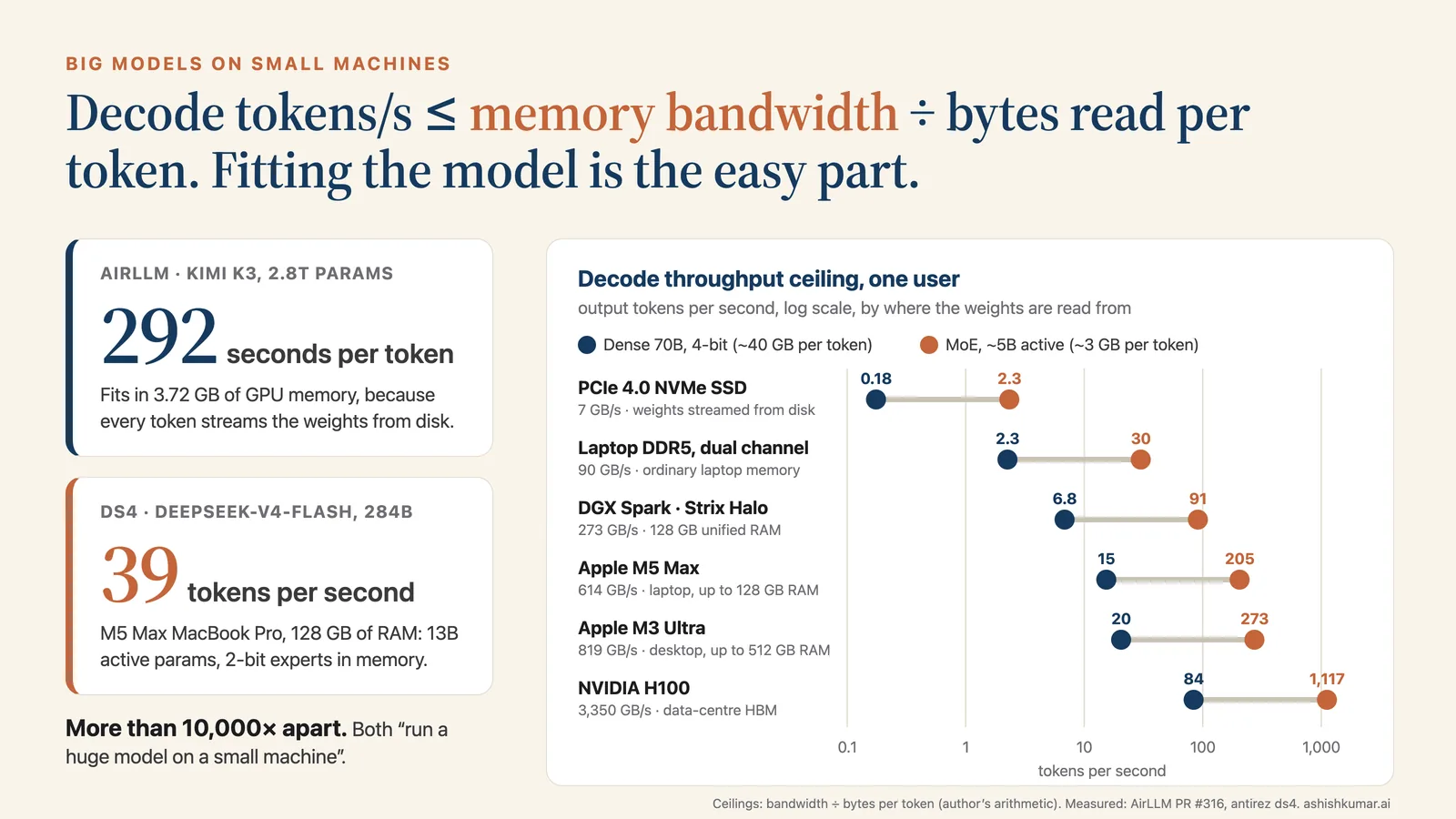
Figure 1. The bandwidth ladder. Each dot is the memory bandwidth of a place a model’s weights can be read from (log scale); the columns give the single-user ceiling, bandwidth divided by bytes read per token. An MoE model with about 5B active parameters has a ceiling about thirteen times higher than a dense 70B model on every rung, and an SSD sits more than ten times below even a laptop’s main memory. Bandwidths from Apple, AMD, NVIDIA and Samsung specifications; ceilings are my arithmetic; measured points from Jeff Geerling’s ai-benchmarks (2025).
Kimi K3 in under 4 GB at 292 seconds a token; a 284B model on a laptop with 128 GB of RAM at 39 tokens a second
How AirLLM works, and what it costs
AirLLM is the work of Gavin Li, who published it on the Python package index on 17 November 2023 and introduced it two weeks later in a Hugging Face article promising 70B inference on a single 4 GB graphics card. It credits much of its original code to a Kaggle notebook by SimJeg, and the idea is older still: Hugging Face’s Accelerate library and Microsoft’s DeepSpeed ZeRO-Inference both streamed weights from disk in September 2022. What AirLLM added was packaging: one call, most common models, a small graphics card.
The current code, version 4.0.0, does what it says. When you load a model, AirLLM builds the model’s structure on PyTorch’s “meta” device, an empty shell that records the shape of every layer but holds no numbers. The first time you use a model, it splits the downloaded checkpoint into one file per module: the embedding table, each transformer block, the final normalisation layer and the output head. It then attaches two hooks to each of those modules. Before a module runs, the first hook reads its weights from disk and copies them to the graphics card. After it runs, the second hook returns the module to the empty shell and clears memory. One background thread loads the next layer while the current one computes. Text generation itself is Hugging Face’s standard loop, which calls the model once for every new token.
The consequence follows directly. No weights are kept between tokens. For a dense model, every token reads the entire split checkpoint from disk. Graphics memory stays small because only about one layer is resident at a time; one layer of Llama 3.1 70B is 1.71 GB at 16 bits. Speed is set by the drive. This is offloading in its most extreme form: keeping weights in a slower, larger tier of storage and moving them to the processor only when they are needed.
The arithmetic is unforgiving. Llama 3.1 70B at 16 bits is 141.1 GB. A fast PCIe 4.0 NVMe drive, such as Samsung’s 990 PRO, reads sequentially at up to 7.45 GB/s; call it 7. The floor is therefore about 20 seconds per token before any computation, copying or Python overhead, and about 40 seconds on an older PCIe 3.0 drive at 3.5 GB/s. A 1,000-token answer would take between five and a half and eleven hours. AirLLM offers optional “compression”, 4-bit or 8-bit block-wise storage through the bitsandbytes library, which cuts the 4-bit read to about 39.7 GB and the floor to about 5.7 seconds per token. But the code expands every layer back to 16 bits on the graphics card for every token, switches off the background prefetching whenever compression is on, and requires an NVIDIA GPU, so it is unavailable on a Mac or a CPU.
Measured numbers sit well above those floors. The maintainer’s own example notebooks, run on a Google Colab T4 in December 2023, took 65 to 99 seconds per token for 7B models and 255 to 267 seconds for a 20B model, and the profiler attributed 60.4 of 67.1 seconds on one token to paging weights in from disk. A user reported a 70B model on an M2 MacBook Pro at about one token every 100 seconds in March 2024. On 4 August 2026 a user with an NVIDIA GB10 machine, where the split model sat entirely in the operating system’s memory cache, measured Qwen2.5-32B at 13.3 seconds per token, and found that compression made it 3.8 times slower at 8 bits and 8 times slower at 4 bits. Compression had helped on Colab’s slow disks, taking a 7B model from about 65 to 10 or 11 seconds per token; it hurts when the weights already come from fast storage. In September a Windows user with a local NVMe drive measured 28.6 seconds per token for a 3B model, an effective read rate of about 0.2 GB/s.
The headline claims deserve the same scrutiny. The README says 70B models run on a 4 GB card “without quantization, distillation, or pruning”, Kimi K3 on under 4 GB, and DeepSeek-V3 (671B) on about 12 GB. The memory figures are plausible, because peak graphics memory is roughly the largest single layer plus working space, and a DeepSeek-V3 layer at its native 8-bit precision is about 11.3 GB. But the published peaks were measured on 24 to 48 GB cards, not on physical 4 GB cards. The Kimi K3 figure came from an RTX 6000 Ada with 48 GB, on a short prompt, and the pull request says that growth of the KV cache at long context “was not tested”. Kimi K3’s weights ship in a 4-bit format called MXFP4, so “without quantization” means AirLLM adds none, not that the model is unquantised. The long-standing example for Llama 3.1 405B on 8 GB loads a pre-quantised 4-bit copy of 215.6 GB, and the notebook contains no executed output. Host memory is not small either: the Qwen3.8-Flash-Next release asks for a 64 GB machine. The maintainer has published no seconds-per-token figure for a 70B or 405B model in any version.
The project also went quiet for a long stretch: no release between 2.11.0 on 21 September 2024 and 3.0.0 on 30 June 2026, about 21 months. It then revived quickly, with a rewritten core and six releases in about ten weeks, ending with 4.0.0. Several performance reports filed since August had no maintainer reply when I checked on 14 October. The licence is Apache 2.0.
None of this makes AirLLM dishonest or useless. It does load and run models far larger than the card, and its per-expert streaming for Kimi K3, which reads only the 16 experts a token chooses out of 896 in each layer, is the right idea for MoE models. Its author was candid from the start: the 2023 article called the approach “not very suitable for interactive scenarios like chatbots” and suggested offline jobs. The trouble is that the README’s headline is about capacity, and readers hear speed.
Where AirLLM is the right tool
There is one shape of job where the arithmetic turns in AirLLM’s favour, and it follows from the difference between prefill and decode. Reading the prompt takes one pass through the model, however long the prompt is, and AirLLM streams the weights once for that pass. If the job needs only one token back, each item costs about one stream of the weights. If it needs a short label of two or three tokens, it costs two or three streams. A 500-token summary costs 500.
So AirLLM’s cost is proportional to output length, not input length. Jobs with long inputs and tiny outputs fit the pattern: classifying documents into a fixed set of labels, scoring a passage for relevance or risk, ranking candidates, or computing how likely the model thinks each answer option is in an evaluation, which needs no generation at all. For a 70B dense model at 16 bits on a 7 GB/s drive, the floor is about 20 seconds per item, and a thousand items take under six hours: an overnight run on a machine that would otherwise sit idle. Research offloaders such as FlexGen (2023) pushed this further by putting many items through each pass, reaching one token per second for the 175B OPT model on a single 16 GB GPU at an effective batch of 144. I have not seen AirLLM’s current code measured with batched prompts, so treat batching as something to test rather than assume.
Within that shape, two uses are legitimate. The first is overnight batch work on hardware you already own, when nobody is waiting for the answer. The second is an air-gapped feasibility test: can an open model of a given class do this task at all, on our data, inside our building, before anyone signs a purchase order?
The caveats are real and should be planned for. Long prompts are the least tested part of the system. Version 2 crashed above 512 tokens; version 3 removed that limit, but the KV cache now grows in graphics memory, and long context was not tested for Kimi K3. Model support is uneven: Kimi K3 needs transformers 4.56 and Qwen3.8-27B needs 5.8 or later, so one environment will not serve every model. On macOS every model is routed through a Llama-only code path with an open bug that corrupts Llama 3 output as prompts grow. The library passes trust_remote_code=True when it loads model classes and tokenizers, which runs Python code shipped inside the model repository, and its splitter will unpickle legacy .bin weight files, a format Hugging Face’s own documentation warns is insecure. Run it in an isolated environment, on safetensors checkpoints you have pinned, with no network access, and measure your real prompt lengths before you promise anyone a finish time.
The other ways in, sorted by lever
If the speed ceiling is bandwidth divided by bytes per token, there are only three levers. You can make each weight smaller, so fewer bytes are read. You can read fewer weights per token. Or you can keep the weights you read in faster memory. Every serious technique pulls at least one of them, and the best pull two or three at once. AirLLM pulls none: it reads every weight, at full size, from the slowest tier in the machine, every time.
Lever one: fewer bytes per weight.Quantisation stores each weight in fewer bits, usually by grouping weights into small blocks that share a scale factor, so a 16-bit weight becomes 8, 4 or even fewer bits at some cost in accuracy. The dominant file format for local use is GGUF, a single-file container for weights and metadata that the llama.cpp project introduced in August 2023; its quantisation schemes carry names like Q4_K_M and IQ2_XXS. The “k-quants” of June 2023 give sensitive tensors more bits than others: on the original LLaMA-7B, the 4-bit Q4_K_S file was 3.56 GB against 13.0 GB at 16 bits, while perplexity (how surprised the model is by real text; lower is better) rose only from 5.91 to 6.02. The “i-quants” of January 2024 reach about 2 bits per weight, guided by an “importance matrix” built from calibration text that protects the weights that matter most.
The aggressive end of this was Unsloth’s January 2025 release of DeepSeek-R1, whose 720 GB of weights were cut to 131 GB with a mix that put most expert weights at about 1.56 bits while keeping attention layers at 4 to 6 bits. Quantising every layer uniformly to that level broke the model completely. The mix worked, but not for free: on Unsloth’s own small coding test, the 1.58-bit build scored 69.2 percent against 91.7 percent for the 2.22-bit build. Model makers now do some of this themselves, training with low precision in mind. gpt-oss ships its expert weights in MXFP4, a 4-bit floating-point format at about 4.25 bits per weight, and Kimi K3 ships in MXFP4 too. Google’s quantisation-aware Gemma 3 27B dropped from 54 GB to 14.1 GB. llama.cpp added NVIDIA’s NVFP4 format in March 2026. At the far end is Microsoft’s BitNet, trained from the start with weights of −1, 0 or +1. Its README says a 100B BitNet model runs on a single CPU at 5 to 7 tokens per second, but the technical report says the models tested were “dummy setups”; the largest official BitNet model has about 2 billion parameters.
Lever two: fewer weights read per token. MoE is the main tool here, and it enables a trick that beats AirLLM’s: put the experts, which are large but read sparsely, in cheap system memory, and keep the attention layers and shared weights, which every token uses, on the graphics card. llama.cpp added a general way to do this in April 2025, the --override-tensor option, and a shorthand, --n-cpu-moe, in August 2025. Georgi Gerganov’s guide reports about 30 tokens per second for gpt-oss-120b on an RTX 5090 with most experts in system memory, and a minimum of about 8 GB of graphics memory. KTransformers, from Tsinghua University’s MADSys lab and Approaching.AI, specialises in this split. Its February 2025 tutorial ran DeepSeek-R1 (671B total, 37B active) at 4 bits on one 24 GB RTX 4090D plus two Xeon processors and 1 TB of DDR5 at 13.69 tokens per second, but only by using 6 of the model’s 8 routed experts per token, which changes the model; with all 8 it managed 12.2. An independent user with an AMD EPYC, 512 GB of older DDR4 and an RTX 4090 reported 9.2.
A second form of this lever is activation sparsity: for a given input, many neurons in a layer output zero and can be skipped. PowerInfer, from Shanghai Jiao Tong University in December 2023, keeps the frequently active “hot” neurons on the GPU and computes the rest on the CPU, reporting an average of 13.20 tokens per second on a single RTX 4090 and up to 11.69 times the speed of llama.cpp. Its follow-up, PowerInfer-2, ran a sparsified 47B Mixtral on a OnePlus 12 phone at 11.68 tokens per second. Apple’s “LLM in a flash” paper, the same December, ran models up to twice the size of available memory by loading only the neurons predicted to fire. The catch is that these methods need activation functions that produce exact zeros, the ReLU family, and most current models must be converted first, which has kept the idea in research.
Levers one and two at once: stream only the experts you need from SSD. This is AirLLM’s idea done right for MoE: the drive is still the slowest tier in the machine, but each token reads only the few experts it chose, at low precision, and the operating system keeps the most-used ones in memory. In March 2026 Dan Woods’ flash-moe ran Qwen3.5-397B, a 397-billion-parameter MoE with 17 billion active, on a MacBook Pro with an M3 Max and 48 GB of memory. The 209 GB of 4-bit experts stayed on the SSD, only 5.5 GB stayed resident, and the model generated 4.36 tokens per second. The fine print matters: it used 4 experts per token instead of the model’s 10, and a 2-bit version that reached 5.74 tokens per second broke JSON output and tool calls. Antirez’s ds4, released in May 2026, goes further for one model, with an asymmetric 2-bit quantisation of DeepSeek-V4-Flash’s experts that fits the whole 284B model into about 81 GB; that is how it reaches 39.35 tokens per second on a laptop with 128 GB of RAM. Its SSD-streaming mode, measured on 6 September 2026, ran GLM-5.3-Flash from a 178 GiB file on the same laptop at 11.9 to 14.9 tokens per second: larger than memory and still interactive, because most of the file still fits in RAM. Colibrì, a pure-C engine from July 2026, runs the roughly 750B GLM-5.2 with about 10 GB resident, at 1.83 tokens per second on a Strix Halo machine with 128 GB of RAM and a warm cache and 0.05 to 0.1 cold on a 25 GB laptop, which its README calls “the honest floor”. A September 2026 paper, SSD-LLaMA, claims more than one token per second for a trillion-parameter MoE on one RTX 5090 with at most 32 GB of system memory; nobody has reproduced it yet.
Lever three: faster memory. The machines that changed local inference most are built on unified memory, where the CPU and GPU share one large pool of fast memory, so the graphics processor can reach 128 or 512 GB instead of the 24 or 32 GB on a gaming card. Apple’s Mac Studio with M3 Ultra, launched in March 2025 with up to 512 GB at 819 GB/s, ran DeepSeek-V3-0324 (671B) at 4 bits at more than 20 tokens per second, according to Apple’s MLX lead Awni Hannun. Apple replaced the M3 Ultra in August 2026 with the M5 Ultra at 1.2 TB/s; its 512 GB configuration is due in late October, so nobody outside Apple has measured it. Software has followed: in March 2026 Ollama, a widely used local model runner, moved to Apple’s MLX framework on Apple silicon in preview, and reported that the switch, with a 4-bit NVFP4 build, took decode on Qwen3.5-35B-A3B from 58 to 112 tokens per second.
More machines, and more items per pass. Two further approaches change the economics rather than the ratio. Clustering pools the memory and bandwidth of several machines. In December 2025 Jeff Geerling tested four Mac Studios with M3 Ultra, 1.5 TB of memory and just under $40,000 of hardware, linked over Thunderbolt 5 with remote direct memory access and running the exo software: the trillion-parameter Kimi K2 Thinking ran at about 30 tokens per second. He also found the setup temperamental. Petals, the older volunteer network that routes prompts through strangers’ GPUs, has had no release since September 2023. Throughput offloaders, the other approach, stream weights for large batches: DeepSpeed’s ZeRO-Inference reported Llama 2 70B at 24 tokens per second, summed across a batch of 96, on one 48 GB card. That is aggregate throughput across many simultaneous requests, not the decode throughput one user sees.
Speculative decoding. One more trick attacks decode directly. A cheap draft model, or a small extra prediction head built into the main model, guesses several tokens ahead, and the large model checks all the guesses in one pass, which costs one read of the weights. Accepted guesses are nearly free tokens, and the output distribution is unchanged. llama.cpp added this using models’ built-in multi-token-prediction heads in May 2026, and users reported speed-ups of about 1.7 to 1.85 times on 27B dense models. The gain shrinks, and can turn negative, on MoE models streaming experts: Colibrì measured a 32 percent loss in its SSD setting, presumably because checking several guesses pulls in more experts.
Tool
Lever
Best verified result
Good for
Status and licence, Oct 2026
AirLLM Gavin Li · Nov 2023
None: streams every layer from disk for every token
Kimi K3 (2.8T) on one 48 GB card, 3.72 GB peak, 292 s per token (maintainer, 2026)
Long-input, one-token batch jobs on hardware you own
v4.0.0 Sep 2026 after a 21-month gap · Apache-2.0
llama.cpp and GGUF Georgi Gerganov, ggml-org · Mar 2023
Fewer bytes (k- and i-quants); MoE experts kept in system RAM
gpt-oss-120b on DGX Spark, 58.72 tok/s (llama.cpp benches, 2026)
The default runtime on almost any hardware
Very active; team joined Hugging Face Feb 2026 · MIT
Unsloth dynamic quants Unsloth · Jan 2025
Fewer bytes: 1.58 to 2.5-bit mixes
DeepSeek-R1 from 720 GB to 131 GB; 69.2% vs 91.7% on its own test (Unsloth, 2025)
Making a very large model fit; quality must be re-tested
Very active · Apache-2.0 library; model licences apply
bitnet.cpp Microsoft Research · Oct 2024
Fewer bytes: ternary weights, trained that way
BitNet b1.58 2B4T at 29 ms per token on a laptop CPU (Microsoft, 2025)
13.20 tok/s average on one RTX 4090 (authors, 2023)
ReLU-family models only
Slowing, now Tiiny-AI · MIT
flash-moe Dan Woods · Mar 2026
Experts streamed from SSD
Qwen3.5-397B on a 48 GB M3 Max, 4.36 tok/s with 4 of 10 experts (author, 2026)
Showing what an SSD can carry
Experimental · licence not stated
ds4 (DwarfStar) antirez · May 2026
All three: 2-bit experts, unified memory, optional SSD streaming
DeepSeek-V4-Flash (284B) on an M5 Max with 128 GB RAM, 39.35 tok/s (author, 2026)
One model, run very well on a laptop
Active · MIT
Colibrì Vincenzo Fornaro · Jul 2026
Experts streamed from disk
GLM-5.2 (~750B) at 1.83 tok/s warm on Strix Halo, 128 GB RAM (author, 2026)
Huge MoE on modest RAM, slowly
Active · Apache-2.0
MLX and mlx-lm Apple · late 2023
Faster memory: unified memory on Apple silicon
DeepSeek-V3-0324 (671B, 4-bit) on one M3 Ultra, over 20 tok/s (Hannun, 2025)
Macs; Ollama’s Apple backend since Mar 2026
Very active · MIT
Ollama Ollama Inc. · Jul 2023
Packaging over llama.cpp, GGML and MLX
Qwen3.5-35B-A3B decode 58 to 112 tok/s after MLX switch (Ollama, 2026)
Simple local server; bind it to localhost
Very active, v0.40.4 Oct 2026 · MIT
exo EXO Labs · Jun 2024
More machines: tensor parallel over Thunderbolt 5
Kimi K2 Thinking (1T) ~30 tok/s on 4 M3 Ultras (Geerling, 2025)
Pooling Macs you already own
Active, releases sparse since Apr 2026 · Apache-2.0
FlexGen Sheng et al. · Mar 2023
Throughput offload: big batches
OPT-175B, 1 tok/s on one 16 GB GPU at batch 144 (authors, 2023)
Offline throughput, not one user
Archived Dec 2024 · Apache-2.0
Table 1. The toolbox, sorted by lever. AirLLM is the only entry that pulls none of the three levers; the fastest single-machine results pull two or three. “Best verified result” is the strongest figure I could trace to a primary source, labelled by who measured it; speeds are single-user generation unless stated. Status and licences from GitHub and project pages, 14 October 2026.
The records, read honestly
Put the measured results on one chart and four tiers appear, set by where the weights live during decode, not by model size.
When everything sits in fast unified memory, very large MoE models run at 15 to 40 tokens per second: DeepSeek-V3 at more than 20 on one M3 Ultra, DeepSeek-V4-Flash at 39 on an M5 Max laptop, Kimi K2 Thinking at about 15 on two M3 Ultras. When the experts sit in a workstation’s system memory with one GPU for the rest, 671B models run at roughly 9 to 15 tokens per second. When the experts stream from an SSD, 400B to trillion-parameter models run at 1 to 5 tokens per second, unless most of the working set fits in memory, as in ds4’s 12 to 15. Dense layer streaming of the AirLLM kind runs at seconds to minutes per token.
Two patterns stand out. Every large-model record here is an MoE model, and the fast ones read between 13 and 40 billion active parameters per token, never the whole model. Nobody runs a dense 400B model quickly on one small machine; Geerling’s M3 Ultra ran dense Llama 3.1 405B at 1.96 tokens per second, which is the bandwidth rule working as expected. And most of the records rely on low-bit quantisation, reduced expert counts or both, each of which costs some quality: Unsloth’s 69.2 against 91.7 percent, flash-moe’s broken JSON at 2 bits, its 4 experts instead of 10, KTransformers’ 6 instead of 8. A record proves that something can run. It is not evidence that the model still does your task as well as the original.
Figure 2. Measured single-user speed for large models on single machines, log scale. Where the weights are read from predicts speed better than model size: dense layer streaming from disk runs at seconds to minutes per token, experts streamed from SSD at 1 to 5 tokens per second, experts in system memory with one GPU at about 10 to 30, and everything in fast unified memory at 20 to 40. Sources: AirLLM pull request #316 and issues #117 and #330; Colibrì and flash-moe READMEs; KTransformers issue #960; Gerganov’s gpt-oss guide; Simon Willison quoting Awni Hannun; antirez’s ds4 performance notes. Author and user figures as reported.
What changes for an enterprise platform
For a platform team, the news is that a capable local tier now exists on hardware an organisation can buy without a data-centre project, with limits you can predict from a specification sheet. OpenAI says gpt-oss-20b runs within 16 GB of memory, and llama.cpp’s guide puts its needs at 14.9 GB at an 8,000-token context. Google says Gemma 4’s 12B Unified model runs locally with 16 GB. I argued in June that the device is now a tier in the enterprise model stack; the bandwidth rule tells you what each device in that tier can sustain before you buy it.
Sovereignty gets a cheaper first step. The strongest enterprise use of these techniques is not chat on a laptop. It is testing a frontier-class open model against sensitive data, inside the building, before committing to infrastructure; a machine with 128 GB of RAM running a 2-bit DeepSeek-V4-Flash does that for a model of nearly 300 billion parameters. I have written about what sovereignty actually costs at trillion scale and what runs in-country in India as of October 2026. A local feasibility test is the cheapest step on that path, and it is a test, not a production system.
Memory got more expensive in 2026, not less. A DRAM shortage pushed up the prices of exactly these machines. NVIDIA’s DGX Spark launched at $3,999 in October 2025, rose to $4,699 in February 2026 and to about $6,950 by early October 2026. Framework’s desktop with 128 GB of memory went from $1,999 at launch to $2,459 by January 2026. Apple’s 512 GB M5 Ultra is not yet shipping. Budget with dated quotes, and expect them to move.
A quantised model is a different model. Every file in a community repository named after a famous model is a new artefact with its own behaviour. The records above came with 2-bit experts, reduced expert counts and, in one case, broken tool calls. If your evaluation ran on the full-precision model through an API, it does not cover the 2-bit file on the workstation. Re-run your evaluation bench on the exact file, runtime and context length you will deploy.
Local model files are a supply chain. In February 2024 Cisco Talos disclosed CVE-2024-21825, a heap overflow in llama.cpp’s GGUF parser through which a crafted file could execute code, rated 8.8 out of 10 for severity. In July 2025 Pillar Security showed that the chat template embedded in a GGUF file, which shapes every prompt, can carry hidden instructions that activate on a trigger, and that Hugging Face’s page shows only the first file’s template, so a poisoned quantisation can sit beside a clean one. Popular quantisations come from individuals and small firms. Cisco Talos also found more than 1,100 Ollama servers reachable from the internet in September 2025, about a fifth of them serving models to anyone. llama.cpp’s documentation says its distributed RPC server must never run on an open network, and tools that load models through Hugging Face transformers, AirLLM among them, may execute Python from the model repository. I covered the harder version of this problem, behaviour trained into the weights, in a recent essay on backdoors in open models.
The licence belongs to the checkpoint, not the family.Kimi K3 ships under the custom Kimi K3 License, which requires a separate agreement for model-as-a-service businesses above US$20 million in revenue over twelve months, and visible attribution above 100 million monthly users or US$20 million in monthly revenue. MiniMax M3 uses the MiniMax Community License, with written authorisation needed above US$20 million in yearly revenue and a list of prohibited uses. Meta’s Llama 4 models use the Llama 4 Community License. Against those, Google’s Gemma 4, Meta’s Muse Glimmer and Mistral’s Large 3 and Small 4 are Apache 2.0, and DeepSeek-V4-Flash is MIT. A team can be compliant with one checkpoint and not with the next one it downloads.
A worked example
Here is the kind of request I expect platform teams to see more often. A risk or legal team wants to know whether an open model in the 250 to 300 billion parameter class can classify 2,000 confidential documents, each about 3,000 tokens long, into a fixed set of labels, answering with a single word. The data may not leave the building, and they want an answer before anyone buys servers. The job is 6 million tokens of input and about 2,000 tokens of output: almost pure prefill. There are three options, and the arithmetic below is mine, built from published figures.
Option A: AirLLM on an existing workstation. Assume a workstation with a 24 GB NVIDIA card and a PCIe 4.0 NVMe drive at 7 GB/s. AirLLM does not list DeepSeek-V4-Flash among its supported models, so take Qwen3-235B-A22B, which it does support, in its official 8-bit checkpoint of 239 GB. AirLLM streams this model in whole layers, every expert included, so each pass reads all 239 GB, and one pass per document is enough if the label is a single token. The floor is 239 ÷ 7, about 34 seconds per document, so 2,000 documents take about 68,000 seconds, or 19 hours. That assumes the drive runs flat out. The effective read rates users have measured for AirLLM range from about 0.22 to 0.77 GB/s, which would mean 5 to 18 minutes per document and between one and nearly four weeks in total. The workstation also needs up to about 480 GB of free disk for the checkpoint and its per-layer copy. If the code and graphics memory allowed eight documents per pass, the floor would fall to under three hours, but I have not seen that measured.
Option B: a 128 GB unified-memory machine running an MoE model. On an M5 Max MacBook Pro with 128 GB, ds4 runs DeepSeek-V4-Flash (284B total, 13B active) with 2-bit experts, and antirez’s published figures show prefill at 790 tokens per second at a 2,000-token context. A 3,000-token document therefore takes about 3.8 seconds to read, plus a fraction of a second to write the label at 39 tokens per second. That is roughly 2,000 × 3.9 seconds, a little over two hours, and since prefill usually slows somewhat as context grows, plan for two to three. If a smaller model is acceptable, llama.cpp’s published DGX Spark benchmark runs gpt-oss-120b prefill at about 2,400 tokens per second, which puts the whole batch at around 45 minutes. In October 2026 the DGX Spark lists at about $6,950, and Apple’s 14-inch MacBook Pro with M5 Max starts at $3,599, more with 128 GB of memory. Spend the first hour confirming these speeds on real documents.
Option C: in-region cloud. If the feasibility test passes and the real workload is two million documents a month, or the team needs the full-precision model, the answer is data-centre GPUs in a region your residency rules allow. An H100 reads its memory at 3.35 TB/s, more than five times an M5 Max, and serves many requests at once. That is a procurement and contracting decision, not a laptop one.
My recommendation for the request as stated is Option B. It answers the real question, whether a model of this class can do the task on this data, in an afternoon, and the machine stays useful afterwards as a local evaluation box. Option A is defensible only if no purchase is possible at all. Even then I would first run it on a labelled sample of 50 documents, which takes about half an hour at the disk floor and four to fifteen hours at the rates users report, to learn whether the quality justifies the full run. Option B tests a 2-bit version of the model, not the original, so compare its labels with a sample that people have labelled before trusting the batch. Option C is for when the answer is yes.
What I would do
Decide by the job, not by the model’s size. Sort local workloads by output length and by who is waiting. Chat and agents need decode speed; batch classification and scoring need prefill speed and patience. Pick the tool for the phase that dominates.
Buy bandwidth, and size by active parameters. Memory capacity must hold the total parameters, but speed is bandwidth divided by the bytes of the active ones. For local tiers, prefer MoE models with small active counts, and read the bandwidth line on the specification sheet before the memory size.
Standardise and pin the runtime, then patch it. Choose one or two runtimes, such as llama.cpp, Ollama or MLX, pin their versions, and update them like any other software that parses untrusted files. GGUF parsing has had code-execution bugs.
Treat every quantised file as a new model. Record the publisher, the file hash and the embedded chat template, and re-run your evaluation on that exact file at the context length you will use.
Keep local servers local. Bind model servers to localhost or an authenticated internal network, never expose llama.cpp’s RPC server, and allow neither trust_remote_code nor pickle weight files without review. Run streaming tools like AirLLM in a sandbox without network access.
Track the licence per checkpoint. Keep a register of each model, its licence, its revenue or user thresholds, and the products that use it.
Measure prefill and decode separately, on your own prompts. Record prefill throughput and TTFT for your real prompt lengths, and decode throughput or TPOT for your real answer lengths. Vendor figures often report one and imply the other, and speeds fall as context grows. A day spent benchmarking your real documents is worth more than any launch chart.
Use AirLLM for what it is. It is an overnight, output-light batch tool for hardware you already own, and an air-gapped way to check feasibility. It is not a chat backend.
Fitting a giant model on a small machine stopped being the hard part some time ago. What you are really buying is bandwidth, and the cheapest bandwidth of all is a model that reads fewer bytes for every token it writes.
Weekly newsletter
The Control Plane, on LinkedIn: one problem from running AI in production each week, explained in plain terms. Or follow by RSS.
Ashish KumarHead of Platforms, AI & Data at Tata Group. Previously applied AI at Ola Krutrim, data science at Salesken, and conversational AI at Reliance Jio Haptik and Active.Ai. Full biography · LinkedIn