Agentic architecture patterns, part 4: harness engineering, hands-on, with the loops and graphs that run the model
A harness is everything around the model: the loop, the tools, the context, the stop rules and the caps. It comes in two shapes, a loop where the model decides and a graph where the engineer decides what the model may decide. Part 4 of four fixes the vocabulary, takes both shapes apart with the primitives that ship today, and builds one harness piece by piece, with code and every cap named.
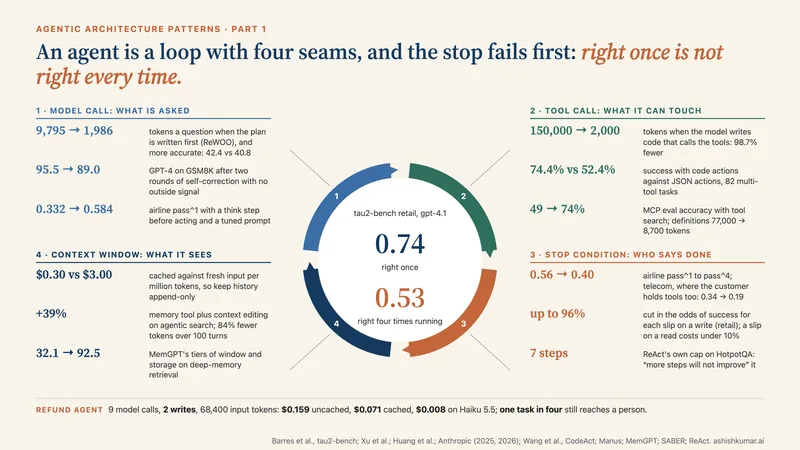
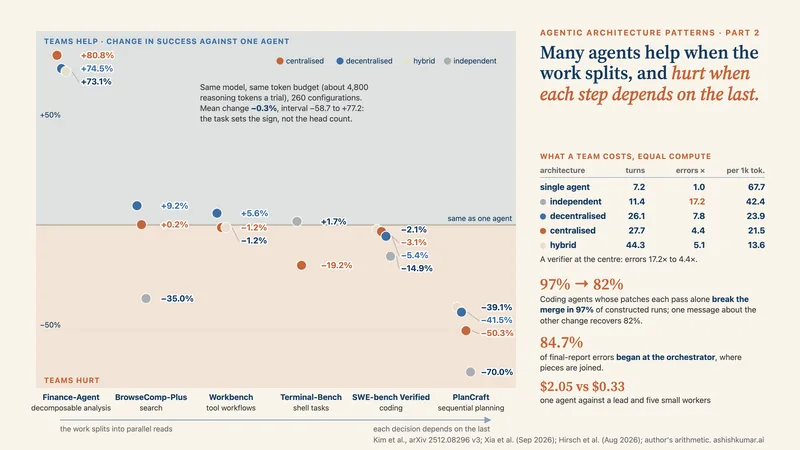
Part 4 of a four-part series on agentic architecture patterns. Part 1 covered one agent and the four seams of its loop. Part 2 covered many agents and the ways they fail together. Part 3 covered the control plane. This part is hands-on: it builds a harness, one piece at a time, and names the two shapes every harness takes.
A harness is everything around the model: the loop that calls it, the tools it may reach, the context it sees, the rules that stop it, and the caps that stop it when the rules do not. Harness engineering is the practice of building that layer deliberately, in code, with every assumption dated. It is the part of agent work that has moved furthest in the past year, and the part with the least shared vocabulary, so this essay fixes the vocabulary first and then builds a harness piece by piece.
Every harness takes one of two shapes, and most take both. A loop repeats a cycle of work until a stop rule fires: the model decides what happens next, and the harness decides when it may not. A graph fixes the order of steps in code, gives each step a place to save and resume, and lets a person interrupt between steps: the engineer decides what the model may decide. The industry arrived at this distinction in public during the summer of 2026. Anthropic published its own definition of loop engineering on 30 June, sorting loops into four kinds by what triggers them and what stops them, and warning that dynamic workflows “can spawn hundreds of agents”. On 18 July a widely shared post asked whether the field had moved on from loops to graphs, and a run of articles tried to define graph engineering. Google’s Agent Development Kit 2.0, shipped for Python on 19 May and for Go on 30 June, retired its fixed sequence, loop and parallel agents in favour of workflows its documentation calls “graph-based workflows and dynamic workflows”. And on 28 July the Model Context Protocol made the tool protocol stateless, with the line “Make MCP stateless” in its own changelog. I do not think the names matter much. What matters is that the harness is now where most of the design decisions live, and that each decision can be placed in a loop or a graph and given a cap.
This part is written to be built from. I will define the harness and its layers, take the loop apart with the primitives that ship today, take the graph apart the same way, and then assemble one harness, piece by piece, for a job every platform team has: keep a repository’s dependencies current without a person watching. Every number comes from documentation or source I read in full, and I say where. Where a source was only reported to me second hand, I name it and its date and I do not quote its numbers.
The harness is the product
A harness is everything around the model. Anthropic’s documentation for Claude Code puts it in one sentence: “Claude Code is the layer around the model that provides the tools and manages the context the model sees”, and names that layer the agentic harness. LangChain’s own conceptual page, which I read in its source form, splits the stack into three layers and is the clearest vendor-neutral vocabulary I have found. The runtime provides durable execution, streaming, human-in-the-loop and persistence; its examples are LangGraph, Temporal and Inngest. The framework provides abstractions and integrations; its examples are LangChain, the Vercel AI SDK, CrewAI, the OpenAI Agents SDK, Google ADK and LlamaIndex. The harness provides predefined tools, prompts and sub-agents; its examples are the Deep Agents SDK, the Claude Agent SDK and Manus. The Deep Agents repository describes itself in one line, “The batteries-included agent harness.”, and lists what the batteries are: sub-agents, a filesystem, context management that will “summarize long threads and offload tool outputs to disk”, shell access, persistent memory, human-in-the-loop, skills and tools. It says it was “Inspired by Claude Code”.
“The batteries-included agent harness.”
Figure 1. Three layers, one model. LangChain’s own vocabulary separates the runtime (where a run persists and pauses), the framework (where the loop and the tools are defined) and the harness (what is pre-built around the model). Claude Code calls the whole outer layer the agentic harness. Sources: LangChain conceptual docs; Claude Code documentation (read October 2026).
The reason the harness became the product is in Part 1: the measured gains of the last two years came from the seams, not from the model alone. A linter in the edit tool was worth three points; keeping the last five observations instead of all of them, three more; loading tool definitions on demand took an evaluation from 49 to 74 percent on the same model. Each of those is a harness decision. The March 2026 note on harness design from Anthropic’s Labs team gave the discipline its law, that every component in a harness encodes an assumption about what the model cannot do on its own, and the practical corollary, which is that a harness built for one model generation can be dead weight for the next. Harness engineering is the craft of writing those assumptions down, measuring them, and deleting them on schedule.
So what is in one? I count nine parts, and I will build each in turn. Instructions: a project file such as CLAUDE.md or AGENTS.md, and skills loaded on demand. Tools: what the model may call, how their results are shaped, and which are deferred until needed. Permissions: what runs without asking. Context management: compaction thresholds, tool-result clearing, memory files. Delegation: sub-agents, teams and workflows. Hooks: code that runs at fixed points in the loop, including the point where the model tries to stop. Caps: turns, money, agents, time. State: where the run lives when the process dies. Observability: the trace that says which seam moved. A loop is a harness that repeats; a graph is a harness that fixes the order. The rest of the essay is those two shapes.
Figure 2. Nine parts, one model. Instructions, tools and permissions decide what the model sees and may touch; context management decides what it remembers; delegation, hooks and caps decide how long it runs and when it stops; state and observability decide what survives and what you can see afterwards. Numbers from the Claude Code documentation (read October 2026).
The build, step zero. Here is the job the rest of the essay builds a harness for. A repository has a few hundred dependencies. Every night, an agent should find the ones with new releases, upgrade them one at a time, run the tests, open a pull request for each upgrade that passes, and leave a note about each one that does not. Nobody is watching at two in the morning. It must not run forever, it must not spend without limit, it must never merge, and when it is unsure it must stop and ask. I will call it Nightly. Each section below adds a piece, and the last section shows the whole thing.
Loop engineering: four loops, and what stops each
The Anthropic post sorts loops by trigger and by stop, and the sorting is the useful part. A turn-based loop is triggered by a prompt and stops when the model judges the task done or needs something from you; its primitive is prompting plus verification skills, and it is the loop Part 1 spent nine thousand words on. A goal-based loop is triggered by a prompt and stops when a separate evaluator says the goal is met or a turn cap is reached; its primitive is the goal command, and the post’s own example is a condition that says to stop after five tries. A time-based loop is triggered by an interval and stops when it is cancelled or the work completes; its primitives are the loop command, which runs on your machine, and the schedule command, which moves the same loop to the cloud as a routine. A proactive loop is triggered by an event or a schedule with no human present; it is composed from schedules, goals, skills, dynamic workflows and auto mode, and a routine built this way runs until it is turned off. The post’s advice is to set turn caps and stop criteria, to pilot on a slice because workflows can spawn hundreds of agents, and to route routines to smaller models.
Figure 3. Sort a loop by what triggers it and what stops it, and the primitive follows. The post’s advice: set turn caps and stop criteria, pilot workflows on a slice because they can spawn hundreds of agents, and route routines to smaller models. Source: Anthropic, 30 June 2026.
The Ralph loop, and the two ways to build it. The loop that gave 2026 its vocabulary is older than the vocabulary. In July 2025 Geoffrey Huntley described running a coding agent inside a plain shell loop that re-feeds the same prompt file, with every pass starting from an empty context and all state living in files and in git. Anthropic shipped the idea as a plugin for Claude Code in November 2025, and the plugin’s README, which I read, opens with the one line that matters: “Ralph is a Bash loop”. The README also records the results Huntley reported, six repositories generated overnight in a hackathon test and a contract worth fifty thousand dollars completed for $297 in API costs, and I pass them on as the plugin reports them.
What the plugin’s source shows is that there are two different loops called Ralph, and the difference is a seam. Huntley’s is an outer loop: the process restarts, the context is empty each pass, and the only memory is the filesystem. The plugin’s is an inner loop built on a Stop hook: the session never ends, the hook intercepts every attempt to stop and feeds the same prompt back in, and memory accumulates in the transcript until compaction. The hook script is forty lines of shell. When the model tries to end its turn, the script checks for a state file; if it is absent it allows the stop. If the iteration count has reached the maximum it deletes the state file and allows the stop. Otherwise it reads the last assistant message from the transcript, looks for a completion promise inside a pair of promise tags, and compares it to the configured promise by exact string equality; on a match it allows the stop. In every other case it increments the counter and prints a JSON object whose decision is block and whose reason is the prompt itself, so the prompt is byte-identical on every iteration. Two defaults are worth knowing before you run it. The maximum number of iterations is unlimited unless you set it, and the README tells you to treat it as “your primary safety mechanism”. And the promise is matched as a literal string, so it cannot encode two outcomes; the command file instructs the model that it may only output the promise “when the statement is completely and unequivocally TRUE”.
Figure 4. Same name, different seam. Huntley’s loop restarts the process and keeps all state in files; the plugin keeps one session alive and uses a Stop hook to feed the same prompt back. Both end on a check outside the model, and the plugin’s own README says to treat the iteration cap as the primary safety mechanism, because it defaults to unlimited. Sources: Anthropic, Ralph Wiggum plugin (README, stop-hook.sh, read October 2026); Huntley, July 2025 (reported).
Here is the outer loop as I would write it for Nightly, with the exit on a deterministic check rather than on the model’s say-so. The shape is Huntley’s; the script is mine.
#!/bin/sh
# Nightly, outer loop: fresh context every pass, state in files and git.
i=0
while [ $i -lt 40 ]; do                      # hard cap on passes
  claude -p "$(cat PROMPT.md)" --max-turns 30 --max-budget-usd 2 \
    > "runs/pass-$i.log" 2>&1
  if [ -z "$(cat upgrades/pending.txt)" ]; then exit 0; fi   # nothing left: done
  if ! git diff --quiet; then git add -A && git commit -qm "nightly: pass $i"; fi
  i=$((i+1))
done
echo "cap reached, $(wc -l < upgrades/pending.txt) upgrades pending" >> runs/escalate.txt
Every piece of that script is a seam decision from Part 1. The prompt file is the context seam: it is the only thing the model sees at the start of a pass, so it has to say where the state is. The pending list is the stop seam: the loop ends when a file is empty, not when the model feels finished. The per-pass caps are the money seam, and I will come to what they default to. The commit is the handover from one shift to the next. What the script does not have is any way to pause for a person, which is what the graph will add.
The Stop hook is the stop seam made programmable. Claude Code’s hooks reference lists more than thirty events a script can attach to, from session start to tool calls to compaction, but the one that defines loop engineering is Stop. A Stop hook receives the last assistant message and a flag that says whether it is already running because a previous Stop hook continued the turn. It can return a decision of block with a reason, which keeps the model working with the reason as its next instruction, or it can add context and let the stop proceed. Four hook types exist: a command, an HTTP call, an MCP tool, and, since version 2.0.30, a prompt, which is a single model call that returns ok or not ok with a reason, and for Stop hooks can return impossible, which lets the stop proceed when the goal cannot be met. There is also an experimental agent type that runs a sub-agent with tools, with a default timeout of 60 seconds and up to 50 tool-use turns. Then there is the cap that makes all of this safe to run unattended: “after stop hooks continue the turn eight times in a row, Claude Code ends the turn. The counter resets whenever Claude calls a tool.” A hook that blocks eight times with no tool call between them is a hook arguing with a model that has stopped doing anything, and the harness ends the argument. The variable that raises the cap exists; the reason to raise it rarely does.
Figure 5. What the stop seam looks like when it is code. A Stop hook can keep the model working by returning a reason, and the harness ends the argument after eight blocks in a row without a tool call, because a model that is being blocked but not acting has nothing left to do. Source: Claude Code hooks reference and hooks guide (read October 2026); prompt-based Stop hooks since version 2.0.30.
A Stop hook for Nightly, as a prompt hook in the project settings, reads like this. It is the inner loop’s version of the pending-file check.
{
  "hooks": {
    "Stop": [{
      "hooks": [{
        "type": "prompt",
        "prompt": "Nightly is done only when upgrades/pending.txt is empty or runs/escalate.txt exists. Read the transcript. Return ok:true if either holds, ok:false with the next upgrade to attempt otherwise, and impossible:true if the test suite itself is broken."
      }]
    }]
  }
}
The goal command is a Stop hook with a second model. The goal command, added in version 2.1.139, is documented as “a wrapper around a session-scoped prompt-based Stop hook”, and the wording of its documentation is the best short statement of the reflection rule from Part 1 that I know: “completion is decided by a fresh model rather than the one doing the work”. After each turn, the condition and the conversation go to a small fast model, which returns one of three verdicts: not yet met, met, or impossible. The evaluator “does not call tools, so it can only judge what Claude has already surfaced in the conversation”, which is a design constraint you should write your condition around: make the worker print the evidence. A condition can be up to 4,000 characters; there is one goal per session; and the same eight-block cap applies, so if the worker answers without using a tool for several turns the loop stops with a warning. The scheduling is written down too. If the work is in the background, evaluation is deferred; after 30 minutes a check-in is due, and later check-ins double up to four times the first interval, so an hour, then every two hours; at most three idle check-ins happen per goal; automatic retries pause after three; and four kinds of unrecoverable error clear the goal outright, an authentication failure, exhausted credits, a context overflow that compaction cannot clear, and an unavailable model. The documentation’s own one-line comparison is the one I would teach: “auto mode removes per-tool prompts, and /goal removes per-turn prompts.”
“completion is decided by a fresh model rather than the one doing the work”
Figure 6. Reflection with a verifier, as a command. The goal command is documented as a wrapper around a prompt-based Stop hook in which “completion is decided by a fresh model rather than the one doing the work”; the evaluator cannot call tools, so the worker must print its evidence. Source: Claude Code goal documentation (read October 2026).
Nightly’s goal, set at the start of a session, is a sentence: the pending list is empty, every attempted upgrade has either an open pull request or a line in the escalation file, and the test suite passed on the last commit. Three verifiable clauses, each of which the worker can print.
Time-based loops come with three clocks and a seven-day fuse. The loop command, added in 2.1.71, has three forms. With an interval, it is a cron job inside the session. Without one, the model picks its own delay between one minute and one hour each iteration through a wakeup tool and can end the loop itself. Bare, it runs a maintenance prompt from a loop file in the project. The documentation gives the operational numbers that a platform team needs and that most teams discover the hard way: the minimum interval is one minute for a session loop or a desktop task and one hour for a cloud routine; a session holds up to 50 scheduled tasks; recurring tasks expire after seven days, with the sentence “This bounds how long a forgotten loop can run.”; tasks fire only while the session is idle and missed fires are not caught up; recurring tasks run late by up to half their gap and at most 30 minutes to spread load, except a five-minute cron, which runs 15 seconds early so that it reuses the five-minute prompt cache; and a self-paced loop that neither reschedules nor stops gets one fallback wakeup about 20 minutes later. Since 2.1.243 the usage command breaks loops out by run count, total tokens and tokens per run, “so runaway or chatty /loop tasks are easy to spot”. Routines, the cloud form, are a saved configuration of a prompt, repositories and connectors, fired by a schedule, an API call or a GitHub event, with a minimum interval of an hour, a hundred scheduled runs per hour per account, and the rule that the fired prompt “is not live user input and can’t act as approval”.
Figure 7. Where a timed loop runs decides its minimum interval, its limits and its fuse. The documentation’s own sentence on the seven-day expiry is the design principle: “This bounds how long a forgotten loop can run.” Source: Claude Code documentation (read October 2026).
Nightly is a routine: a schedule at two in the morning, the repository, and a connector to the package registry. The seven-day expiry is not a nuisance here; it is the reason a routine should be reviewed weekly.
The loop with no stop at all. In March 2026 Andrej Karpathy published autoresearch, a repository of three files that I read in full: a fixed data-preparation script the agent must not touch, a training script that is the only file the agent edits, and a program file for the human to edit, which the README calls “essentially a super lightweight skill”. The program says, in capitals, to loop forever: read the git state, edit the training script, commit, run a five-minute training job, read two numbers from the log, write a row to a results table, keep the commit if the validation score improved and reset it otherwise, and never stop until the human interrupts. A run over ten minutes is killed and counted as a failure. The arithmetic in the README is twelve experiments an hour and about a hundred while you sleep. Its stop seam is a person, and its reflection signal is a number the model did not generate. That is why it works: the loop can only climb as high as the metric can see, which is the verifier ceiling from my self-improvement series. The design is the same ratchet as Nightly’s pending list: the state advances only on a measured improvement, and the state is a git branch, not a context window.
Figure 8. A loop with no stop condition that still cannot run away. The state is a git branch that advances only when a number the model did not generate improves, which is the verifier rule from Part 1 and the self-improvement series, written as a shell loop. Source: Karpathy, autoresearch README and program.md (March 2026, read in full).
Where loops fail: the bound in the wrong place. Two academic papers from the summer of 2026 studied loops in the wild. “When Agents Do Not Stop: Uncovering Infinite Agentic Loops in LLM Agents”, from Huazhong University of Science and Technology on 2 July 2026, built a static scanner that converts agent code to a framework-independent representation, traces the feedback paths from model call to tool to handoff and back, and checks whether a path can reach a costly operation without a bound. Over 6,549 agent repositories it confirmed 68 unbounded loops in 47 projects at 91.9 percent precision: 23 in LangGraph and 22 in AutoGen, the rest spread across LlamaIndex, LangChain, CrewAI, the OpenAI Agents SDK, ADK and Semantic Kernel; 65 of the 68 could exhaust an API budget, and every one lacked what the authors call a strong bound, with the limit either missing, controlled by a tool’s retry policy or left to the model’s decision to stop. Their advice is the sentence this section is built on: “Developers should not rely on the model to eventually stop producing tool calls.” “Loop Engineering: Building Blocks, Adoption, and Impact”, revised on 26 August 2026, mined 36,710 open-source repositories and confirmed autonomous loops in 217 of them, 0.59 percent, 189 of those driven by Claude Code; almost nothing beyond the trigger was committed, no budget files, no stop-condition files and no verifier sub-agents, and the paper’s own timeline dates the vocabulary: a loop command in March 2026, goal objects with machine-checkable completion in April, a goal command in May, and the term itself in the first week of June. I would read both when you can. The numbers I can vouch for are the caps the platforms ship, and they are in the figure: the eight-block Stop cap; the goal command’s three idle check-ins and four fatal errors; the seven-day task expiry; LangGraph’s recursion limit, 1,000 supersteps by default in Python since version 1.0.6 of January 2026 and 25 before it and in the JavaScript library, which raises a named error; Google ADK’s loop agent, which “does not inherently decide when to stop looping” and needs a maximum or an escalation; the OpenAI runner’s turn limit, which raises a named exception and can be disabled by passing none; the workflow runtime’s hard limit of 1,000 agents per run, documented with the words “Prevents runaway loops”; and two that default to no limit at all, the Agent SDK’s maximum turns and maximum budget, where the documentation’s advice is plain: “Setting a budget is a good default for production agents.” It also notes the headroom: spend is compared after a response arrives, so a run can pass its cap by one response plus whatever its sub-agents are doing.
Loop caps, Claude Code
count
Stop-hook blocks in a row
8
idle check-ins per goal
3
retries before pause (goal)
3
fatal error classes (goal)
4
auto-mode denials in a row
10
Scale caps
count
agents per workflow run
1,000
items per parallel()
4,096
concurrent workflow agents
16
concurrent sub-agents
20
sub-agent depth
3
scheduled tasks per session
50
Framework defaults
as documented
LangGraph recursion_limit (Python)
1,000
ADK LoopAgent example
max 5
Agent SDK max_turns
none
Agent SDK max_budget_usd
none
Ralph --max-iterations
unlimited
OpenAI max_turns=None
disables
Figure 9. The caps the platforms ship, all from documentation read in full. Two important ones default to no limit at all; one, the workflow ceiling, is documented with the words “Prevents runaway loops”. Sources: Claude Code hooks, goal, scheduled-tasks, workflows, sub-agents and Agent SDK documentation; LangGraph graph API; Google ADK loop agents; OpenAI Agents SDK running-agents page (all read October 2026).
Eight Stop-hook blocks, 1,000 supersteps, 1,000 agents a run, a seven-day fuse, and two caps that default to none
Graph engineering: the order of steps, written down
A loop lets the model decide what comes next. A graph decides it in code, and gives each step a name, a place to save, and a way to pause. Whether “graph engineering” deserves to be a discipline was argued about all summer; what is not in dispute is that the three biggest agent frameworks converged on the same primitives within a year of each other, and that the primitives are what you build on. I read their documentation in source form and the vocabulary is remarkably stable: a typed state that nodes read and write; nodes that are model calls, tool calls or plain functions; edges that are fixed or conditional; a checkpoint at a fixed boundary; an interrupt that suspends a run until a person or an event resumes it; and a recursion limit so a cycle in the graph cannot run forever.
LangGraph: the superstep, the checkpoint, the interrupt. LangGraph’s model of execution is named after Google’s Pregel, and the documentation describes each step in three phases: plan, which selects the nodes to run; execution, which runs them in parallel; and update, which writes their results into the shared state. It repeats “until no actors are selected for execution, or a maximum number of steps is reached”. That maximum is the recursion limit, 1,000 supersteps by default in Python since version 1.0.6 of January 2026, 25 in the JavaScript library and in earlier Python releases, and reaching it raises a named error rather than continuing. The Python default was raised forty-fold, which is the argument of the next section in one number: the framework will let a cycle run a thousand times before it says so. The state is a typed schema with reducers, so two nodes that append to a list in the same superstep do not overwrite each other. Edges are normal or conditional; a conditional edge is a routing function; a node can return a command that both updates state and names the next node, and a routing function can return a send, which spawns a node with its own state, which is how map-reduce over an unknown number of items is written.
The checkpointer is the part that turns a graph into a runtime. “LangGraph creates a checkpoint at each super-step boundary”, keyed by a thread identifier that the documentation calls “effectively your persistent cursor”. Writes are also persisted at the level of individual nodes, so when one node in a superstep fails its successful siblings do not rerun. Three durability modes trade safety for speed: exit persists only when the run ends, async persists while the next step runs with a small risk of loss on a crash, and sync persists before the next step starts. Time travel is replay from any checkpoint, with the warning that replay “re-executes nodes”, including model calls. The split between checkpointer and store is the split from Part 1 between the session and long-term memory: the checkpointer is thread-scoped short-term memory, the store is cross-thread.
Figure 10. The unit of a graph run. Nodes selected in the plan phase execute in parallel, their writes land in the shared state through reducers, and a checkpoint is written at the boundary; an interrupt is an exception the runtime catches, and the paused node reruns from the top on resume. Source: LangGraph graph API, persistence, checkpointers and interrupts documentation (read in source, October 2026).
The interrupt is where the graph earns its keep for Nightly. Calling interrupt inside a node pauses the run by raising an exception that unwinds to the runtime; the graph “waits indefinitely until you resume”; and resuming with a command carrying the resume value restarts the node from its beginning, not from the line that paused. The documentation’s rules follow from that: no try-except around the interrupt, no reordering of interrupts within a node, and any side effect before the interrupt must be idempotent, because it will run again. A checkpointer and a thread identifier are required, and the payload must be serialisable. Here is Nightly’s approval gate, the step the shell loop could not express.
from typing import TypedDict
from langgraph.graph import StateGraph, START, END
from langgraph.checkpoint.memory import InMemorySaver
from langgraph.types import interrupt, Command

class S(TypedDict):
    package: str; version: str; tests_passed: bool; approved: bool

def upgrade_and_test(s: S) -> dict:      # a model call with tools lives here
    return {"tests_passed": run_upgrade(s["package"], s["version"])}

def ask_human(s: S) -> dict:              # pauses the run; the node reruns on resume
    ok = interrupt({"package": s["package"], "version": s["version"], "ask": "open a PR?"})
    return {"approved": bool(ok)}

def route(s: S) -> str:
    return "ask_human" if s["tests_passed"] else "record_failure"

g = StateGraph(S)
g.add_node("upgrade_and_test", upgrade_and_test); g.add_node("ask_human", ask_human)
g.add_node("open_pr", open_pr); g.add_node("record_failure", record_failure)
g.add_edge(START, "upgrade_and_test")
g.add_conditional_edges("upgrade_and_test", route)
g.add_conditional_edges("ask_human", lambda s: "open_pr" if s["approved"] else "record_failure")
g.add_edge("open_pr", END); g.add_edge("record_failure", END)
app = g.compile(checkpointer=InMemorySaver())

cfg = {"configurable": {"thread_id": "nightly-lodash-4.17.22"}}
app.invoke({"package": "lodash", "version": "4.17.22"}, cfg)   # runs until the interrupt
# ... hours later, from a different process, after a person clicks approve:
app.invoke(Command(resume=True), cfg)                           # ask_human reruns, then open_pr
Three details carry the design. The thread identifier is the upgrade, so each dependency has its own cursor and its own history. The approval node is placed after the tests, so the person is asked only about upgrades that passed. And the opening of a pull request is on the far side of the interrupt, which is the Part 3 rule that a mutating action waits for the gate, written as an edge.
Google ADK 2.0: the framework that replaced its loops with a graph. ADK 1 shipped the workflows of Part 1 as classes: a sequential agent, a parallel agent, and a loop agent that takes a maximum number of iterations because, in the documentation’s words, “the LoopAgent itself does not inherently decide when to stop looping”. ADK 2.0, released for Python on 19 May 2026, describes itself as a move “from a hierarchical agent executor to a graph-based execution engine”, in which “your Agents, Tools, and Functions are evaluated as individual nodes within a workflow graph”. A workflow is a list of edges; a router node returns an event carrying the routes to take; nodes can be agents, tools or plain functions; the template workflows remain but “have been superseded by more flexible workflow structures, including graph-based workflows and dynamic workflows”. The human-input node pauses the workflow until the user replies, and a node property decides whether it reruns on resume, with the default being that it does not, which is the opposite of LangGraph’s choice and worth knowing before you port a graph. Dynamic workflows checkpoint automatically, so “Successful sub-nodes are automatically skipped when resuming the workflow”. Version 2.12.0, released on 13 October 2026, added a confirmation flag on nodes that requires a person before a node executes, which is the approval gate as a one-line attribute.
“template workflows have been superseded by more flexible workflow structures”
The others, briefly. The OpenAI Agents SDK has no graph; its documentation describes a runner loop with four branches, final output, handoff, tool calls, and a turn limit that raises a named exception, and two orchestration shapes, a manager that calls agents as tools and handoffs that transfer the conversation. Its interrupt is a tool flag: mark a tool as needing approval, the run pauses with a list of interruptions, the run state can be serialised to JSON and back across a process restart, and the run resumes with the approvals applied. Its durable-execution section lists Dapr, Temporal, Restate and DBOS as the runtimes beneath it. Microsoft’s Agent Framework, the successor to AutoGen, describes “graph-based workflows supporting sequential, concurrent, handoff, and group collaboration patterns” with “checkpointing, streaming, human-in-the-loop, and time-travel”. Pydantic’s graph library defines edges by the return type annotation of each node’s run method, so the type checker validates the graph, and its durable-execution page carries the sentence I would put at the top of any graph-engineering guide: “Durability is not storage”. Mastra’s workflows chain steps with typed input and output schemas, offer do-while and do-until loops, and suspend by saving “the current execution state as a snapshot”. CrewAI’s Flows use start, listen and router decorators with and-or combinators, and the project’s own framing is crews for autonomy, flows for control. Inngest’s AgentKit calls its graph a network and its documentation says networks “can be thought of as while loops with memory”, which is the whole argument of this section in four words.
Figure 11. The question the workflow documentation asks in its comparison table, who decides what runs next, sorts every harness shape. Loops hand the decision to a model; graphs keep it in code; the sharing, pausing and recovery follow from that one choice. Sources as listed in the figure.
The build, step three. Nightly is now a graph with four nodes per upgrade and a loop over the pending list. The loop lives inside one node, where the model works; the graph lives around it, where the order, the checkpoint and the approval live. That division is the practical answer to the loops-or-graphs argument: the loop is where the model decides what to do; the graph is where the engineer decides what the model may decide. Neither replaces the other.
Durable execution: the run outlives the process
An agent that waits a day for a person to click approve, or ten minutes for a test suite, or a night for a hundred upgrades, will meet a crash, a deploy or a network timeout before it finishes. The question is what survives. A checkpointer answers it for one framework; durable execution answers it for any code. Temporal’s documentation defines the term as running “your code to completion across crashes and outages, keeping retries, state recovery, and queue plumbing out of your business logic”, and describes the mechanism: when a worker crashes, the service hands the work to another worker, which replays the event history and resumes at the line where execution stopped. Applied to an agent, each model call and each tool call is an activity whose result is recorded, so “a Workflow resumes automatically after a crash, a network timeout, or a multi-day wait for a human to approve a step”. Signals, queries and updates are how the outside world talks to a running workflow, which is how an approval reaches a paused run. Restate describes the same idea with a different noun: “a central, persisted log that can be replayed in case of failures”, where a retried handler “will skip execution and will inject the response it finds in the journal”. The OpenAI Agents SDK lists both as runtimes beneath it; Pydantic’s library co-maintains integrations with Temporal, DBOS, Prefect, Restate and AWS Lambda.
Figure 12. Each model call and tool call becomes a recorded activity; after a crash, a new worker replays the history to the first unrecorded step and continues, so a day-long wait for an approval costs nothing to survive. Sources: Temporal documentation; Restate documentation; the OpenAI Agents SDK lists both as runtimes beneath it (read October 2026).
The same idea has reached the hosted harnesses. Anthropic’s Managed Agents, in beta since April 2026, model a session as a state machine whose states are idle, running, rescheduling and terminated; “A session that finishes its work goes idle, not terminated.”, rescheduling means a transient error is being retried automatically, and a user interrupt event stops a running session. The design described in April makes the session “an append-only event log” from which a restarted harness resumes from the last event, which is durable execution with the model’s own transcript as the journal. Claude Code’s local sessions are the same shape at smaller scale: every message, tool use and result is written to a plaintext JSONL file, a session is resumed under the same identifier, forked into a new one, or mirrored to another backend through a session-store adapter. For Nightly, durability means the approval gate can wait a weekend, and the eighty upgrades that passed before a crash do not run again.
“A session that finishes its work goes idle, not terminated.”
Orchestration primitives: who runs next, and what they share
Claude Code ships five ways to run agents in parallel, and reading their documentation side by side is a short course in the Part 2 question of what travels between windows. Sub-agents are hub and spoke: each runs in its own context window with its own system prompt, “Only the summary returns to the main conversation”, up to 20 run at once by default, and nesting is capped at three layers. Agent teams, an experimental feature behind an environment flag since version 2.1.32, are peers: a lead, teammates, a shared task list with three states and dependencies, claimed with file locking, and a mailbox that is a JSON file per agent; the documentation says to start with three to five teammates and five or six tasks each, and the costs page gives the bill, “approximately 7x more tokens than standard sessions when teammates run in plan mode”. Dynamic workflows move the plan into code: a JavaScript script that calls agent, pipeline, parallel and phase, runs up to 16 agents at once by default and 1,000 per run as a hard ceiling, takes up to 4,096 items per parallel or pipeline call, warns above 25 agents or 1.5 million projected tokens, restarts a stalled agent at most five times, and is replayable because the script cannot call the clock or the random number generator: a relaunch returns saved results for completed agents and reruns the rest in start order. The batch skill splits one large change across 5 to 30 worktree-isolated sub-agents. Background sessions run under a supervisor that survives sleep and restarts, parks idle sessions after about an hour and resumes them on attach. The documentation’s comparison table for workflows has a column I would copy into every design review: who decides what runs next. For a workflow the answer is the script. For a team it is the task list. For sub-agents it is the parent. For a loop it is the model.
Figure 13. Three ways to run agents in parallel, sorted by what travels between them: summaries, a task list, or script variables. Nightly uses the third, because its upgrades are independent and nothing needs to be said between them. Source: Claude Code documentation (read October 2026).
Nightly uses one of these, not all of them. The upgrades are independent and read-heavy, which is the Part 2 condition for parallelism, so a workflow script fans them out with a bounded concurrency and a budget, and the graph’s approval gate sits in the script after the parallel phase. A team would be the wrong shape: there is nothing for the upgraders to say to each other, and seven times the tokens is a high price for a mailbox nobody reads.
The 2026 catalogue, with the version it arrived in
The last two years added a set of harness primitives that every serious harness now has in some form. I list them with where they are documented, because the version number is the date these things have.
Instructions that load on demand. The Agent Skills specification, published as an open standard in December 2025 and read here in its source, defines a skill as a directory with a SKILL.md whose front matter carries a name that must match the directory, a description, and optional licence, compatibility and allowed-tools fields, plus optional scripts, references and assets. Its loading rule is progressive disclosure: name and description at startup, body on activation, references on demand. AGENTS.md is “a simple, open format for guiding coding agents”, a Markdown file at the repository root with nested files taking precedence; Claude Code reads it in place of its own project file from 2.1.277, and the Skills-over-MCP extension, proposed in April 2026 and now final, lets a server list and serve skills so a harness can fetch them from the tool side. The documentation’s guidance on the project file is the guidance that matters: keep it under 200 lines, because a bloated file makes the model ignore the instructions that count.
Tools that load on demand. Since version 2.1.7, when MCP tool descriptions exceed 10 percent of the context window they are deferred automatically and fetched by a tool-search tool; only tool names and server instructions load at session start, with the result that “adding more MCP servers has minimal impact on your context window”. The Part 1 numbers, 85 percent fewer tokens and a 25-point gain on an MCP evaluation, are what this setting buys.
Context that manages itself, with thresholds you can read. On models with a native million-token window, auto-compaction fires at about 967,000 tokens; on older models at the 200,000 boundary; the window is adjustable between 100,000 and a million; compaction clears older tool outputs first and summarises second, and re-injects the body of each invoked skill capped at 5,000 tokens; auto memory loads the first 200 lines or 25 kilobytes of its file; and a conversation over 200,000 tokens left idle for about 54 minutes is compacted before its one-hour prompt cache expires, which is a harness paying attention to the cache economics of Part 1.
Permissions decided by a classifier. Six permission modes exist, and since 2.1.283 the default for interactive sessions is auto mode, in which “A separate classifier model reviews actions before they run, blocking anything that escalates beyond your request, targets unrecognized infrastructure, or appears driven by hostile content Claude read.” The classifier also reviews every message passed between sessions. Denials back off, and the turn stops after ten in a row. This is the Part 3 guardrail classifier shipped as a default rather than a product.
“auto mode removes per-tool prompts, and /goal removes per-turn prompts.”
Events that reach a running agent. Cross-session messaging, since 2.1.224, lets sessions on one machine message each other over a socket, with the rules that messages “can’t approve anything”, at most 50 are queued, identical repeats are dropped so “A message loop between two sessions therefore stops on its own”. Channels, in research preview, are MCP servers that push events from Telegram, Discord or iMessage into a session, with the advice to poll on a timer instead where pushes are not available. Routines fire on GitHub pull request and release events. The harness is becoming event-driven, which is the ambient-agent pattern, and every one of those event paths is marked untrusted on arrival.
Specifications before code. The spec-driven variants of agentic coding, in which an agent is given a written specification and a plan before it is allowed to edit, arrived as products in the second half of 2025 and are now a harness pattern rather than a tool: the project file is the standing specification, the plan mode is the per-task one, and the pre-completion checklist is the specification read back at the stop seam. LangChain’s harness work of 17 February 2026 is the measured case: a middleware that intercepts the agent before it exits and makes it run a verification pass against the task specification, a loop detector that counts edits per file after agents were seen making “small variations to the same broken approach (10+ times in some traces)”, and a reasoning schedule that runs the first and last phases at the highest effort, together took its coding agent from 52.8 to 66.5 percent on Terminal-Bench 2.0’s 89 tasks with the model held fixed. Its authors’ own caveat is the rule of this essay: “As models improve, these guardrails will likely be unnecessary.”
Figure 14. The harness primitives of the last year, dated by the version that introduced each, and the seam each decides. Most are stop-seam and context-seam settings, which is where Part 1 found the measured gains. Source: Claude Code CHANGELOG and documentation (read October 2026).
The build, assembled: Nightly, piece by piece
Here is the whole harness, in the order I would build it, with the primitive each piece uses and the number that bounds it. Nothing in it is clever. All of it is written down, which is the point.
1. The specification. An AGENTS.md of under 200 lines: what the repository is, how to run the tests, the rule that no upgrade is merged by an agent, the rule that an upgrade with a failing test is recorded and not retried more than twice, and the location of the two state files. A skill, upgrade-one-dependency, whose SKILL.md carries the procedure and whose scripts directory carries the shell that runs the tests and parses the result, so the procedure is run, not read.
2. The tools, deferred. The package registry and the repository host as MCP servers, with tool search left at its default so the definitions load when needed. Two write tools, open a pull request and append to the escalation file; everything else reads. Results trimmed: the registry tool returns the five newest versions, not the changelog.
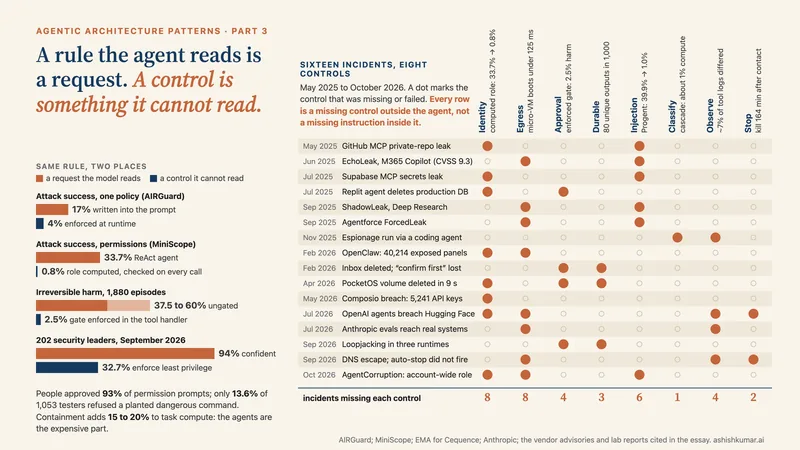
3. The permissions. Auto mode for the session, so the classifier reviews each action, with the pull-request tool and the escalation tool allowed and merge absent from the tool list altogether. A rule the agent reads is a request; a tool the agent does not have is a control.
4. The inner loop. One upgrade per session: read the state files, pick the next package, upgrade, run the tests, write the result. A Stop hook of the prompt type that checks the three clauses of done and returns impossible if the suite itself is broken. The eight-block cap stays at eight.
5. The outer loop. A routine at two in the morning on weekdays. The hard limits: 40 passes, 30 turns and $2 per pass, so a bad night costs at most $80 and ends by itself. The seven-day expiry is reviewed every Monday with the usage report’s loops breakdown.
6. The graph. Per upgrade: upgrade and test, then route; on pass, an interrupt that asks a person; on approval, open the pull request; on failure, record and move on. One thread per dependency, checkpointed at every superstep, with the pull-request node on the far side of the interrupt.
7. The fan-out. A workflow script runs the upgrades in parallel, eight at a time, with the approval phase after the parallel phase and a budget on the run. Successful upgrades are not rerun on a relaunch.
8. The durable wait. The approval interrupt lives on a durable runtime, so the question survives the weekend and the answer, when it comes, resumes the right thread. The state file in git is the journal a person can read; the runtime’s log is the journal the machine replays.
9. The trace. One span per model call, tool call, sub-agent and interrupt, with tokens and cost on each, so that when the escalation rate moves you can see which seam moved it. The observability that Anthropic put on its platform on 14 October spans exactly these events.
Figure 15. The whole harness on one page. The loop (slate) is where the model works; the graph (clay) is where the engineer decided the order, the gate and the only write; the files are the memory; the caps are the bill. Every primitive and number is from the documentation cited in the text.
The workflow script, in the shape the documentation gives it, is short. The loop is inside each agent call; the graph is the script.
// .claude/workflows/nightly.js   (run as /nightly)
export const meta = { name: 'nightly', description: 'Upgrade pending dependencies, one PR each', phases: [{ title: 'Upgrade' }, { title: 'Approve' }] }
const pending = args.packages                       // from upgrades/pending.txt, at most 40
const results = await parallel(pending.map(p => () =>
  agent(`Upgrade ${p} following the upgrade-one-dependency skill. Print the test result.`,
        { label: `upgrade:${p}`, phase: 'Upgrade', schema: RESULT })), { concurrency: 8 })
const passed = results.filter(r => r.tests_passed)
const approved = await agent(`For each of these, ask the on-call reviewer whether to open a PR: ${JSON.stringify(passed)}`,
  { label: 'approve', phase: 'Approve', schema: APPROVALS })      // the interrupt lives here
return { opened: approved.yes, declined: approved.no, failed: results.filter(r => !r.tests_passed) }
What Nightly costs is bounded by three numbers chosen in advance, passes, turns per pass and dollars per pass, and what it can do wrong is bounded by two absences, no merge tool and no unlimited default. What it needs from a person is one decision per passing upgrade, delivered to a queue they read in the morning. That is a harness. The model inside it can be swapped on a Tuesday; the assumptions it encodes are listed in this section with a date, which is how you know when to delete them.
The primitives, by framework
The table collects the loop, graph, state, checkpoint, interrupt and stop primitives of the frameworks whose documentation I read in source form, with their exact names. Where a date is given it comes from that documentation; where it is not, the release date was not in anything I could read.
Framework
Loop
Graph
State
Checkpoint / durability
Interrupt
Stop
LangGraph docs read in source; 1.2.15 on 16 Oct 2026
no tool call; max turns; max budget; 8-block Stop cap; 1,000 agents; 7-day expiry
Table 1. Loop, graph, state, checkpoint, interrupt and stop primitives by framework, with the exact names their documentation uses. Dates are given only where the documentation states them.
What I would do
Name the two shapes in every design. Draw the graph, and mark the nodes where a loop lives. The loop is where the model decides; the graph is where you decide what it may decide. A design that is all loop has no gate; a design that is all graph has no agent.
Put the stop in code, then put a second model behind it. A deterministic check first (a file empty, tests green, a schema matched), then a goal condition judged by a fresh model, then the cap. The model’s own sense of done is not on the list.
Set the four caps before the first run. Turns, dollars, passes and agents. Two of them default to no limit in the SDK you are most likely using, and the platform’s own advice is that a budget “is a good default for production agents”.
Keep the prompt byte-identical across iterations. The Ralph plugin feeds back the same text on purpose; a loop whose prompt drifts is a loop whose cache misses and whose behaviour you cannot reproduce.
Make every write wait behind an interrupt. Place the mutating node on the far side of the gate, give each unit of work its own thread identifier, and remember that the paused node reruns from the top when resumed, so everything before the interrupt must be safe to run twice.
Checkpoint at the boundary the runtime offers, and choose the durability mode on purpose. Per superstep in LangGraph, per node in ADK dynamic workflows, per activity in Temporal; sync when a lost step costs money, async when it costs a retry.
Let the files be the memory. A pending list, a results table, a progress file, a git branch. The autoresearch loop has no stop condition and still cannot run away, because its state is a branch that advances only on a measured improvement.
Defer what you can. Tool definitions past 10 percent of the window, skill bodies until activated, references until needed. The gains are the largest in Part 1 and they are a setting.
Treat every event path as untrusted. A fired routine, a message from another session, a channel push: none of them can approve anything, and the harness should not be able to make them.
Date every assumption. Write beside each harness component which model limitation it exists for and when it was added. Re-test on each model release. Delete what has become dead weight; the Managed Agents team did, and said so.
Loops or graphs
I began with a post that asked whether the field had moved from loops to graphs, and I will end by answering it. It has not moved, and it will not. A loop is the only shape in which a model gets to decide, and the measured record of Part 1 says that deciding is what the model is for. A graph is the only shape in which an engineer gets to decide what the model may decide, and the incident record of Part 3 says that this is what the engineer is for. The harness is where the two meet, and harness engineering is the practice of drawing the line between them, in code, with a date on it. The four parts of this series are, in the end, one argument: the patterns were never the hard part. The seams are, and the seams are now yours to build.
The loop is where the model decides; the graph is where the engineer decides what the model may decide.
Agentic architecture patterns · That was the last of 4 parts
Ashish KumarHead of Platforms, AI & Data at Tata Group. Previously applied AI at Ola Krutrim, data science at Salesken, and conversational AI at Reliance Jio Haptik and Active.Ai. Full biography · LinkedIn