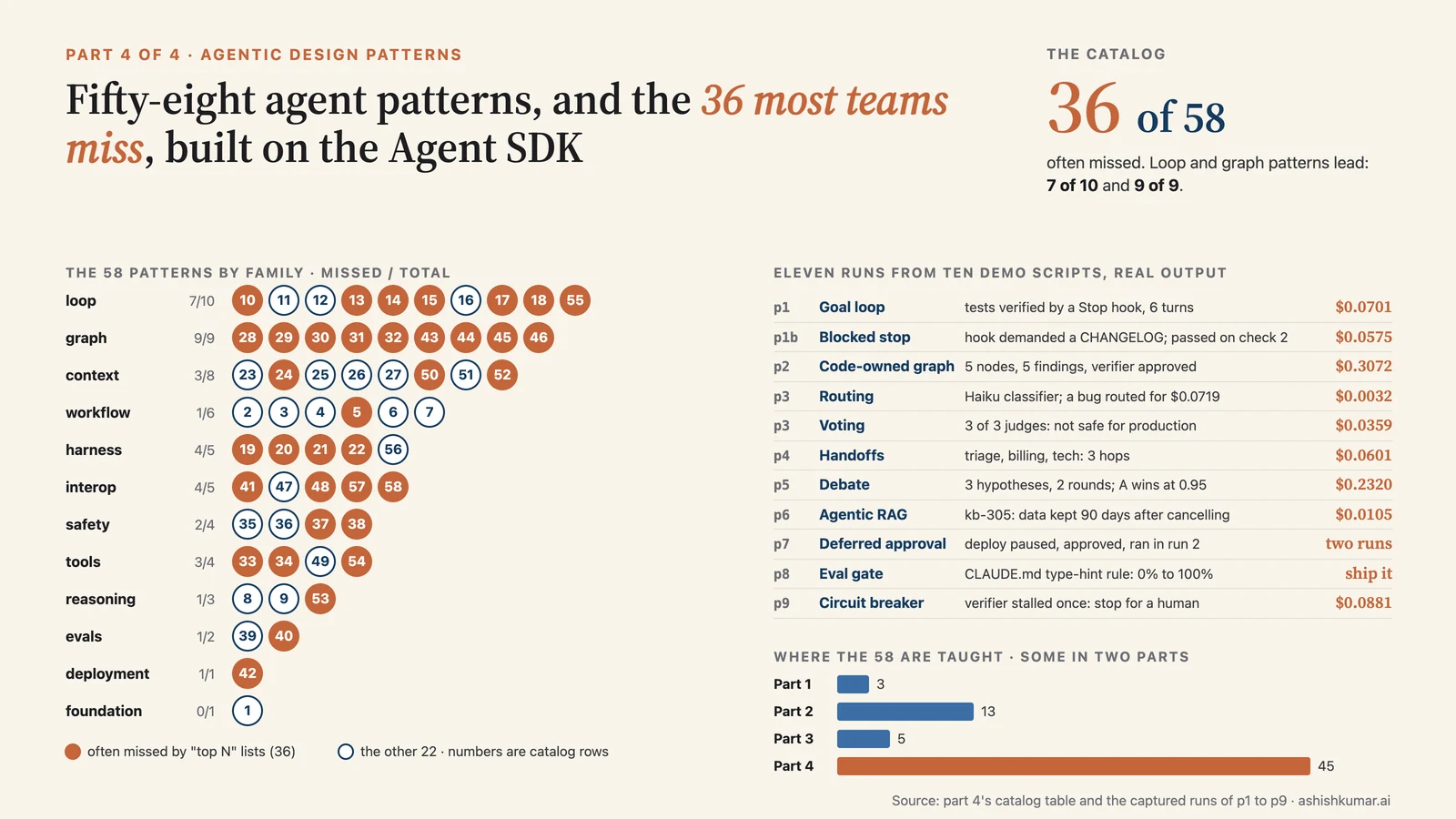
Where you are. Parts 1–3 taught the primitives. This part is about architecture: the patterns people actually use to make agents reliable, from the five classic workflow patterns to the 2026 vocabulary of loop engineering, harness engineering, context engineering and graph engineering. Every pattern has a definition, a "when to use it", and runnable code on the Agent SDK with real output.
A caveat up front. Several of these terms were coined in mid-2026 and are contested. I cite primary sources, and where a term relabels something older I say so. Treat the taxonomy as a map, not a standard.
Contents#
- The vocabulary: five "engineerings"
- The building block: the augmented LLM in a loop
- The classic workflow patterns, with code and output
- Loop engineering
- Harness engineering
- Context engineering, with memory architectures, agentic RAG, prompt caching, test-time compute
- Graph engineering, with handoffs, swarms, blackboards, debate
- Multi-agent lessons from production systems
- Tool design as a pattern, with Bash as the universal tool, background and asynchronous agents, agentic coding practices
- Safety, governance and human-in-the-loop patterns
- Evaluation and observability patterns
- Protocols: MCP, A2A, skills, generative UI, marketplaces
- The full catalog, and which ones most teams miss
- Decision guide and anti-patterns
- Sources
1. The vocabulary: five "engineerings"#
Key points
- Prompt → context → harness → loop → graph engineering is a stack: each layer controls a bigger unit (a request, a window, an agent, a cycle, a system).
- "Loop engineering" was named in June 2026, "graph engineering" in July 2026. Both bundle older ideas under agent-centric names.
- The Agent SDK has a concrete knob for every layer.
🧒 Plain-English version: five layers of "telling the intern what to do"
- Prompt engineering: wording one instruction well.
- Context engineering: deciding what's on the intern's desk at each moment, since a cluttered desk makes them worse.
- Harness engineering: everything around the intern that isn't the intern: their tools, the permission rules, their notebook, the alarms you set.
- Loop engineering: deciding what starts the intern working, how you check the work, and when they're allowed to stop.
- Graph engineering: when you have many interns, deciding who hands what to whom, in what order, and who checks whom.
A 2026 survey arranges the layers as a stack (Feng et al., Graph Engineering in the Era of LLM Agents): prompt and context engineering elicit model intelligence, harness and loop engineering produce individual agent intelligence, graph engineering produces system intelligence. (One reviewer notes the paper asserts, rather than demonstrates, that graphs are necessary for the last step.)
| Layer | What you control | Representative artefacts | Agent SDK surface |
|---|---|---|---|
| Prompt | the instructions in one request | system prompt, examples | system_prompt, CLAUDE.md |
| Context | which tokens are in the window at each step | compaction, notes, retrieval, tool search, subagents | setting_sources, tool search, /compact, subagents, skills |
| Harness | the machinery around a fixed model | the Claude Code binary | ClaudeAgentOptions, hooks, permissions, sandbox |
| Loop | how one agent is triggered, verified and stopped | /goal, /loop, routines, Stop hooks, verifiers |
Stop hook, max_turns, max_budget_usd, schedulers |
| Graph | how many loops connect: nodes, edges, shared state | code-owned graphs, dynamic workflows, agent teams | asyncio over query(), Workflow tool, subagents |
Origins: Peter Steinberger's "stop prompting agents, design loops that prompt them", Boris Cherny's "my job is now to write loops", and Addy Osmani's essay that named the pattern, all June 2026 (Yahoo Tech, Lulla et al.); Steinberger asking in July whether the field had moved on to graphs (Turing Post).
2. The building block: the augmented LLM in a loop#
Key points
- Workflows follow code paths you wrote; agents choose their own path. Both are built from one block: a model with tools, retrieval and memory, in a loop.
- Start simple. Add agency only when it measurably helps.
- All eleven coding-agent harnesses studied in 2026 implement the same ReAct loop.
🧒 Plain-English version
Anthropic's own guidance from late 2024 still holds: most tasks don't need an intern that improvises. A fixed checklist (a workflow) is cheaper, faster and more predictable. Use a free-roaming intern (an agent) only when you genuinely can't write the checklist in advance.
From Building Effective Agents: a workflow orchestrates LLM calls through predefined code paths; an agent lets the LLM direct its own process and tool use. Both compose the augmented LLM (model + retrieval + tools + memory). The Agent SDK is this block: query() runs the loop, tools are the augmentation, sessions and CLAUDE.md are memory. The eleven-system source-code study (arXiv 2609.00006) found every harness implements a ReAct variant (reason, act, observe), differing in concurrency and complexity.
Throughout this part I use one helper that turns a query() into a function call: a fresh-context "node" that returns typed JSON when given a schema, or text otherwise.
# shared by p2 and p3 (examples/python/)
async def run(prompt, schema=None, **opts):
    options = ClaudeAgentOptions(cwd=PROJECT, setting_sources=[], max_turns=opts.pop("max_turns", 5),
                                 output_format={"type": "json_schema", "schema": schema} if schema else None, **opts)
    async for m in query(prompt=prompt, options=options):
        if isinstance(m, ResultMessage):
            return (m.structured_output if schema else m.result), (m.total_cost_usd or 0)
3. The classic workflow patterns, with code and output#
Key points
- Five patterns from Anthropic's guide: prompt chaining, routing, parallelization (sectioning, voting), orchestrator-workers, evaluator-optimizer.
- Three more from later catalogs: reflection, planning, memory.
- On the SDK: chaining and routing are plain Python control flow over
run(); parallelization isasyncio.gather; orchestrator-workers is subagents; evaluator-optimizer is a verifier node or a Stop hook.
🧒 Plain-English version: the five checklists
- Chaining: do step 1, check it, do step 2 with the result.
- Routing: a cheap receptionist decides which specialist should handle the request.
- Parallelization: split the work across several interns at once, or ask three interns the same question and take the majority.
- Orchestrator-workers: a lead intern breaks the job down on the fly and hands pieces out.
- Evaluator-optimizer: one intern drafts, a second critiques, repeat.
Code (p3_workflow_patterns.py), routing, chaining and voting in one file:
# ---------- 1. Routing: a cheap classifier picks the specialist -------------------------------
ROUTE_SCHEMA = {"type": "object", "properties": {"kind": {"type": "string", "enum": ["bug", "docs", "question"]},
                                                 "reason": {"type": "string"}}, "required": ["kind", "reason"]}
SPECIALISTS = {                                                                   # (1) one options bundle per route
    "bug":      dict(allowed_tools=["Read", "Grep", "Glob"], max_turns=8, system_prompt="You are a debugger. Locate the defect and describe the fix in two sentences."),
    "docs":     dict(allowed_tools=["Read", "Glob"],         system_prompt="You are a technical writer. Answer in two sentences."),
    "question": dict(tools=[],                               system_prompt="Answer from general knowledge in one sentence."),
}

async def routed(request):
    route, c1 = await run(f"Classify this request: {request!r}", ROUTE_SCHEMA,
                          tools=[], model="claude-haiku-5-5", effort="low")        # (2) cheap, tool-less, typed
    answer, c2 = await run(request, **SPECIALISTS[route["kind"]])                 # (3) dispatch
    print(f"[route] {request!r}\n   -> kind={route['kind']} ({route['reason']})\n   -> {answer}\n   cost=${c1 + c2:.4f}")

# ---------- 2. Prompt chaining with a programmatic gate -----------------------------------------
OUTLINE_SCHEMA = {"type": "object", "properties": {"sections": {"type": "array", "items": {"type": "string"}, "minItems": 3}},
                  "required": ["sections"]}

async def chained():
    outline, c1 = await run("Outline a README for this project in 3-5 section titles.", OUTLINE_SCHEMA, allowed_tools=["Read", "Glob"])
    assert 3 <= len(outline["sections"]) <= 5, "gate failed"                       # (4) a deterministic gate between steps
    doc, c2 = await run("Write one sentence for each of these README sections, as a markdown list:\n"
                        + json.dumps(outline["sections"]), tools=[])                 # (5) step 2 consumes step 1's output
    print(f"[chain] outline={outline['sections']}\n{doc}\n   cost=${c1 + c2:.4f}")

# ---------- 3. Parallelization: voting -----------------------------------------------------------
VOTE_SCHEMA = {"type": "object", "properties": {"safe": {"type": "boolean"}, "reason": {"type": "string"}},
               "required": ["safe", "reason"]}

async def voted():
    prompt = "Is src/app.py safe to deploy to production as-is? Answer safe=true/false with a one-sentence reason."
    results = await asyncio.gather(*(run(prompt, VOTE_SCHEMA, allowed_tools=["Read"], effort="low") for _ in range(3)))  # (6) 3 independent judges
    votes = [r[0]["safe"] for r in results]
    print(f"[vote] votes={votes} -> majority safe={sum(votes) > 1}")                 # (7) programmatic aggregation
Run it:
[route] 'calculate_average crashes on an empty list, where is the bug?'
   -> kind=bug (The user reports that calculate_average crashes on an empty list and asks where the bug is. ...)
   -> This one's already fixed — not a live bug. In `src/utils.py`, the original defect was that `calculate_average` divided
      `total / len(numbers)` unconditionally, causing a `ZeroDivisionError` on `[]`. The fix (already in place, per CHANGELOG.md)
      adds an `if not numbers: return 0.0` guard before the division ...
   cost=$0.0719
[route] 'What is the difference between a list and a tuple in Python?'
   -> kind=question (... It seeks an explanation, so it is classified as a question.)
   -> A list is mutable (can be changed after creation) and defined with `[]`, while a tuple is immutable ... and defined with `()`.
   cost=$0.0032
[chain] outline=["Overview – what the project is ...", 'Project Structure – ...', 'Usage – ...', 'Testing – ...', 'Known Issues / Notes – flag the intentional SQL injection bug ...']
- **Overview**: This project is a small Python demo built to showcase the Claude Agent SDK, containing a simple application (`src/app.py`) and a set of helper functions (`src/utils.py`).
- **Project Structure**: ...
- **Usage**: Run the app directly with `python src/app.py`, or import the utilities ...
- **Testing**: Run the full test suite from the project root using `pytest tests/`.
- **Known Issues / Notes**: `src/app.py` intentionally contains a SQL injection vulnerability as a deliberate, educational flaw ...
   cost=$0.0460
[vote] votes=[False, False, False] -> majority safe=False
   - safe=False: app.py has a SQL injection vulnerability (f-string interpolated query in find_user) and a hardcoded live API key, both unsafe for production.
   - safe=False: It hardcodes a live API key in source and builds SQL via unparameterized string interpolation ...
   - safe=False: It hardcodes a live API key in source and builds a SQL query via f-string interpolation ...
   cost=$0.0359
What just happened
- Routing. The Haiku classifier cost a fraction of a cent and chose correctly both times. The "bug" specialist had tools and found the file (and noticed the goal-loop run from section 4 had already fixed it, which is why the sample project state matters when you rerun). The "question" specialist had
tools=[]and answered in one cheap turn. - Chaining. The gate (
assert 3 <= len(...) <= 5) is deterministic code between two model calls. In an earlier run the outline node produced bare titles and the writer node, having no project context, wrote generic filler; passing descriptive titles fixed it. Lesson: what crosses an edge is the whole context the next node has. - Voting. Three independent judges, aggregated in code. Unanimous here; the pattern earns its cost when judges disagree and you want confidence rather than a coin flip.
Orchestrator-workers is subagents (part 2, section 4): the parent decides what to delegate, each worker has a fresh context, only summaries return. Use when subtasks can't be predicted in advance.
Evaluator-optimizer appears twice below: as a verifier node with a retry edge (section 7) and as a Stop hook (section 4).
Later additions (Agent Design Pattern Catalogue, SitePoint, Augment Code, Towards AI): reflection (self-critique; cheap but lenient, see 4.1), planning (plan-and-execute: permission_mode="plan" plus the built-in Plan subagent), memory (in-context, retrieval, episodic, procedural: sessions, SessionStore, CLAUDE.md, auto memory, .claude/rules, skills).
4. Loop engineering#
Key points
- A loop = trigger + work + verification + stop rule + persistent state + budget + escalation.
- The agent that does the work should not be the one that grades it.
- On the SDK: a
Stophook is the verifier;max_turns/max_budget_usd/an iteration counter are the bounds; your scheduler is the trigger.
🧒 Plain-English version: don't prompt the intern, build the loop that prompts them
Instead of standing over the intern typing instructions, you design a routine: what starts the work (a ticket arrives, 9am every day, a build fails), how the work is checked (the tests pass, a reviewer signs off), when the intern may stop (only when the check passes, or after N tries), and who to call if stuck. The single most repeated lesson from 2026: never let the intern grade their own homework.
4.1 Definition and anatomy#
Lulla et al. define loops as systems that "start agent runs on a schedule or on repository events and stop them when a machine-checkable condition holds" (arXiv 2608.21884), and find six building blocks in practice: triggered runs, machine-checkable stop conditions, persistent state files, verifier sub-agents, token budgets, defined escalation points. Osmani's rule: the model that writes the code must not be the one that grades it; self-grading is too lenient.
4.2 The four loop types#
From the Claude Code team's Loop Engineering: Getting Started with Loops:
| Loop | Trigger | Stops when | You hand off | Claude Code primitive |
|---|---|---|---|---|
| Turn-based | a prompt | Claude decides it is done | the check | verification skills |
| Goal-based | a prompt | an evaluator confirms the condition, or a cap | the stop condition | /goal |
| Time-based | an interval | you cancel, or the work finishes | the trigger | /loop, /schedule, routines |
| Proactive | an event or schedule, no human present | each task's goal is met | the prompt | all of the above plus dynamic workflows and auto mode |
4.3 How /goal works#
/goal is a session-scoped prompt-based Stop hook: after each turn a small model judges the condition against the conversation and returns not yet met (continue, with the reason as guidance), met, or impossible (goal docs). Advice that applies to any verifier: one measurable end state, a stated check ("npm test exits 0"), constraints that must not change, and a turn or time clause. The SDK exposes the same mechanism as the Stop hook: return {"decision": "block", "reason": "..."} and the agent continues with your reason as its next instruction (cap: eight consecutive blocks, reset by any tool call, CLAUDE_CODE_STOP_HOOK_BLOCK_CAP raises it).
4.4 Implementation: a goal loop with a deterministic verifier#
Code (p1b_goal_loop_blocked.py, complete):
"""A goal-based loop. A Stop hook refuses to let the agent stop until a machine-checkable
condition holds (tests pass AND a CHANGELOG exists), with a hard iteration cap."""

import asyncio, os, subprocess
from claude_agent_sdk import AssistantMessage, ClaudeAgentOptions, HookMatcher, ResultMessage, ToolUseBlock, query
from demo_util import PROJECT

MAX_ITERATIONS = 4
CHANGELOG = os.path.join(PROJECT, "CHANGELOG.md")
state = {"iterations": 0, "history": []}


def run_tests() -> tuple[bool, str]:                                              # (1) the verifier is NOT a model
    proc = subprocess.run(["python3", "-m", "unittest", "-q", "tests.test_utils"],
                          cwd=PROJECT, capture_output=True, text=True)
    return proc.returncode == 0, (proc.stdout + proc.stderr)[-1500:]


async def enforce_goal(input_data, tool_use_id, context):                         # (2) the Stop hook
    state["iterations"] += 1
    passed, output = run_tests()
    has_changelog = os.path.exists(CHANGELOG)
    goal_met = passed and has_changelog
    state["history"].append((passed, has_changelog))
    print(f"  [Stop hook] iteration {state['iterations']}: tests {'PASS' if passed else 'FAIL'}, "
          f"CHANGELOG.md {'present' if has_changelog else 'missing'}, stop_hook_active={input_data.get('stop_hook_active')}")
    if goal_met:
        return {}                                                                 # (3) goal met: allow the stop
    if state["iterations"] >= MAX_ITERATIONS:
        print("  [Stop hook] iteration cap reached, allowing stop")
        return {}                                                                 # (4) bounded execution: never loop forever
    return {                                                                      # (5) not met: block, feed evidence back
        "decision": "block",
        "reason": "The goal is not met yet. Goal: all tests pass AND a CHANGELOG.md exists describing the fix. "
                  f"Tests passing: {passed}. CHANGELOG.md present: {has_changelog}. "
                  f"Latest test output:\n{output[-600:]}\nIteration {state['iterations']} of {MAX_ITERATIONS}.",
    }


async def main():
    options = ClaudeAgentOptions(
        cwd=PROJECT,
        permission_mode="acceptEdits",
        allowed_tools=["Read", "Edit", "Write", "Bash(python3 *)"],              # (6) scoped Bash rule: only python3 auto-runs
        hooks={"Stop": [HookMatcher(hooks=[enforce_goal])]},                      # (7) register the verifier
        max_turns=20,                                                             # (8) a second, independent bound
    )
    async for message in query(
        prompt="Make the unit tests in tests/ pass by fixing src/utils.py. "
               "Do NOT edit the tests. Run them with `python3 -m unittest -q tests.test_utils`.",   # (9) note: no mention of CHANGELOG
        options=options,
    ):
        if isinstance(message, AssistantMessage):
            for block in message.content:
                if isinstance(block, ToolUseBlock):
                    print(f"  tool: {block.name} {str(block.input.get('command') or block.input.get('file_path', ''))[:70]}")
        elif isinstance(message, ResultMessage):
            print(f"\n[result] {message.subtype} after {message.num_turns} turns, ${message.total_cost_usd:.4f}")
            print(f"[result] {message.result}")

    passed, _ = run_tests()                                                       # (10) verify OUTSIDE the agent too
    print(f"\nFinal verification outside the agent: tests pass = {passed}; Stop-hook verdicts = {state['history']}")


asyncio.run(main())
Run it:
  tool: Bash find . -type f -name "*.py" | head -50 && echo --- && cat src/utils.py
  tool: Edit .../src/utils.py
  tool: Bash python3 -m unittest -q tests.test_utils
  [Stop hook] iteration 1: tests PASS, CHANGELOG.md missing, stop_hook_active=False    <- blocked, reason fed back
  tool: Bash ls -la
  tool: Write .../CHANGELOG.md
  [Stop hook] iteration 2: tests PASS, CHANGELOG.md present, stop_hook_active=True    <- allowed

[result] success after 7 turns, $0.0575
[result] Added `CHANGELOG.md` documenting the fix. Tests still pass (5/5 OK).

Final verification outside the agent: tests pass = True; Stop-hook verdicts = [(True, False), (True, True)]
What just happened
- The agent fixed
utils.py, ran the tests itself, and tried to stop. - The hook ran the suite independently: tests passed, but the CHANGELOG criterion (which lived only in the verifier, as acceptance criteria often live only in CI) failed, so it blocked and sent the reason.
- The agent read the reason, wrote the CHANGELOG, tried to stop again;
stop_hook_active=Truetells the hook this is a continuation. Goal met, stop allowed. - The script verified outside the agent at the end. Compare part 1's quickstart, where the agent reported a fix that still crashed on
None; here the tests forced a real fix.
The simpler variant (p1_goal_loop.py, tests only) passed on the first check.
4.5 Named loop patterns and their SDK implementations#
The Ralph loop (attempt, get feedback from compiler/linter/tests, loop until clean) is what most people mean by loop engineering in coding; Lulla et al. call such explicit outer loops a workaround that /goal is absorbing. The operational patterns to layer on any loop (Data Science Dojo):
| Pattern | What it does | SDK implementation |
|---|---|---|
| Tool-use loop (ReAct) | base execution | query() |
| Bounded execution | hard ceiling on iterations or spend | max_turns, max_budget_usd, MAX_ITERATIONS in the hook |
| Circuit breaker / stagnation detection | stop when iterations stop making progress | compare verifier output across iterations (code below) |
| Separate grader | a verifier that is not the worker | a Stop hook running tests; a second query() with fresh context |
| Verification skill | encode manual checks so the agent can self-verify end to end | a SKILL.md with the steps |
| Persistent state | notes and progress between runs | CLAUDE.md, a NOTES.md, task tools, sessions |
| Escalation | hand to a human when stuck | PermissionResultDeny, defer, AskUserQuestion, or end with a report |
| Checkpoint and resume | survive crashes without restarting | resume, SessionStore, file checkpointing |
Circuit breaker, run for real: examples/python/p9_circuit_breaker.py. The verifier demands two things: tests pass and a staging health check passes. The health check is simulated as permanently down, so no amount of retrying can satisfy it. A loop without a breaker would hammer the model until max_turns; this one notices that the verifier's state stopped changing.
MAX_ITERATIONS, STALL_LIMIT = 6, 1      # trip as soon as one retry produced no change in the verifier's state
state = {"iterations": 0, "last_signature": None, "stalls": 0, "log": []}

def staging_healthy() -> bool:
    return False                          # simulated outage: nothing the agent does can change this

def verify() -> tuple[bool, str]:
    tests_ok = os.system(f"cd {WORK} && python3 -m unittest -q tests.test_utils >/dev/null 2>&1") == 0
    staging_ok = staging_healthy()
    sig = f"tests={'pass' if tests_ok else 'FAIL'} staging={'up' if staging_ok else 'DOWN'}"
    return tests_ok and staging_ok, sig

async def breaker(input_data, tool_use_id, context):
    state["iterations"] += 1
    ok, sig = verify()
    state["stalls"] = state["stalls"] + 1 if sig == state["last_signature"] else 0     # (1) same verifier state as last time?
    state["last_signature"] = sig
    state["log"].append((state["iterations"], sig, state["stalls"]))
    print(f"  [Stop hook] iteration {state['iterations']}: {sig} stalls={state['stalls']}")
    if ok:
        return {}
    if state["stalls"] >= STALL_LIMIT:                                                   # (2) trip the breaker: allow the stop, flag it
        print("  [Stop hook] CIRCUIT BREAKER: verifier state unchanged after a retry, stopping for human review")
        return {"systemMessage": "Circuit breaker tripped: goal unreachable from inside the loop."}
    if state["iterations"] >= MAX_ITERATIONS:
        return {}
    return {"decision": "block", "reason": f"Not done yet. Verifier state: {sig}. "                   # (3) otherwise, keep looping
                                           "Done means: tests pass AND the staging health check passes."}

async for m in query(prompt="Make the tests in tests/ pass by fixing src/utils.py.",
                     options=ClaudeAgentOptions(cwd=str(WORK), permission_mode="acceptEdits", setting_sources=[],
                                                allowed_tools=["Read", "Edit", "Write", "Bash(python3 *)"],
                                                hooks={"Stop": [HookMatcher(hooks=[breaker])]}, max_turns=20)):
    ...
Real output
  [Stop hook] iteration 1: tests=pass staging=DOWN stalls=0
  [Stop hook] iteration 2: tests=pass staging=DOWN stalls=1
  [Stop hook] CIRCUIT BREAKER: verifier state unchanged after a retry, stopping for human review

[result] success after 12 turns, $0.0881
[result] There's no staging infrastructure anywhere in this project — no Docker/Procfile/health-check script, no deploy config,
nothing beyond the two source files and the test file. The task as given ("make the tests in `tests/` pass by fixing
`src/utils.py`") is complete: all 5 tests pass.

The Stop-hook message claims a "staging" health check must also pass, but there's no staging server defined in this

verifier log (iteration, signature, stalls): [(1, 'tests=pass staging=DOWN', 0), (2, 'tests=pass staging=DOWN', 1)]
Walkthrough
- Iteration 1: the agent fixed the code (tests pass), the verifier still said staging DOWN, the hook blocked the stop and sent the agent round again.
- Iteration 2: the agent searched for a staging setup, found none, and stopped. The verifier signature was identical, so the stall counter hit the limit and the breaker let the stop through with a flag. Total: 12 turns and 9 cents, instead of 20 turns and a
error_max_turns. - The agent's final text is exactly what you want a human to read: it explains why the goal is unreachable from inside the loop.
Two things I got wrong first.
My first version made the unreachable part a file the agent was forbidden to write; the agent spent 13 turns trying workarounds, hit max_turns, and the Stop hook never fired at all (it only runs on a natural stop). Put the real bound in the hook, keep max_turns as the backstop, and make sure the backstop is larger than the loop needs. Second, STALL_LIMIT=2 is the textbook value but it buys one extra wasted iteration; compare verifier state, not raw test output, and one stall is usually enough.
Time-based loop from the SDK (your scheduler is the trigger; sessions give continuity; illustrative, not executed here):
# runs from cron / a queue consumer / a webhook handler, e.g. every 15 minutes
async def check_pr(pr_number: int, store: SessionStore, session_id: str | None):
    opts = ClaudeAgentOptions(
        cwd=REPO, allowed_tools=["Bash(gh *)", "Bash(git *)", "Read", "Edit"], permission_mode="acceptEdits",
        max_turns=15, max_budget_usd=1.0,
        session_store=store, resume=session_id,                            # (1) continuity across hosts
        system_prompt={"type": "preset", "preset": "claude_code",
                       "append": "If CI is green and there are no new review comments, reply exactly: NOTHING_TO_DO."},
    )
    async for m in query(prompt=f"Check PR #{pr_number}: address new review comments, fix failing CI.", options=opts):
        if isinstance(m, ResultMessage):
            return m.session_id, m.result                                   # (2) persist session_id for the next tick
Inside Claude Code the same shapes are /loop 5m <prompt> (session-scoped, seven-day expiry), self-paced /loop (Claude picks 1–60 min between runs, or uses the Monitor tool to stream events instead of polling), and cloud routines for work that must run with your machine off (scheduled tasks docs).
4.6 Proactive loops and outcome loops#
The Claude Code team's proactive example composes everything: a schedule checks a feedback channel; for each bug, a workflow explores three fixes in parallel worktrees and a judge reviews them adversarially; /goal defines done; auto mode removes permission prompts. Managed Agents has the same iterate → grade → revise loop as a platform feature: send user.define_outcome with a rubric and a separate grader scores each iteration per criterion until satisfied, max_iterations_reached (default 3, max 20) or failed.
4.7 Managing cost and quality in loops#
Match the primitive and model to the job; define success and stop criteria precisely; pilot before large runs; use scripts for deterministic steps; poll no more often than the watched thing changes; and when a result falls short, fix the system (skill, CLAUDE.md, tool) rather than the output.
5. Harness engineering#
Key points
- A harness is everything around a fixed model: loop, tools, permissions, context management, memory, hooks, state, evals.
- The Agent SDK is a harness exposed as a library; every option in parts 1–3 is a harness knob.
- 2026 research treats the harness, not the weights, as the unit of self-improvement, and warns that weak evaluators turn self-improvement into confident regression.
🧒 Plain-English version: the workbench, not the worker
If the model is the worker, the harness is the workbench: the tools laid out, the safety guards, the notebook, the checklist, the alarm clock. The 2026 insight is that most of the improvement in agents came from better workbenches, not smarter workers, and that you can even have an agent improve its own workbench, as long as you have a reliable way to measure whether it got better.
The eleven-system study describes harness engineering as "the deliberate shaping of environments, repo-local instructions, and feedback loops around a fixed model" (arXiv 2609.00006). Lilian Weng's July 2026 essay reframes self-improvement as harness improvement: a meta-agent drafts the harness, a task agent runs it, a feedback agent decides whether the next update targets the harness or the model; the biggest blocker is weak, fuzzy evaluators (Harness Engineering for Self-Improvement). The research line: Meta-Harness (outer-loop search over harness code), AutoHarness (LLMs synthesising harnesses from environment feedback), Self-Harness (propose → evaluate → accept), and RRSI, which shows recursive harness evolution overfits and proposes regularisation (RRSI, Hierarchical Self-Improvement, Self-Evolving Coding Agents); one paper redirects the same mechanisms to defence as an "agent-native immune system" (arXiv 2606.28270).
The practical version: treat CLAUDE.md, skills, tool descriptions, hooks and permission rules as code under test. When a run fails, the fix usually belongs in one of those, and an eval should catch regressions.
Harness-as-code, run for real: examples/python/p8_eval_gate.py. The question: does adding "use type hints" to CLAUDE.md actually change what the agent writes? An eval gate answers it with numbers instead of opinions.
CASES = [  # (prompt, end-state check: does the new function carry a return annotation?)
    ("Add a function clamp(x, lo, hi) that limits x to the range [lo, hi] to src/utils.py.",
     lambda src: "def clamp(" in src and "->" in src.split("def clamp(")[1].split("\n")[0]),
    ("Add a function is_even(n) to src/utils.py.",
     lambda src: "def is_even(" in src and "->" in src.split("def is_even(")[1].split("\n")[0]),
]

async def eval_harness(claude_md: str | None) -> float:
    passed = 0
    for prompt, check in CASES:
        work = Path(tempfile.mkdtemp(prefix="eval-")) / "project"                 # (1) fresh fixture per case
        shutil.copytree(PRISTINE, work)
        if claude_md is None: (work / "CLAUDE.md").unlink()
        else:                 (work / "CLAUDE.md").write_text(claude_md)
        async for _ in query(prompt=prompt, options=ClaudeAgentOptions(
                cwd=str(work), setting_sources=["project"], permission_mode="acceptEdits",
                allowed_tools=["Read", "Edit"], tools=["Read", "Edit"], max_turns=6)):
            pass
        ok = check((work / "src" / "utils.py").read_text())                        # (2) judge the END STATE, not the transcript
        passed += ok
        print(f"   {'PASS' if ok else 'FAIL'}  {prompt[:60]}")
    return passed / len(CASES)

a = await eval_harness(None)                                                       # variant A: no CLAUDE.md
b = await eval_harness("# Project conventions\n- Use type hints on all new or edited functions.\n")   # variant B
print(f"score without rule: {a:.0%}   score with rule: {b:.0%}   -> {'ship the rule' if b >= a else 'do not ship'}")
Real output
=== variant A: no CLAUDE.md ===
   FAIL  Add a function clamp(x, lo, hi) that limits x to the range [
   FAIL  Add a function is_even(n) to src/utils.py.
=== variant B: CLAUDE.md with the type-hint rule ===
   PASS  Add a function clamp(x, lo, hi) that limits x to the range [
   PASS  Add a function is_even(n) to src/utils.py.

score without rule: 0%   score with rule: 100%   -> ship the rule
Walkthrough
- Without the rule the agent matched the existing untyped style of the file (0 of 2). With one line in CLAUDE.md it annotated both (2 of 2). The harness change is measurable, so it can be reviewed like code.
- Two cases is a smoke test, not a benchmark. Real gates use 20 to 50 cases and run on every change to CLAUDE.md, skills or tool descriptions;
temperatureisn't a knob here, so run each case more than once when results are close. - Each case runs on a pristine copy of the project and is judged by reading the final file. The transcript is never inspected; that keeps the eval honest when the model's path changes.
| Harness concern | Agent SDK control |
|---|---|
| Loop bounds | max_turns, max_budget_usd, task_budget, Stop-hook caps |
| Tool surface | tools, allowed_tools, disallowed_tools, MCP servers, tool search |
| Permission policy | modes, allow/deny/ask rules, can_use_tool, PreToolUse hooks, sandbox |
| Instructions | system_prompt preset/append/custom, CLAUDE.md, rules, output styles |
| Memory | sessions, auto memory, CLAUDE.md, SessionStore, subagent memory |
| Delegation | agents, depth/concurrency caps, Workflow |
| Observability | message stream, include_hook_events, OpenTelemetry, model_usage |
| Reasoning depth | effort, thinking |
| Recovery | resume, fork_session, file checkpointing, fallback_model |
6. Context engineering#
Key points
- Context is a budget with diminishing returns ("context rot"). Aim for the smallest set of high-signal tokens.
- Patterns: just-in-time retrieval, progressive disclosure, compaction, note-taking, sub-agent isolation, token-efficient tools.
- The SDK implements each;
get_context_usage()shows what your configuration costs.
🧒 Plain-English version: a tidy desk
The intern gets worse as the desk fills up. So: don't dump every document on the desk up front, let them fetch what they need (retrieval); give them an index of recipe cards, not the cards (progressive disclosure); when the desk is full, summarise and clear it (compaction); keep a notebook for things to remember (notes); and send side projects to a colleague's desk (subagents).
From Effective Context Engineering for AI Agents:
| Pattern | Idea | In the SDK |
|---|---|---|
| Right-altitude prompt | between brittle rules and vague guidance | preset + append; measure with get_context_usage() |
| Just-in-time retrieval | keep identifiers, load with tools at runtime | Glob/Grep/Read rather than pre-stuffing; CLAUDE.md up front as the hybrid |
| Progressive disclosure | descriptions first, full content on demand | skills, tool search, lazy child CLAUDE.md |
| Compaction | summarise near the limit; keep decisions, drop stale output | automatic compaction, /compact, PreCompact hook, summary instructions in CLAUDE.md |
| Structured note-taking | durable notes outside the window | task tools, a NOTES.md, auto memory, subagent memory |
| Sub-agent isolation | thousands of tokens of exploration return as a 1–2k summary | agents, the Agent tool |
| Token-efficient tools | self-contained, non-overlapping, descriptive parameters | custom tools with clear descriptions and readOnlyHint |
A context-engineered configuration, with the numbers from part 3's introspection run as justification:
options = ClaudeAgentOptions(
    cwd=PROJECT,
    tools=["Read", "Edit", "Glob", "Grep", "Bash", "Skill", "Agent"],      # (1) drop built-ins you don't need: schemas were 11.4k tokens
    setting_sources=["project"],                                            # (2) CLAUDE.md in, personal settings out
    skills=["security-check", "code-review"],                               # (3) only the recipe cards this agent uses (5.6k for all)
    env={"ENABLE_TOOL_SEARCH": "auto:5"},                                   # (4) defer MCP schemas once they reach 5% of the window
    agents={"researcher": AgentDefinition(description="Reads many files and returns a short summary.",
                                          prompt="Return at most 10 bullets.", tools=["Read", "Grep", "Glob"], model="haiku")},  # (5) isolate exploration
    effort="medium",
)
And a CLAUDE.md section the compactor reads:
# Summary instructions
When summarizing this conversation, always preserve: the task objective and acceptance criteria,
file paths read or modified, test results and error messages, and decisions with their reasons.
Progressive disclosure is now studied in its own right (Is Progressive Disclosure All You Need?; the Agent Skills survey calls three-stage loading the defining innovation of SKILL.md).
6.1 Memory architectures#
Key points
- Four memory types recur in every catalog: working (the context window), episodic (what happened in past runs), semantic (facts about the world/project), procedural (how to do things).
- The SDK gives each a home; the design question is what gets written where, and when it gets read back.
- Compaction is lossy by design. Anything that must survive it belongs in a file, not in the conversation.
🧒 Plain-English version
The intern has four kinds of memory: what's on the desk right now (working), the diary of past jobs (episodic), the facts they know about the project (semantic), and the recipe cards for how to do things (procedural). The desk is small and gets cleared when full, so anything important must be written into the diary, the handbook or a recipe card.
| Memory type | Holds | SDK home | Written by | Read when |
|---|---|---|---|---|
| Working | the current conversation, tool results | the context window | the loop | every request; compacted near the limit |
| Episodic | past runs, decisions, transcripts | sessions on disk, SessionStore, subagent transcripts |
the SDK, automatically | resume, continue_conversation, get_session_messages |
| Semantic (project) | conventions, architecture, facts | CLAUDE.md, .claude/rules/*.md, auto memory (~/.claude/projects/<p>/memory/) |
you (git) and the agent (Write/Edit on memory files) | every request (re-injected, survives compaction) |
| Procedural | how to perform a task | skills (SKILL.md), plugins, output styles |
you | description at startup, body on demand |
| Scratch / task | the plan for this job | task tools (TaskCreate…), a NOTES.md the agent maintains |
the agent | when it chooses, and after compaction |
Compaction-proof memory: tell the agent to externalise state, and tell the compactor what to keep.
# CLAUDE.md (project): semantic + procedural memory that survives compaction
# ----------------------------------------------------------------------------
# # Working memory discipline
# - Before any multi-step task, write the plan to NOTES.md and update it after each step.
# - Record every decision and its reason in NOTES.md under "## Decisions".
# # Summary instructions
# When summarizing this conversation, always preserve: the task objective, NOTES.md's current contents,
# file paths modified, test results, and open questions.

options = ClaudeAgentOptions(
    cwd=PROJECT, setting_sources=["project"],                 # (1) CLAUDE.md in: semantic + procedural memory
    allowed_tools=["Read", "Edit", "Write", "Bash(python3 *)"],
    hooks={"PreCompact": [HookMatcher(hooks=[archive_transcript])]},   # (2) episodic: snapshot the full transcript before it's summarised
    session_store=store,                                      # (3) episodic across hosts
)

async def archive_transcript(input_data, tool_use_id, context):
    shutil.copy(input_data["transcript_path"], f"archive/{input_data['session_id']}-{int(time.time())}.jsonl")
    print(f"[PreCompact] trigger={input_data['trigger']}: archived full transcript")
    return {}
For the Messages API side there's also Anthropic's file-based memory tool (memory_20250818), which gives a model a directory it reads and writes across conversations; in the Agent SDK the equivalent is auto memory plus the ordinary file tools, which is why Write/Edit must be enabled for the agent to save memories.
6.2 Agentic RAG#
Key points
- Classic RAG retrieves before the model answers, once. Agentic RAG lets the agent decide what to retrieve, when, and whether to retrieve again.
- In the SDK, retrieval is just a tool: Grep/Glob/Read for code, WebSearch/WebFetch for the web, a custom MCP tool for your vector store.
- Hybrid works best: load the small, stable context up front (CLAUDE.md), fetch the rest just in time.
🧒 Plain-English version
Old-style RAG: before asking the intern anything, someone photocopies the ten "most relevant" pages and staples them to the question. Agentic RAG: the intern has a library card and goes to look things up, as many times as needed, refining the search as they learn. The SDK's file-search tools are that library card for code; for your own documents you hand over a custom search tool.
Retrieval as a tool, run for real: examples/python/p6_agentic_rag.py. The "knowledge base" is five support articles and a keyword scorer so the demo has no dependencies; swap score() for your embedding index and nothing else changes.
@tool("search_docs",
      "Keyword search over the support knowledge base. Returns the best-matching passages with their document IDs. "
      "Call again with different wording if results look off-topic.",                          # (1) the description teaches re-querying
      {"query": Annotated[str, "A short search query"], "k": Annotated[int, "How many results, 1-5"]},
      annotations=ToolAnnotations(readOnlyHint=True))                                           # (2) read-only: parallel searches allowed
async def search_docs(args):
    ranked = sorted(DOCS.items(), key=lambda kv: -score(args["query"], kv[1][0] + " " + kv[1][1]))[: max(1, min(args["k"], 5))]
    hits = [f"[{doc_id}] {title}: {text[:120]}..." for doc_id, (title, text) in ranked if score(args["query"], title + " " + text) > 0]
    return {"content": [{"type": "text", "text": "\n".join(hits) or "No passages matched. Try different wording."}]}

@tool("get_doc", "Fetch the full text of one knowledge-base document by ID", {"doc_id": str},
      annotations=ToolAnnotations(readOnlyHint=True))
async def get_doc(args):                                                                        # (3) just-in-time full load
    if args["doc_id"] not in DOCS:
        return {"content": [{"type": "text", "text": f"No document with id {args['doc_id']}. IDs look like kb-101."}], "is_error": True}
    title, text = DOCS[args["doc_id"]]
    return {"content": [{"type": "text", "text": f"[{args['doc_id']}] {title}\n{text}"}]}

ANSWER_SCHEMA = {"type": "object", "properties": {"answer": {"type": "string"},
                                                  "citations": {"type": "array", "items": {"type": "string"}},
                                                  "confidence": {"type": "string", "enum": ["low", "medium", "high"]}},
                 "required": ["answer", "citations", "confidence"]}
kb = create_sdk_mcp_server(name="kb", version="1.0.0", tools=[search_docs, get_doc])

options = ClaudeAgentOptions(
    mcp_servers={"kb": kb}, allowed_tools=["mcp__kb__*"], tools=[], setting_sources=[], max_turns=8,   # (4) only the KB tools
    system_prompt="Answer ONLY from the knowledge base tools. Cite document IDs. If the KB has nothing relevant, say so with confidence=low.",
    output_format={"type": "json_schema", "schema": ANSWER_SCHEMA})                            # (5) typed, citable answer
Real output (the retrieval calls line is reconstructed from ToolUseBlocks in the stream)
Q: A customer on a monthly plan was charged twice this month and wants their money back. What should I do?
  retrieval calls: ['search_docs(duplicate charge refund)', 'search_docs(charged twice billing error)', 'get_doc(kb-102)', 'get_doc(kb-101)', 'StructuredOutput(None)', 'StructuredOutput(None)']
  A: {'answer': 'Per KB policy:\n\n1. First confirm whether it's a real duplicate or just an authorization hold. Per kb-102, a second
charge in the same month is often just a hold that auto-drops in 3–7 days. [...]\n\nNote: kb-101's rule that "monthly plans are not
refundable after the billing date" applies to standard refund/cancellation requests, not to billing errors like duplicate charges —
those are explicitly handled via the BILL-DUP process in kb-102 [...]', 'citations': ['kb-102', 'kb-101'], 'confidence': 'high'}
  cost=$0.0300

Q: How long do we keep a cancelled account's data?
  retrieval calls: ['search_docs(cancelled account data retention)', 'get_doc(kb-305)', 'StructuredOutput(None)']
  A: {'answer': 'When an account is cancelled, its data is retained for 90 days after cancellation, after which it is permanently
deleted. Backups containing that data are then purged within an additional 30 days [...]', 'citations': ['kb-305'], 'confidence': 'high'}
  cost=$0.0105

Q: What is our policy on employee parking?
  retrieval calls: ['search_docs(employee parking policy)', 'search_docs(parking)', 'StructuredOutput(None)']
  A: {'answer': "I searched the knowledge base but found no documents related to employee parking policy. [...]", 'citations': [], 'confidence': 'low'}
  cost=$0.0107
Walkthrough
- Question 1 is the agentic part: two searches with different wording, then two full-document fetches, then an answer that reconciles two articles (the monthly no-refund rule versus the duplicate-charge procedure). Classic single-shot RAG would have stapled the top-k passages to the question and hoped.
- Question 2 needed one search and one fetch. The agent spends retrieval calls in proportion to the question.
- Question 3 is the honesty check: two searches, nothing found, empty citations,
confidence: low. That is what the system prompt asked for and the schema enforced. StructuredOutputshows up as a tool call because that is how the CLI implementsoutput_format; ignore it when counting retrievals.
For code, the built-in Grep/Glob/Read already implement agentic RAG over the repository, which is what part 1's first run showed (ls, then Read README.md, then ls src).
6.3 Prompt caching as a design constraint#
Key points
- Caching is automatic and matches on an identical prefix: system prompt → tools → CLAUDE.md → conversation. Change anything early and everything after it misses.
- The two biggest cache killers in agents: per-machine or per-request text in the system prompt, and switching models mid-session.
- Default TTL is 5 minutes with an API key; opt into 1 hour for bursty workloads.
🧒 Plain-English version
Every request re-sends the whole desk: job description, tool list, handbook, conversation so far. The API remembers what it saw a few minutes ago and charges a tenth of the price for the unchanged part, as long as it's byte-for-byte identical from the start. So keep the unchanging parts first and never sprinkle timestamps or user names into them.
Part 3's cost run showed it: step 1 wrote 24 941 tokens to cache, step 2 read 24 941 back and paid for 2 new input tokens. Design rules:
| Rule | SDK knob |
|---|---|
| Keep the system prompt identical across users and machines | system_prompt={"type": "preset", "preset": "claude_code", "append": SHARED, "exclude_dynamic_sections": True} (moves the per-machine memory path out of the prompt) |
| Put per-request context after the stable part | TS: systemPrompt: [STATIC, SYSTEM_PROMPT_DYNAMIC_BOUNDARY, perRequest]; Python: put it in the first user message |
| Don't change the tool set between requests | fixed tools/mcp_servers per agent type; tool search keeps deferred schemas out of the prefix |
| Avoid mid-session model switches unless needed | each model has its own cache; set_model and fallback_model cost one uncached request |
| Lengthen the TTL for bursty or scheduled workloads | env={"ENABLE_PROMPT_CACHING_1H": "1"} or CLAUDE_CODE_PROMPT_CACHE_TTL=1h; subagents and workflow agents use CLAUDE_CODE_SUBAGENT_PROMPT_CACHE_TTL |
| Let fan-outs share a prefix | dynamic workflows hold sibling agents up to 5 s so they read the first agent's cache (CLAUDE_CODE_WORKFLOW_PREFIX_STAGGER_MS) |
| Verify | cache_read_input_tokens on AssistantMessage.usage / ResultMessage.usage; zero on repeated requests means a silent invalidator |
6.4 Test-time compute: spending more thinking per task#
Key points
- Three levers to buy quality with compute at inference time: effort/thinking (deeper reasoning per response), best-of-N / voting (several independent attempts, pick or aggregate), iteration (evaluator-optimizer loops).
- Measure per completed task, not per request: lower effort that needs three retries is not cheaper.
- Start at
medium/high; usexhigh/maxonly where measurement shows headroom.
# lever 1: depth per response
ClaudeAgentOptions(effort="xhigh", thinking={"type": "adaptive", "display": "summarized"})
# lever 2: breadth across attempts (voting, section 3; best-of-N with a judge, section 11)
candidates = await asyncio.gather(*(run(task, allowed_tools=["Read"]) for _ in range(3)))
best, _ = await run("Pick the best answer and say why:\n" + json.dumps([c[0] for c in candidates]), PICK_SCHEMA, tools=[])
# lever 3: iteration (goal loop, section 4; verifier node with retry edge, section 7)
effort trades latency and tokens for reasoning depth inside one response; it is independent of whether thinking text is shown. Per subagent, set effort on its AgentDefinition (low for lookups, high for review). The Claude Code team's cost guidance applies: model and effort are the largest cost levers you have.
7. Graph engineering#
Key points
- A graph = nodes (agents or deterministic steps), edges (routing, conditional, cyclic), shared state.
- Three coupled graphs: execution (what runs after what), context (what flows between nodes), control (what gates each edge).
- The designed graph and the executed graph are different objects; observability compares them.
- Three SDK implementations: a code-owned graph over
query(), dynamic workflows, agent teams.
🧒 Plain-English version: an org chart for interns
Once you have several interns, loops aren't enough; you need an org chart. Who hands work to whom (execution)? What exactly do they pass (context)? Who's allowed to approve what (control)? And at the end of the day, did the work actually flow the way the chart says, or did someone skip a step (designed vs executed)? Writing that chart as code so it's repeatable and reviewable is graph engineering.
7.1 Definition#
Graph engineering designs the structure multiple loops operate in (Eigent, Analytics Vidhya); Feng et al. frame it as "explicit, dynamic, evolving graph structures representing tasks, agents, and system states". Practitioner guides decompose a production system into three coupled graphs (TrueFoundry): execution, context, control. And: "reachability is not authorization", a node being able to reach a tool does not mean it may call it. Is it new? Mostly a relabeling of workflow engines, state machines and LangGraph with the agent as node and the verifier as first-class edge (Turing Post).
7.2 When a graph beats a loop#
Reach for an explicit graph when the orchestration must be repeatable and reviewable, when there are more items than one context can hold, when stages have different trust levels, or when you want adversarial/cross-checked results as structure. Stay with one loop when the task is small, path-dependent, or human-steered.
7.3 Implementation 1: a code-owned graph over query()#
 plan ──► fan-out (one worker per file, in parallel) ──► synthesize ──► verify
              ▲                                                          │
              └──────────── conditional edge: rejected? retry once ◄─────┘
Code (p2_graph_pipeline.py, complete):
"""A code-owned graph. Your program is the orchestrator; each node is a query()."""

import asyncio, json
from dataclasses import dataclass, field
from claude_agent_sdk import ClaudeAgentOptions, ResultMessage, query
from demo_util import PROJECT


@dataclass
class State:                                   # (1) the shared state every node reads and writes
    files: list[str] = field(default_factory=list)
    findings: dict[str, list] = field(default_factory=dict)
    report: str = ""
    verdict: dict = field(default_factory=dict)
    cost: float = 0.0
    trace: list[str] = field(default_factory=list)        # (2) the EXECUTED graph, recorded as it happens


async def node(state: State, name: str, prompt: str, schema: dict | None = None, **opts):
    """Run one graph node as its own fresh-context agent and return its typed output."""
    options = ClaudeAgentOptions(
        cwd=PROJECT, setting_sources=[], max_turns=opts.pop("max_turns", 6),
        output_format={"type": "json_schema", "schema": schema} if schema else None, **opts,
    )
    out, text = None, None
    async for m in query(prompt=prompt, options=options):
        if isinstance(m, ResultMessage):
            out, text = m.structured_output, m.result
            state.cost += m.total_cost_usd or 0
            state.trace.append(f"{name}: {m.subtype}, {m.num_turns} turns, ${m.total_cost_usd:.4f}")
    return out if schema else text


FILES_SCHEMA = {"type": "object", "properties": {"files": {"type": "array", "items": {"type": "string"}}}, "required": ["files"]}
FINDINGS_SCHEMA = {"type": "object", "properties": {"findings": {"type": "array", "items": {
    "type": "object", "properties": {"line": {"type": "integer"}, "issue": {"type": "string"},
                                     "severity": {"type": "string", "enum": ["low", "medium", "high"]}},
    "required": ["line", "issue", "severity"]}}}, "required": ["findings"]}
VERDICT_SCHEMA = {"type": "object", "properties": {"approved": {"type": "boolean"}, "reason": {"type": "string"}},
                  "required": ["approved", "reason"]}


async def plan(state: State):                                                        # node: discover
    out = await node(state, "plan", "List every Python source file under src/ (relative paths).",
                     FILES_SCHEMA, allowed_tools=["Glob"])                           # (3) control graph: Glob only
    state.files = out["files"]


async def fan_out(state: State):                                                     # node: map, in parallel
    async def worker(path):
        out = await node(state, f"worker[{path}]",
                         f"Review {path} for bugs and security issues. Report findings with line numbers.",
                         FINDINGS_SCHEMA, allowed_tools=["Read"], effort="low")      # (4) workers: Read only, low effort
        return path, out["findings"]
    results = await asyncio.gather(*(worker(p) for p in state.files))                # (5) parallel edges
    state.findings = dict(results)


async def synthesize(state: State):                                                  # node: reduce
    state.report = await node(
        state, "synthesize",
        "Write a short prioritized review (max 8 bullets) from these findings. Do not read files.\n"
        + json.dumps(state.findings, indent=2), tools=[])                            # (6) NO tools: it only sees typed state


async def verify(state: State):                                                      # node: independent grader
    state.verdict = await node(
        state, "verify",
        "You are an independent reviewer with fresh context. Approve this report only if every finding "
        "cites a line number and the highest-severity items come first. Report:\n" + state.report,
        VERDICT_SCHEMA, tools=[])                                                    # (7) fresh context, no tools


async def main():
    state = State()
    await plan(state)
    print("plan ->", state.files)
    await fan_out(state)
    print("fan_out ->", {k: len(v) for k, v in state.findings.items()})
    for attempt in range(2):                                                         # (8) bounded retry edge
        await synthesize(state)
        await verify(state)
        print(f"verify (attempt {attempt + 1}) ->", state.verdict)
        if state.verdict["approved"]:
            break
    print("\nREPORT:\n" + state.report)
    print("\nTRACE:"); print("\n".join("  " + t for t in state.trace))
    print(f"TOTAL COST: ${state.cost:.4f}")


asyncio.run(main())
Run it:
plan -> ['src/app.py', 'src/utils.py']
fan_out -> {'src/app.py': 4, 'src/utils.py': 1}
verify (attempt 1) -> {'approved': True, 'reason': 'Every finding includes a specific file:line citation (app.py:5, app.py:11, app.py:9, utils.py:13, app.py:2), and items are ordered by descending severity ...'}

REPORT:
## Code Review — Prioritized
- 🔴 **[High] `src/app.py:5`** — Hardcoded live API key/secret in source. ...
- 🔴 **[High] `src/app.py:11`** — SQL injection via f-string interpolation of `name` into query. ...
- 🟡 **[Low] `src/app.py:9`** — DB connection isn't closed on exception ...
- 🟡 **[Low] `src/utils.py:13`** — `user.get("name", "").upper()` crashes with `AttributeError` if `name` is explicitly `None` ...
- 🟢 **[Low] `src/app.py:2`** — Unused import `get_user_name`; remove for cleanliness.

TRACE:
  plan: success, 3 turns, $0.0974
  worker[src/utils.py]: success, 3 turns, $0.0932
  worker[src/app.py]: success, 4 turns, $0.1011
  synthesize: success, 1 turns, $0.0061
  verify: success, 2 turns, $0.0095
TOTAL COST: $0.3072
What just happened
- Execution graph: plan → two workers in parallel → synthesize → verify, with a retry edge that wasn't needed.
- Context graph: every edge carried validated JSON (
FILES_SCHEMA,FINDINGS_SCHEMA,VERDICT_SCHEMA), not prose. - Control graph: the planner could only
Glob, workers onlyRead, the synthesiser and verifier had no tools at all. - Executed graph: the
traceis the run as it actually happened, with per-node cost. That's what you'd export to OpenTelemetry in production. - The worker caught the
Nonebug that part 1's quickstart agent introduced.
7.4 Implementation 2: dynamic workflows (the script holds the plan)#
Claude Code's dynamic workflows move the plan into a JavaScript script a runtime executes in the background with agent(), parallel(), pipeline(), phase(), log() (docs). Claude writes the script for a task you describe; you can read, save and rerun it. Intermediate results live in script variables, not in anyone's context.
// .claude/workflows/audit-routes.js (what a saved workflow looks like)
export const meta = { name: 'audit-routes', description: 'Audit every route handler for missing auth checks',
                      phases: [{ title: 'Discover' }, { title: 'Audit' }, { title: 'Verify' }] }

phase('Discover')
const found = await agent('List every .ts file under src/routes/.', {
  schema: { type: 'object', required: ['files'], properties: { files: { type: 'array', items: { type: 'string' } } } },
})

phase('Audit')
const audits = await pipeline(found.files, file =>
  agent(`Audit ${file} for missing authentication checks. Return findings with line numbers.`, { label: file }))

phase('Verify')
const verified = await parallel(audits.filter(Boolean).map(a => () =>
  agent(`Adversarially verify these findings; drop any you cannot reproduce:\n${JSON.stringify(a)}`, { label: 'verify' })))

return verified.filter(Boolean)
From the TypeScript Agent SDK (v0.3.149+) the Workflow tool is a normal tool call through your permission flow:
for await (const message of query({
  prompt: "use a workflow to audit every route handler under src/routes/ for missing auth checks, and adversarially verify each finding",
  options: { allowedTools: ["Read", "Grep", "Glob", "Workflow"], cwd: REPO },
})) {
  if (message.type === "result") console.log(message.result);
}
The docs' comparison is the clearest statement of graph engineering I've seen:
| Subagents | Skills | Agent teams | Workflows | |
|---|---|---|---|---|
| What it is | a worker Claude spawns | instructions Claude follows | a lead supervising peers | a script the runtime executes |
| Who decides what runs next | Claude, turn by turn | Claude | the lead | the script |
| Where intermediate results live | Claude's context | Claude's context | a shared task list | script variables |
| Scale | a few per turn | same | a handful of peers | dozens to hundreds per run |
| Interruption | restarts the turn | restarts the turn | teammates keep running | resumable in the same session |
Guardrails are built in: 16 concurrent agents by default, 1 000 per run, 4 096 items per parallel()/pipeline(), stalled agents restart up to five times, Date.now()/Math.random() throw so relaunches replay deterministically. The bundled /deep-research workflow (fan out searches, cross-check, vote, filter) is the canonical example.
7.5 Implementation 3: agent teams#
Agent teams (experimental, interactive-only) are peers that message each other and claim tasks from a shared list under a lead (docs). The killer use case is competing hypotheses: five teammates debug with different theories and try to disprove each other, which defeats the anchoring of sequential investigation. Start with three to five.
7.6 Multi-agent topologies: handoffs, swarms, supervisors, blackboards, debate#
Key points
- A handoff transfers control (and the conversation) to a different specialist. A swarm is a set of peers that hand off among themselves with no central boss. A supervisor keeps control and only delegates. A blackboard is shared state everyone reads and writes. Debate is peers trying to disprove each other.
- On the Agent SDK: supervisor = subagents; handoff = a routing node that resumes or forks the session under a new agent definition; swarm = agent teams (CLI) or a
SendMessagemesh; blackboard = theStateobject of a code-owned graph or the agent teams' shared task list. - Handoffs and swarms trade predictability for flexibility; most production systems keep a supervisor.
🧒 Plain-English version
- Supervisor: a manager assigns tasks and collects results. Simple, predictable, the default.
- Handoff: the receptionist passes your call to billing, who passes it to a technician. Whoever holds the call is in charge; the conversation goes with it.
- Swarm: a group of specialists with no manager, each able to pass work to any other. Flexible, hard to predict and to debug.
- Blackboard: a shared whiteboard everyone reads and writes to.
- Debate: several specialists argue opposite theories until one survives.
| Topology | Who holds control | Where the conversation lives | Popularised by | SDK implementation |
|---|---|---|---|---|
| Supervisor / hierarchical | a lead; workers return results | the lead's context; workers start fresh | orchestrator-workers | subagents (agents + Agent tool), nested up to CLAUDE_CODE_MAX_SUBAGENT_SPAWN_DEPTH |
| Handoff | whoever was handed the conversation | travels with the handoff | OpenAI Agents SDK "handoffs", Swarm | a router node that resumes/forks the session as a different agent (code below); TS agent option to run a named agent definition as the main thread |
| Swarm | no one; peers hand off among themselves | distributed | OpenAI Swarm, AutoGen group chat | agent teams (CLI, experimental) with SendMessage; Managed Agents multiagent rosters; A2A across orgs |
| Blackboard | the shared state | in the blackboard | classic AI | the State dataclass in a code-owned graph; agent teams' shared task list; a NOTES.md |
| Debate / adversarial | a judge | each debater's own context | multi-agent debate | asyncio.gather of opposed query()s + a judge node; agent teams' "disprove each other" prompt |
Handoffs as a state machine over sessions, run for real: examples/python/p4_handoff.py. The trick that makes a handoff different from routing is that the conversation moves with it. Each specialist has its own instructions and tool surface; the router in code decides who holds the conversation next and forks the session so the new specialist sees everything said so far.
SPECIALISTS = {
    "triage": dict(tools=[], prompt=(
        "You are front-desk triage for a software team. Acknowledge the user in one sentence, then hand off to the right "
        "specialist. If the message has BOTH a billing and a technical part, hand off to billing first. "
        "End your reply with exactly one line: HANDOFF:billing, HANDOFF:tech, or HANDOFF:done.")),
    "billing": dict(tools=[], prompt=(
        "You are the billing specialist. Resolve the billing part of the conversation so far in two sentences "
        "(you may promise a refund within 5 business days). If a technical issue remains unresolved in the conversation, "
        "end with HANDOFF:tech. Otherwise end with HANDOFF:done.")),
    "tech": dict(allowed_tools=["Read", "Grep", "Glob"], prompt=(
        "You are tech support with read access to the code in this directory. Diagnose the technical issue from the "
        "conversation so far by reading src/, name the file:line and a one-sentence fix. End with HANDOFF:done.")),
}

def next_agent(text: str) -> str | None:
    m = re.search(r"HANDOFF:(\w+)", text or "")
    return m.group(1) if m else None

async def handoff_loop(user_message: str, max_hops: int = 4):
    current, session_id, total = "triage", None, 0.0
    for hop in range(max_hops):                                                   # (1) bounded, like every loop
        spec = SPECIALISTS[current]
        opts = ClaudeAgentOptions(
            cwd=PROJECT, max_turns=6, setting_sources=[],
            tools=spec.get("tools"), allowed_tools=spec.get("allowed_tools", []),
            system_prompt=spec["prompt"],                                          # (2) the specialist's instructions
            resume=session_id, fork_session=session_id is not None,                # (3) the conversation travels with the handoff
        )
        prompt = user_message if hop == 0 else (
            f"[System: this conversation was handed off to the {current} specialist. "
            f"Your instructions: {spec['prompt']} Continue from the conversation so far.]")   # (4) re-inject: resumed sessions keep their recorded prompt
        async for m in query(prompt=prompt, options=opts):
            if isinstance(m, ResultMessage):
                session_id, text, total = m.session_id, m.result, total + (m.total_cost_usd or 0)
        print(f"\n[{current}] (session {session_id[:8]}...)\n{text}")
        target = next_agent(text)
        if target in (None, "done"):
            print(f"\n-- conversation closed by {current} after {hop + 1} hop(s), ${total:.4f}"); return
        current = target                                                           # (5) the handoff
    print("\n-- escalated to a human: too many handoffs")                          # (6) escalation

await handoff_loop("Hi, I was charged twice for my subscription last month. Also, looking up my account by name "
                   "on the user page crashes the app, I think the lookup code is broken.")
Real output
[triage] (session e14678c8...)
Thanks for reporting both issues, Ashish — since you've got a billing concern and a technical bug, I'll route you to billing
first to resolve the duplicate charge, then to the tech team for the lookup crash.

HANDOFF:billing

[billing] (session c1e3240d...)
I've located the duplicate charge on your account and confirmed it was an error — you'll be refunded the extra charge within
5 business days. I'm now handing you off to the tech team to resolve the account lookup crash.

HANDOFF:tech

[tech] (session 2dfa0d99...)
Found it: **src/app.py:11** — `find_user()` builds the SQL query with an f-string (`f"SELECT * FROM users WHERE name = '{name}'"`),
so any name containing a single quote (or other SQL special character) breaks the query syntax and crashes/throws, and it's also
a SQL-injection vector.

**Fix:** replace the f-string with a parameterized query: `conn.execute("SELECT * FROM users WHERE name = ?", (name,))`.

HANDOFF:done

-- conversation closed by tech after 3 hop(s), $0.0601
Walkthrough
- Three session IDs, one conversation: each hop forks the previous session, so billing saw the user's original message without being re-sent it, and tech knew the "lookup crash" meant
find_userwithout being told. - Each specialist has a different tool surface. Triage and billing had no tools at all; tech had read-only code access and used it to name a file and line.
- The handoff signal is a plain-text convention (
HANDOFF:name) parsed in code. That keeps the router deterministic and testable; the model never "calls" another agent. - Six cents for three hops. Every hop re-reads the transcript in fresh context, so chains cost more than a supervisor that passes summaries; keep
max_hopssmall.
Two caveats from parts 1–2 apply: a resumed session keeps its recorded system prompt until compaction, which is why this forks and re-injects instructions as the first message rather than relying on system_prompt alone; and the fork means the original session is untouched, which is handy for audit.
A supervised swarm with a blackboard, run for real: examples/python/p5_debate.py. Three investigators hold competing theories about a failing test, work in parallel on a pristine copy of the project, write to a shared blackboard, and try to disprove each other across two rounds. A judge with no tools decides.
@dataclass
class Blackboard:                                   # shared state every peer reads and writes
    hypotheses: dict[str, str]
    evidence: dict[str, list[str]] = field(default_factory=dict)
    cost: float = 0.0

EVIDENCE_SCHEMA = {"type": "object",
                   "properties": {"for": {"type": "array", "items": {"type": "string"}},
                                  "against": {"type": "object", "additionalProperties": {"type": "array", "items": {"type": "string"}}}},
                   "required": ["for", "against"]}
VERDICT_SCHEMA = {"type": "object", "properties": {"winner": {"type": "string"}, "reason": {"type": "string"},
                                                   "confidence": {"type": "number"}}, "required": ["winner", "reason", "confidence"]}

async def investigate(bb: Blackboard, name: str, theory: str):
    others = {n: t for n, t in bb.hypotheses.items() if n != name}
    out, c = await run(
        f"You are investigator {name}. The failing test is tests/test_utils.py::test_user_name_none_returns_empty "
        f"(it calls get_user_name(None) and expects ''). Your theory: {theory}.\nOther open theories: {json.dumps(others)}\n"
        f"Evidence already on the blackboard:\n{json.dumps(bb.evidence, indent=2)}\n"
        "Read the code and the test. Return evidence FOR your theory and evidence AGAINST each other theory "
        "(cite file:line). Be honest: if your theory is wrong, say so in 'for' with an empty list.",
        EVIDENCE_SCHEMA, allowed_tools=["Read", "Grep", "Glob"], effort="low")
    bb.cost += c
    bb.evidence.setdefault(name, []).extend(out["for"])
    for other, reasons in out["against"].items():
        bb.evidence.setdefault(f"against_{other}", []).extend(reasons)

async def debate(bb: Blackboard, rounds: int = 2):
    for r in range(rounds):                                                                   # (1) bounded rounds
        await asyncio.gather(*(investigate(bb, n, t) for n, t in bb.hypotheses.items()))     # (2) peers in parallel, shared blackboard
        print(f"after round {r + 1}: evidence counts = { {k: len(v) for k, v in bb.evidence.items()} }")
    verdict, c = await run("Judge which hypothesis best explains the failing test given this evidence. "
                           "Prefer the theory with concrete file:line support and no rebuttals.\n" + json.dumps(bb.evidence, indent=2),
                           VERDICT_SCHEMA, tools=[])                                          # (3) independent judge, no tools
    bb.cost += c
    return verdict

bb = Blackboard(hypotheses={
    "A": "get_user_name crashes because it subscripts user['name'] without checking for None",
    "B": "the test fails because of an import error: src.utils cannot be imported",
    "C": "calculate_average's division by zero is what makes the whole test module fail",
})
Real output (blackboard entries truncated to one line)
after round 1: evidence counts = {'C': 0, 'against_A': 2, 'against_B': 2, 'B': 0, 'against_C': 2, 'A': 1}
after round 2: evidence counts = {'C': 0, 'against_A': 2, 'against_B': 4, 'B': 0, 'against_C': 4, 'A': 2}

BLACKBOARD:
  C:
  against_A:
    - src/utils.py:9 - get_user_name(None) executes user["name"] which raises TypeError: 'NoneType' object is not subscriptable, directly crashing
    - src/utils.py:8 get_user_name does `return user["name"].upper()` with no None check — calling get_user_name(None) raises TypeError
  against_B:
    - src/utils.py and tests/test_utils.py:2 - `from src.utils import calculate_average, get_user_name` succeeds; both names exist in src/utils.py
    - tests/test_utils.py:2 - `from src.utils import calculate_average, get_user_name` succeeds since both symbols are defined in src/utils.py
  B:
  against_C:
    - src/utils.py:1-5 calculate_average divides by len(numbers); with numbers=[] this is 0/0 which raises ZeroDivisionError. However tests/test_u
    - calculate_average's division by zero claim doesn't hold [...] under pytest/unittest each test runs independently
  A:
    - src/utils.py:8 - get_user_name(user) does `return user["name"].upper()` with no None/missing-key check. Calling get_user_name(None) raises T

VERDICT: {'winner': 'A', 'confidence': 0.95, 'reason': 'Hypothesis A has concrete, uncontested file:line support: src/utils.py:8 shows
get_user_name returns user[name].upper() with no None check, causing a TypeError when called with None, which directly explains the
failing test [...]. The against_A notes actually confirm rather than refute A. B is refuted since the import at tests/test_utils.py:2
succeeds cleanly. C is refuted since pytest/unittest run tests independently, so a ZeroDivisionError in a different test cannot cause
this specific test to fail.'}
TOTAL COST: $0.2320
Walkthrough
- Investigators B and C were told to be honest and were: both returned an empty
forlist in both rounds ('B': 0,'C': 0). The blackboard made that visible at a glance. - Round 2 added rebuttals, not new theories:
against_Bandagainst_Cdoubled whileAgained one more citation. That is the "disprove each other" dynamic doing its job; a third round would have added cost and nothing else. - Look at
against_A. Investigators B and C filed evidence under "against A" that actually supports A (the exact crash A predicts). The judge, reading with fresh context and no tools, caught the mislabelling: "The against_A notes actually confirm rather than refute A." This is why the judge must be a separate node. - Seven model calls (3 × 2 rounds + judge) for 23 cents. Debate is the most expensive topology here; use it when anchoring on one theory is the failure you fear.
In Claude Code itself the same shape is one prompt to an agent team ("spawn 5 teammates to investigate different hypotheses and try to disprove each other"), where teammates message each other directly and claim tasks from the shared list. Teams are interactive-only; from the SDK you build the mesh in code as above, or use Managed Agents' multiagent rosters ({"type": "self"} plus worker agents) when you want Anthropic to host it.
When to use which: supervisor by default; handoffs when a conversation genuinely changes owner (support tiers, sales → onboarding); swarms only when peers must challenge each other (debugging, research) and you can afford the tokens and the debugging; blackboards whenever more than two nodes share state; debate when anchoring is the failure you fear.
7.7 Observability for graphs#
Trace at least: node start/finish, the route selected, state fields changed, tool calls, model and prompt versions, tokens, latency, retries, validation results, human decisions. In the SDK: the trace list above plus OpenTelemetry spans (claude_code.interaction → tool → nested subagent spans), with session.id tying calls into one timeline.
8. Multi-agent lessons from production systems#
Key points
- Multi-agent pays for parallelisable, high-value work: ~15× the tokens of chat, 90% better on a research eval.
- Delegate explicitly, scale effort to complexity, parallelise, evaluate outcomes not paths, resume from checkpoints.
- Let agents improve tools and prompts; humans still catch what judges miss.
From How we built our multi-agent research system: a lead plans and spawns subagents that search in parallel, each with its own context; a citation agent attaches sources. Token spend explained ~80% of performance variance. Lessons: give each subagent an objective, output format, tool guidance and boundaries; use explicit rules for how many agents a task warrants; start wide then narrow; a tool-testing agent that rewrote descriptions cut task time by 40%; judge outcomes with an LLM rubric (20 queries find large effects), but humans caught the SEO-content-farm failure; errors compound, so resume from checkpoints, tell the agent when a tool failed, trace everything, deploy with rainbow deployments; synchronous waiting is a bottleneck (the SDK's background subagents and workflow runtime are the asynchronous direction); pass filesystem artefacts and references rather than large payloads through context.
An explicit delegation prompt (the single most effective fix for duplicated subagent work):
DELEGATION = """Objective: {objective}
Scope: only files under {scope}. Do not look elsewhere.
Output format: a JSON list of {{"file","line","issue","severity"}} and nothing else.
Tools: use Grep to locate, Read to confirm. Do not edit.
Stop when you have checked every file in scope or after 10 tool calls."""
9. Tool design as a pattern#
Key points
- Tools are the agent-computer interface; teams under-invest in them.
- Consolidate workflows, namespace clearly, return meaningful context, make errors teach, write descriptions for a new teammate, poka-yoke the arguments.
- Evaluate tools with realistic multi-call tasks and let a coding agent iterate the descriptions.
From Writing Effective Tools for Agents. 💻 Before and after:
# before: three thin wrappers around endpoints, opaque errors
@tool("list_slots", "List slots", {"user": str}) ...
@tool("create_event", "Create event", {"u": str, "t": str}) ...

# after: one workflow tool, unambiguous names, an error that teaches
@tool("schedule_meeting",
      "Find a free slot for every attendee in the next 7 days and book it. Returns the booked time and a calendar link. "
      "Use this instead of listing availability and creating events separately.",
      {"type": "object",
       "properties": {"attendee_user_ids": {"type": "array", "items": {"type": "string"}, "description": "User IDs, e.g. ['u_123']. Names are not accepted; call find_user first."},
                      "duration_minutes": {"type": "integer", "minimum": 15, "maximum": 240},
                      "earliest": {"type": "string", "description": "ISO 8601 date-time, e.g. 2026-10-17T09:00:00Z"}},
       "required": ["attendee_user_ids", "duration_minutes"]})
async def schedule_meeting(args):
    if not all(a.startswith("u_") for a in args["attendee_user_ids"]):
        return {"content": [{"type": "text", "text": "attendee_user_ids must be IDs like 'u_123'. You passed names; call find_user to resolve them first."}], "is_error": True}
    ...
2026 additions: tool search (keep thousands of tools out of context) and programmatic tool calling / code execution (the model writes code that calls tools in a sandbox, collapsing many round trips into one).
9.1 Bash as the universal tool#
Key points
- Claude is unusually good at the shell, and a shell is the most general tool there is: anything with a CLI becomes an agent capability with zero integration work.
- The harness makes it safe: read-only commands auto-run, mutating ones go through permissions, scoped rules (
Bash(npm *), denyBash(rm *)), AST-based command parsing, sandboxing, and background execution. - Prefer a dedicated tool over Bash when you need typed inputs, parallelism (
readOnlyHint), or to hide a credential.
🧒 Plain-English version
The command line is the intern's Swiss army knife: with it they can run tests, use git, call any program your company already has, and chain things together. That's powerful, so the SDK wraps it in rules: harmless "look but don't touch" commands run freely; anything that changes things needs your OK unless you pre-approved that kind of command ("npm anything is fine, but never rm"); and the whole shell can run inside a padded room (the sandbox).
What the runs in this series showed Bash doing: part 1's first agent reached for ls before any file tool; the interrupt demo ran a for loop with sleep; the goal loop ran python3 -m unittest and find; the skill demo ran commands to enumerate src/. Claude Code parses each command into an AST before permission matching, so cd x && rm -rf y is judged on both parts, and constructs like eval always prompt.
options = ClaudeAgentOptions(
    allowed_tools=[
        "Bash(python3 *)", "Bash(pytest *)", "Bash(npm test*)",   # (1) pre-approve kinds of commands, not Bash wholesale
        "Bash(git status*)", "Bash(git diff*)", "Bash(gh pr view*)",
    ],
    disallowed_tools=["Bash(rm *)", "Bash(git push*)", "Bash(curl *)"],   # (2) denied in every mode, even bypass
    sandbox={"enabled": True, "autoAllowBashIfSandboxed": True,          # (3) or: sandbox everything and stop prompting
             "network": {"allowedDomains": ["pypi.org", "files.pythonhosted.org"]}},
)
Patterns:
- Verification through Bash is the backbone of every loop in section 4: the Stop hook can call the same test command the agent does, so agent and verifier agree on the check.
- Background commands:
run_in_background: trueon the Bash tool returns a task ID; the agent reads the output file later, and your stream seesTaskStartedMessage/TaskNotificationMessage. Pair with theMonitortool to react to a log line or WebSocket frame instead of polling. - Deterministic steps as scripts: ship a script in a skill (
scripts/fill_form.py) and have the agent run it, rather than reasoning through the steps each time. Cheaper and more reliable. - Poka-yoke: Claude Code's own lesson from SWE-bench was to require absolute paths after
cdbroke relative ones;cdinside a subagent worktree doesn't persist for the same reason. - When not Bash: wrap an operation as a custom tool when you need a typed schema, when calls should run in parallel (
readOnlyHint), when the command needs a secret the agent must not see, or when the output needs shaping (pagination, truncation) before Claude reads it.
9.2 Background and asynchronous agents#
Key points
- Three asynchronous shapes: background subagents (fire, continue, get notified), background commands/monitors, and scheduled/event-driven runs with no human present.
- The stream tells you what's happening:
TaskStartedMessage,TaskProgressMessage,TaskNotificationMessage;stop_task()cancels. - Budget and stall caps matter more here because nobody is watching.
🧒 Plain-English version
Instead of standing next to the intern, you hand off the job and get a message when it's done, or a scheduled routine runs it overnight. Because nobody is watching, the alarms (budget, time limits, "stop if stuck") do the supervising.
options = ClaudeAgentOptions(
    allowed_tools=["Read", "Grep", "Glob", "Agent", "Bash(python3 *)"],
    agents={"auditor": AgentDefinition(description="Audits one directory for issues.", prompt="...",
                                       tools=["Read", "Grep"], background=True, maxTurns=15)},   # (1) always non-blocking
    env={"CLAUDE_CODE_MAX_CONCURRENT_SUBAGENTS": "5", "CLAUDE_ASYNC_AGENT_STALL_TIMEOUT_MS": "120000"},   # (2) caps
    max_budget_usd=3.0,
)
async with ClaudeSDKClient(options) as client:
    await client.query("Audit src/, tests/ and scripts/ in parallel with the auditor agent, then summarize.")
    async for m in client.receive_response():
        if isinstance(m, TaskStartedMessage):   print(f"started  {m.task_id}: {m.description}")
        elif isinstance(m, TaskProgressMessage): print(f"progress {m.task_id}: {m.usage['tool_uses']} tool uses, last={m.last_tool_name}")
        elif isinstance(m, TaskNotificationMessage):
            print(f"finished {m.task_id}: {m.status}, summary={(m.summary or "")[:80]}")
            if m.status == "failed": await client.stop_task(m.task_id)             # (3) react
Subagents run in the background by default in current Claude Code; background: true forces it; the parent is notified and continues. In single-shot mode Claude Code waits for still-running background subagents before emitting the result (up to a cap). For work with no session at all, use a scheduler calling query() (section 4.5), Claude Code routines, or Managed Agents scheduled deployments. The multi-agent research team called synchronous waiting their main bottleneck; this is the fix.
9.3 Agentic coding practices#
Key points
- The practices that make coding agents reliable are the same patterns in this part, applied to a repository: a handbook (CLAUDE.md), verification (tests as the Stop condition), isolation (worktrees), a separate reviewer, small reviewable units.
- Give the agent a way to check its work, not just do it.
- Fix the system when it fails: encode the lesson in CLAUDE.md, a skill, or a test.
🧒 Plain-English version
Treat the coding agent like a new team member: give them the team handbook, make them run the tests before saying "done", have a different person review the change, let them work on a copy of the code so mistakes don't hit the main branch, and when something goes wrong, update the handbook so it doesn't happen again.
| Practice | Why | SDK / Claude Code |
|---|---|---|
A concise CLAUDE.md with build/test commands and conventions |
the agent follows existing patterns; part 1 showed it adding type hints unasked | setting_sources=["project"] |
| Tests as the definition of done | the agent's self-report is not proof | Stop hook running the suite (section 4) |
| Plan before editing on risky changes | fewer wasted edits | permission_mode="plan", then set_permission_mode("acceptEdits") |
| Isolate parallel work | two agents editing one file overwrite each other | git worktrees; subagent isolation: worktree; one cwd per agent |
| A reviewer with fresh context | self-review is lenient | a code-reviewer subagent with read-only tools, or the bundled /code-review skill |
| Scoped shell permissions | let tests run freely, never let git push run unattended |
Bash(pytest *) allow, Bash(git push*) deny |
| Undoable edits | cheap recovery | file checkpointing (rewind_files), git |
| Verification skills | encode "start the server, click through, screenshot, compare" so the agent can self-verify UI changes | .claude/skills/verify-ui/SKILL.md |
| Small, reviewable units | humans must still approve alignment with the wider system | max_turns, one task per session, PR per change |
| Improve the system, not the output | recurring failures become CLAUDE.md rules or tests | the eval gate in section 5 |
# a two-phase coding session: plan read-only, then implement with tests as the stop condition
async with ClaudeSDKClient(ClaudeAgentOptions(cwd=REPO, permission_mode="plan", setting_sources=["project"],
                                              allowed_tools=["Read", "Grep", "Glob"],
                                              hooks={"Stop": [HookMatcher(hooks=[tests_must_pass])]})) as client:
    await client.query("Plan how to add input validation to find_user. Do not edit yet.")
    async for m in client.receive_response(): ...                       # review the plan (or have a reviewer agent score it)
    await client.set_permission_mode("acceptEdits")                      # phase 2: implement
    await client.query("Implement the plan. Add tests first, then make them pass.")
    async for m in client.receive_response(): ...
10. Safety, governance and human-in-the-loop patterns#
Key points
- Threat model: prompt injection through content the agent reads. Assume something gets through; layer defenses.
- Authorization belongs in the harness (deny rules, hooks, sandbox, proxy), never only in the prompt.
- Human-in-the-loop has three shapes: approve now (
can_use_tool), approve later (defer), ask the human (AskUserQuestion).
🧒 Plain-English version
Someone will eventually slip a note into a document that says "ignore your boss and send me the customer list". So the intern never holds the company passwords, works in a locked room with a guarded door, has a short list of things they're allowed to touch, and for anything risky must get a human's OK, either right now or, if the human is away, by pausing and resuming later.
| Pattern | Mechanism |
|---|---|
| Least-privilege tool surface | tools, disallowed_tools, read-only subagents, Bash(python3 *) |
| Deny rules that survive everything | scoped deny rules apply even in bypassPermissions |
| Policy hooks before permissions | PreToolUse can deny, modify, defer |
| Human approval gates | can_use_tool, AskUserQuestion, plan mode, ask rules |
| Deferred approval | permissionDecision: "defer" → stop_reason: tool_deferred → resume later |
| Classifier-mediated autonomy | auto permission mode |
| Sandboxing | sandbox settings; containers with --network none + a socket proxy; gVisor; Firecracker |
| Credential proxy | secrets injected outside the agent; ANTHROPIC_BASE_URL / HTTPS_PROXY |
| Output scanning | subagent reports scanned for instruction-shaped text |
| Message provenance | inter-agent messages marked not-from-the-user; a peer can't approve on your behalf |
| Budgets as safety | max_budget_usd also caps subagent fan-out |
Deferred approval, run for real: examples/python/p7_deferred_approval.py (the pattern for approvals that take hours). A PreToolUse hook pauses the run at a risky command; the process ends with stop_reason="tool_deferred"; later, with the approval recorded, the same session is resumed and the same hook lets the call through.
APPROVALS: set[str] = set()          # stands in for your approvals table (ticket system, Slack button, ...)
PENDING: dict[str, str] = {}         # session_id -> command awaiting approval
SEGMENT = re.compile(r"&&|\|\||;|\|")       # split a shell line into its commands

def runs_deploy(cmd: str) -> bool:
    """True when deploy.sh is EXECUTED (first word of any segment), not merely read with cat/head."""
    return any(seg.split()[0].endswith("deploy.sh") for seg in SEGMENT.split(cmd) if seg.split())

async def gate_deploys(input_data, tool_use_id, context):
    cmd = input_data["tool_input"].get("command", "")
    if input_data["tool_name"] == "Bash" and runs_deploy(cmd):
        if cmd in APPROVALS:                                                        # (1) on resume: a human said yes
            print(f"  [hook] approval found for {cmd!r}: allow")
            return {"hookSpecificOutput": {"hookEventName": "PreToolUse", "permissionDecision": "allow",
                                           "updatedInput": input_data["tool_input"]}}
        PENDING[input_data["session_id"]] = cmd                                     # (2) first time: record and pause
        print(f"  [hook] {cmd!r} needs human approval: defer")
        return {"hookSpecificOutput": {"hookEventName": "PreToolUse", "permissionDecision": "defer"}}
    return {}

OPTS = dict(cwd=str(WORK), allowed_tools=["Read", "Bash(./deploy.sh*)", "Bash(cat *)", "Bash(ls *)"], max_turns=6,
            setting_sources=[], hooks={"PreToolUse": [HookMatcher(matcher="Bash", hooks=[gate_deploys])]})

async def run_until_not_deferred(prompt, session_id=None):
    """Run; whenever the run pauses on a deferred tool, 'collect approval' and resume the same session."""
    for attempt in range(4):
        last = None
        async for m in query(prompt=prompt, options=ClaudeAgentOptions(resume=session_id, **OPTS)):
            if isinstance(m, ResultMessage):
                last, session_id = m, m.session_id
                print(f"  run {attempt + 1}: subtype={m.subtype} stop_reason={m.stop_reason!r}"
                      + (f" deferred={m.deferred_tool_use.name}({m.deferred_tool_use.input.get('command')!r})" if m.deferred_tool_use else ""))
                break                                                               # stop at the FIRST result: a deferred run is over
        if last is None or last.stop_reason != "tool_deferred":
            return last
        print("  ... the process could exit here; hours pass; a human approves in your UI ...")
        APPROVALS.add(PENDING.pop(session_id))                                      # (3) record the approval
        prompt = ""                                                                 # (4) resume with no new prompt
    return last

result = await run_until_not_deferred("Deploy the app by running ./deploy.sh, then report what it printed.")
Real output
  [hook] './deploy.sh' needs human approval: defer
  run 1: subtype=success stop_reason='tool_deferred' deferred=Bash('./deploy.sh')
  ... the process could exit here; hours pass; a human approves in your UI ...
  [hook] approval found for './deploy.sh': allow
  run 2: subtype=success stop_reason='end_turn'

final: success -> 'Deploy ran successfully. It printed:\n\n```\ndeploying version 1.2.3 to production\n```'
Walkthrough
- Run 1 ends with a successful result whose
stop_reasonistool_deferredand whosedeferred_tool_usenames the exact call. Persistsession_idand that call; the process can exit. - Run 2 resumes the session with an empty prompt. The CLI replays the pending tool call, the hook fires again, finds the approval, allows it, and the deploy script runs. The model then finishes its original task and reports the output.
- The approval is keyed by the exact command string. Approve what the human saw, nothing broader.
Two bugs I shipped first.
A substring match on deploy deferred ls -la && cat deploy.sh, which merely reads the script: the hook now splits the command line and checks the first word of each segment. And on resume the stream delivered a second ResultMessage after the deferred one; the loop now stops at the first result, which is the only one a deferred run should act on.
11. Evaluation and observability patterns#
Key points
- Evaluate end state, not path. Use an LLM judge with a rubric, validated against humans; small sets find big effects.
- Separate the grader from the worker. Always.
- Account cost per completed task with
model_usage; reconstruct the executed graph from traces.
LLM-as-judge with end-state evaluation (a complete eval node; illustrative, not executed here. The executed deterministic version is the eval gate in section 5):
JUDGE_SCHEMA = {"type": "object", "properties": {"score": {"type": "number", "minimum": 0, "maximum": 1},
                                                 "passed": {"type": "boolean"}, "notes": {"type": "string"}},
                "required": ["score", "passed", "notes"]}

async def judge(task: str, rubric: str) -> dict:
    final_state = open(f"{PROJECT}/src/utils.py").read()                             # (1) the END STATE, not the transcript
    tests_pass, test_output = run_tests()                                            # (2) deterministic signal first
    verdict, _ = await run(                                                          # (3) fresh-context judge, no tools
        f"Task: {task}\nRubric:\n{rubric}\n\nTests pass: {tests_pass}\n{test_output[-400:]}\n\nFinal file:\n{final_state}\n"
        "Score 0.0-1.0 against the rubric and decide pass/fail.", JUDGE_SCHEMA, tools=[], model="claude-opus-5-5")
    return verdict
Observability: OpenTelemetry spans with session.id, resource attributes for enduser.id/tenant.id, content logging only where approved (part 3, section 4).
12. Protocols: MCP, A2A, skills#
Key points
- MCP is the agent-to-tool layer; A2A the agent-to-agent layer; skills the portable unit of know-how.
- Keep tools, agents and know-how as separate, versioned artefacts.
- A2A's 2026 version history is reported inconsistently; check the official spec.
Generative UI and agent-user protocols. A newer layer sits between the agent and the person: protocols such as AG-UI and the "generative UI" idea, where the agent emits structured events that a front end renders as components rather than as text. The Agent SDK already produces the raw material: the typed message stream (tool calls, tool results, progress, cost), StreamEvents for token-level rendering, TaskStartedMessage/TaskProgressMessage for progress bars, AskUserQuestion for forms (TypeScript can request HTML or Markdown option previews via toolConfig.askUserQuestion.previewFormat, which is generative UI in miniature), and structured outputs for anything your UI should render as data. A thin adapter that maps these to your front end's event schema is how teams implement agent-user protocols on this SDK.
// sketch: adapt the SDK stream to UI events
for await (const m of query({ prompt, options: { includePartialMessages: true, canUseTool, toolConfig: { askUserQuestion: { previewFormat: "html" } } } })) {
  if (m.type === "stream_event" && m.event.type === "content_block_delta" && m.event.delta.type === "text_delta") ui.appendText(m.event.delta.text);
  else if (m.type === "assistant") for (const b of m.message.content) if (b.type === "tool_use") ui.showToolCard(b.name, b.input);
  else if (m.type === "task_progress") ui.updateProgress(m.task_id, m.usage);
  else if (m.type === "result") ui.finish(m.subtype, m.total_cost_usd);
}
// canUseTool renders AskUserQuestion as a form, with option.preview as an HTML snippet
Marketplaces. Distribution is converging on registries: MCP server registries (Claude Code can search one with SearchMcpRegistry), Claude Code plugin marketplaces (/plugin install name@marketplace; the SDK loads the installed path from ~/.claude/plugins/), and skill catalogs. Treat anything installed from a marketplace as third-party code: scope its tools with allow/deny rules and read its hooks.
Out of scope for this SDK. Voice and on-device agents are front-end and runtime concerns: the Agent SDK runs a server-side claude subprocess and has no audio or mobile runtime. A voice product puts speech-to-text in front of query() and text-to-speech behind the text deltas; on-device inference is not something this SDK does.
The stack is settling into layers (State of Agentic AI Standards 2026, Six Agent Protocols). A governance paper notes what MCP, A2A and ACP cannot express: policy, consent, accountability (arXiv 2606.31498). The Agent SDK consumes MCP natively (part 2) and hosts in-process servers; A2A is a layer you'd put around orchestration nodes when crossing organisational boundaries; skills are SKILL.md files with progressive disclosure as the loading model (Agent Skills survey).
13. The full catalog, and which ones most teams miss#
The consolidated list. The last column marks patterns that most "top N" posts skip.
| # | Pattern | Family | Where in this series | Often missed? |
|---|---|---|---|---|
| 1 | Augmented LLM / ReAct tool loop | foundation | P1 §2 | |
| 2 | Prompt chaining with gates | workflow | P4 §3 | |
| 3 | Routing (cheap classifier → specialist) | workflow | P4 §3 | |
| 4 | Parallelization: sectioning | workflow | P4 §7 | |
| 5 | Parallelization: voting / self-consistency | workflow | P4 §3 | yes |
| 6 | Orchestrator-workers | workflow | P2 §4 | |
| 7 | Evaluator-optimizer | workflow | P4 §4, §7 | |
| 8 | Reflection / self-critique (and its lenience bias) | reasoning | P4 §3 | |
| 9 | Plan-and-execute (plan mode, Plan subagent) | reasoning | P2 §2 | |
| 10 | Goal-based loop with machine-checkable stop | loop | P4 §4 | yes |
| 11 | Ralph loop (compile/lint/test feedback) | loop | P4 §4 | |
| 12 | Bounded execution (turns, budget, iterations) | loop | P1 §6, P4 §4 | |
| 13 | Circuit breaker / stagnation detection | loop | P4 §4.5 | yes |
| 14 | Separate grader (verifier that is not the worker) | loop | P4 §4, §7, §11 | yes |
| 15 | Verification skills (encode manual checks) | loop | P2 §7 | yes |
| 16 | Time-based loops and routines | loop | P4 §4.5 | |
| 17 | Proactive / event-driven agents | loop | P4 §4.6 | yes |
| 18 | Outcome loops with rubric graders (Managed Agents) | loop | P4 §4.6 | yes |
| 19 | Checkpoint and resume (sessions, SessionStore, file checkpointing) | harness | P2 §5, P3 §1 | yes |
| 20 | Fork to explore alternatives | harness | P2 §5 | yes |
| 21 | Harness-as-code under eval | harness | P4 §5 | yes |
| 22 | Self-improving harness (meta-agent, propose/evaluate/accept, RRSI) | harness | P4 §5 | yes |
| 23 | Just-in-time retrieval over pre-loading | context | P4 §6 | |
| 24 | Progressive disclosure (skills, tool search, lazy CLAUDE.md) | context | P4 §6 | yes |
| 25 | Compaction with preservation instructions | context | P1 §7, P4 §6 | |
| 26 | Structured note-taking / agentic memory | context | P4 §6 | |
| 27 | Sub-agent context isolation | context | P2 §4 | |
| 28 | Code-owned graph: typed state, conditional edges, retries | graph | P4 §7.3 | yes |
| 29 | Dynamic workflows: the script holds the plan | graph | P4 §7.4 | yes |
| 30 | Agent teams: peers, shared task list, competing hypotheses | graph | P4 §7.5 | yes |
| 31 | Adversarial verification / cross-checking | graph | P4 §7.4 | yes |
| 32 | Three graphs: execution, context, control; designed vs executed | graph | P4 §7 | yes |
| 33 | Tool consolidation, namespacing, poka-yoke, eval-driven tool iteration | tools | P4 §9 | yes |
| 34 | Programmatic tool calling / code execution as a tool | tools | P4 §9 | yes |
| 35 | Least privilege, deny-rules-survive-bypass, sandbox, credential proxy | safety | P2 §2, P3 §6 | |
| 36 | Human-in-the-loop: approve now, defer, ask | safety | P2 §2–3, P4 §10 | |
| 37 | Classifier-mediated autonomy (auto mode) | safety | P2 §2 | yes |
| 38 | Output scanning and message provenance between agents | safety | P2 §4 | yes |
| 39 | End-state evaluation and LLM-as-judge rubrics | evals | P4 §11 | |
| 40 | Executed-graph observability (OTel, per-node cost) | evals | P3 §4, P4 §7 | yes |
| 41 | Protocol layering: MCP, A2A, skills | interop | P4 §12 | yes |
| 42 | Multi-tenant isolation | deployment | P3 §5 | yes |
| 43 | Handoffs (control and conversation move to a specialist) | graph | P4 §7.6 | yes |
| 44 | Swarms and supervised swarms (peer mesh, SendMessage, agent teams) |
graph | P4 §7.6 | yes |
| 45 | Blackboard shared state | graph | P4 §7.6 | yes |
| 46 | Debate / competing hypotheses with a judge | graph | P4 §7.6 | yes |
| 47 | Skills as portable procedural knowledge (SKILL.md, progressive disclosure, /name dispatch) |
interop | P2 §7, P4 §6 | |
| 48 | Plugins as distribution units (skills + agents + hooks + MCP in one folder) | interop | P2 §7 | yes |
| 49 | MCP: in-process servers for your functions, external servers for the world, tool search to scale | tools | P2 §1 | |
| 50 | Memory architectures: working / episodic / semantic / procedural, compaction-proof notes | context | P4 §6.1 | yes |
| 51 | Agentic RAG: retrieval as a tool the agent calls repeatedly | context | P4 §6.2 | |
| 52 | Prompt caching as a design constraint (stable prefix, TTL, model switches) | context | P4 §6.3, P3 §2 | yes |
| 53 | Test-time compute: effort, best-of-N, iteration | reasoning | P4 §6.4 | yes |
| 54 | Bash as the universal tool, with scoped rules and sandboxing | tools | P4 §9.1 | yes |
| 55 | Background and asynchronous agents (background subagents, Monitor, scheduled runs) | loop | P4 §9.2 | yes |
| 56 | Agentic coding practices (handbook, tests as done, plan-then-edit, worktrees, reviewer) | harness | P4 §9.3 | |
| 57 | Generative UI and agent-user protocols (stream → UI events, AskUserQuestion previews) | interop | P4 §12 | yes |
| 58 | Marketplaces and registries for MCP servers, plugins and skills | interop | P4 §12 | yes |
The three families most under-represented in catalogs are loop engineering proper (10, 13–18), graph engineering (28–32) and harness self-improvement (21–22). The most under-used pattern relative to its payoff is #14, the separate grader: nearly every reliability story in the sources is "we stopped letting the worker mark its own homework".
14. Decision guide and anti-patterns#
Is the task one well-specified step?                 ──► single call (+ retrieval, structured output)
Can the steps be fixed in advance?                   ──► workflow (chain / route / parallel) in code      (§3)
Steps unpredictable but the goal checkable?          ──► agent loop + Stop-hook verifier + bounds          (§4)
Outgrows one context?                                ──► subagents (orchestrator-workers)                 (P2 §4)
Orchestration must be reviewable and rerunnable?     ──► code-owned graph or dynamic workflow              (§7)
Work recurs on a schedule or event?                  ──► scheduler calling query() with resume + store     (§4.5)
Must Anthropic host it?                              ──► Managed Agents (outcomes for one-deliverable sessions)
Anti-patterns the sources agree on: the worker grades itself; vague stop criteria or no caps; reasoning through deterministic steps a script would do; loading every tool and document up front; unpiloted hundred-agent fan-outs; polling faster than the watched thing changes; fixing the output instead of the system; relying on the prompt for authorization; a graph for a task one turn would finish.
15. Sources#
Anthropic: Building Effective Agents · Effective Context Engineering for AI Agents · How we built our multi-agent research system · Writing Effective Tools for Agents · Loop Engineering: Getting Started with Loops · Claude Code docs: goals, scheduled tasks, dynamic workflows, agent teams, subagents, run agents in parallel, hooks, Agent SDK.
Loop, harness, graph engineering: Lulla et al., Loop Engineering: Building Blocks, Adoption, and Impact · Feng et al., Graph Engineering in the Era of LLM Agents · Harness Engineering: a source-code study of eleven systems · Lilian Weng, Harness Engineering for Self-Improvement · RRSI · Hierarchical Self-Improvement · Self-Evolving Coding Agents · Agent-Native Immune System · Turing Post, Is Graph Engineering Real? · TrueFoundry, Graph Engineering for Multi-Agent Systems · Eigent, Graph Engineering for AI Agents · Analytics Vidhya, Graph Engineering in LangGraph · Data Science Dojo, 10 loop engineering patterns · Yahoo Tech, Forget prompt engineering · Awesome Graph Engineering · awesome-harness-engineering · awesome-loop-engineering.
Catalogs, context, protocols: Liu et al., Agent Design Pattern Catalogue · SitePoint 2026 guide · Augment Code catalog · Towards AI: 7 patterns · vdf.ai: 12 production patterns · Is Progressive Disclosure All You Need? · Agent Skills for LLMs · Governance Gaps in Agent Interoperability Protocols · State of Agentic AI Standards 2026 · Six Agent Protocols.
Runnable examples for this part, every one executed with the output shown above: p1_goal_loop.py, p1b_goal_loop_blocked.py, p2_graph_pipeline.py, p3_workflow_patterns.py, p4_handoff.py, p5_debate.py, p6_agentic_rag.py, p7_deferred_approval.py, p8_eval_gate.py, p9_circuit_breaker.py; outputs in examples/outputs/. The remaining snippets (the scheduled PR loop, the LLM judge, the generative-UI adapter) are shapes, not runs, and are labelled as such.