Where you are. Part 1 got an agent running, conversing and returning results. This part gives it capabilities and boundaries: your own tools, external systems through MCP, a permission system, hooks that put your code inside the loop, subagents, memory across runs, and ways to shape its personality and knowledge.
Contents#
- Giving your agent tools: built-in, custom, MCP
- Permissions: deciding what the agent may do
- Hooks: your code inside the loop
- Subagents: splitting work
- Sessions: remembering, resuming, forking
- Shaping behaviour: system prompts, CLAUDE.md, output styles
- Skills, commands, and plugins
- Recap and what's next
1. Giving your agent tools: built-in, custom, MCP#
Key points
- Built-in tools cover files, search, shell and web. Three options control them:
tools(does it exist?),allowed_tools(is it auto-approved?),disallowed_tools(removed, or denied?). - Custom tools are Python/TypeScript functions registered through an in-process MCP server. Claude calls them like any other tool.
- External MCP servers (GitHub, databases, your APIs) plug in with a few lines of config.
🧒 Plain-English version: tools are the intern's hands
Out of the box the intern can read and edit files, search, run commands and browse the web. You can also hand it your own tools: "here's a button that looks up stock levels in our warehouse system; here's one that places a reorder". You write what the button does; the SDK describes it to Claude; Claude presses it when appropriate. MCP is the industry-standard plug for such tools, so thousands of ready-made ones exist (GitHub, Slack, databases). The three control knobs answer three questions: does the tool exist at all? may it be used without asking? is it forbidden?
Built-in tools#
| Category | Tools |
|---|---|
| Files | Read, Edit, Write, NotebookEdit |
| Search | Glob (find files by pattern), Grep (search contents) |
| Shell | Bash (+ TaskStop, Monitor) |
| Web | WebSearch, WebFetch |
| Discovery | ToolSearch (loads tool schemas on demand) |
| Orchestration | Agent (subagents; appears as Task in the init list), Skill, AskUserQuestion, task tools, Workflow (TS) |
Read-only tools (Read, Glob, Grep, MCP tools marked read-only) run in parallel; mutating tools run one at a time.
The three layers, explained once#
Think of a tool call going through two doors. Door 1: does the tool exist in this session? Door 2: is this call approved?
| Option | Door | Effect |
|---|---|---|
tools=["Read", "Grep"] |
1 | only these built-ins exist |
tools=[] |
1 | no built-ins; only your MCP tools |
disallowed_tools=["Bash"] |
1 | Bash is removed entirely |
allowed_tools=["Read", "Bash(npm *)"] |
2 | these calls are approved automatically |
disallowed_tools=["Bash(rm *)"] |
2 | Bash exists, but rm calls are denied, in every mode |
Allow-rule wildcards are valid only after a literal mcp__<server>__ prefix (mcp__github__*). A bare allowed_tools=["*"] is ignored with a warning. Edit(path) rules also govern Write and NotebookEdit; use //abs/path/** for absolute paths.
Custom tools: your own functions#
You write an async function, decorate it with @tool(name, description, schema), bundle one or more into a server with create_sdk_mcp_server, and pass the server in mcp_servers. It runs inside your process. Claude sees it as mcp__<server>__<tool>.
Code (04_custom_tools.py, core):
INVENTORY = {"widget": 42, "gadget": 0, "sprocket": 7}

@tool(
    "get_stock",                                                   # (1) the name Claude will call
    "Look up how many units of a product are in stock",            # (2) Claude reads this to decide WHEN to use it
    {"product": Annotated[str, "Product name, lowercase"]},        # (3) simple schema: field -> type (+ description)
    annotations=ToolAnnotations(readOnlyHint=True),                # (4) "doesn't change anything" -> may run in parallel
)
async def get_stock(args):
    product = args["product"].lower().rstrip("s")
    if product not in INVENTORY:
        return {"content": [{"type": "text", "text": f"Unknown product: {product}"}], "is_error": True}   # (5) an error Claude can read
    return {"content": [{"type": "text", "text": f"{product}: {INVENTORY[product]} units"}]}             # (6) a normal result

@tool(
    "reorder", "Place a reorder for a product",
    {"type": "object",                                             # (7) full JSON Schema for enums / optional fields
     "properties": {"product": {"type": "string"},
                    "quantity": {"type": "integer", "minimum": 1, "maximum": 1000},
                    "priority": {"type": "string", "enum": ["normal", "rush"]}},
     "required": ["product", "quantity"]})                         # (8) priority is optional
async def reorder(args):
    priority = args.get("priority", "normal")
    INVENTORY[args["product"]] = INVENTORY.get(args["product"], 0) + args["quantity"]
    return {"content": [{"type": "text", "text": f"Reorder placed: {args['quantity']} x {args['product']} ({priority}). New stock: {INVENTORY[args['product']]}"}]}

inventory_server = create_sdk_mcp_server(name="inventory", version="1.0.0", tools=[get_stock, reorder])   # (9) bundle

options = ClaudeAgentOptions(
    mcp_servers={"inventory": inventory_server},   # (10) "inventory" becomes the middle of mcp__inventory__get_stock
    allowed_tools=["mcp__inventory__*"],           # (11) approve every tool on this server
    tools=[],                                      # (12) no built-in tools: this agent can ONLY use ours
)
Run it (prompt: "Check stock for widgets, gadgets and doohickeys. If anything is out of stock, place a rush reorder for 25 units."):
MCP tools visible at init: ['mcp__inventory__get_stock', 'mcp__inventory__reorder']
MCP servers: [{'name': 'inventory', 'status': 'connected', 'source': 'sdk'}]
[tool call] mcp__inventory__get_stock({'product': 'widgets'})
[tool call] mcp__inventory__get_stock({'product': 'gadgets'})
[tool result] [{'type': 'text', 'text': 'widget: 42 units'}]
[tool result] [{'type': 'text', 'text': 'gadget: 0 units'}]
[tool call] mcp__inventory__get_stock({'product': 'doohickeys'})
[tool result] ERROR Unknown product: doohickey
[tool call] mcp__inventory__reorder({'product': 'gadget', 'quantity': 25, 'priority': 'rush'})
[tool result] [{'type': 'text', 'text': 'Reorder placed: 25 x gadget (rush). New stock: 25'}]

Final answer: Widgets: 42 in stock. Gadgets: were out of stock, so I placed a rush reorder for 25 (now at 25).
Doohickeys aren't a recognized product in inventory, so I couldn't check them.

Inventory after run: {'widget': 42, 'gadget': 25, 'sprocket': 7}
What just happened
- Both tools appeared with the
mcp__inventory__prefix; the server reportedconnected. - The first two
get_stockcalls were issued together:readOnlyHint=Trueallowed parallel execution. doohickeysreturnedis_error: True. The loop did not crash; Claude read the error and explained it. Your error messages are for Claude: make them informative.- Claude used the
enumvalue"rush"and the optionalpriorityfield exactly as the schema allowed. - The Python dict
INVENTORYchanged: the tool ran in your process and mutated your state.
TypeScript uses Zod, which also types the handler's arguments (agent.ts):
const convert = tool(
  "convert_temperature",
  "Convert a temperature between Celsius and Fahrenheit",
  { value: z.number().describe("The temperature value"), from: z.enum(["C", "F"]) },   // Zod shape
  async ({ value, from }) => {                                                          // typed args
    const result = from === "C" ? (value * 9) / 5 + 32 : ((value - 32) * 5) / 9;
    return { content: [{ type: "text", text: `${value}°${from} = ${result.toFixed(1)}°${from === "C" ? "F" : "C"}` }] };
  },
  { annotations: { readOnlyHint: true } },
);
const server = createSdkMcpServer({ name: "temps", version: "1.0.0", tools: [convert] });
tool_use: mcp__temps__convert_temperature({"value":100,"from":"F"})
tool_result: [{"type":"text","text":"100°F = 37.8°C"}]
tool_use: mcp__temps__convert_temperature({"value":37,"from":"C"})
tool_result: [{"type":"text","text":"37°C = 98.6°F"}]
answer: 100°F is 37.8°C, and 37°C is 98.6°F.
A tool may return a content list of text, image (inline base64 + mimeType), audio, resource (uri + text/blob) or resource_link blocks; optional is_error; TypeScript also structuredContent. Annotations (readOnlyHint, destructiveHint, idempotentHint, openWorldHint) are hints; only readOnlyHint changes behaviour.
External MCP servers#
options = ClaudeAgentOptions(
    mcp_servers={
        # a local program, talking over stdin/stdout ("stdio")
        "filesystem": {"command": "npx", "args": ["-y", "@modelcontextprotocol/server-filesystem", "/Users/me/projects"]},
        # a remote server over HTTP, with an auth header
        "github": {"type": "http", "url": "https://api.githubcopilot.com/mcp/",
                   "headers": {"Authorization": f"Bearer {os.environ['GITHUB_TOKEN']}"}},
        # a remote server over SSE
        "remote-api": {"type": "sse", "url": "https://api.example.com/mcp/sse"},
    },
    allowed_tools=["mcp__filesystem__read_file", "mcp__github__list_issues", "mcp__remote-api__*"],
)
Server docs give a command → stdio; a URL → HTTP or SSE. A .mcp.json at your project root is also loaded (with the project setting source), ${VAR} expanding from the environment. Status in the init message: connected, pending, failed, needs-auth, disabled. OAuth is not performed by the SDK: complete it in your app and pass the token in headers. Part 3's introspection run connects Anthropic's public docs server over HTTP and reports connected with three tools.
Tool search#
With many tools, their definitions could eat your context. Tool search is on by default: Claude sees a compact list and loads up to five schemas at a time via ToolSearch. For under ~10 tools, upfront loading is marginally faster: ENABLE_TOOL_SEARCH=false in env. auto turns it on when deferrable schemas reach 10% of the window.
Common mistakes
acceptEditsdoes not auto-approve MCP tools. Useallowed_tools=["mcp__server__*"].- Treating
pendingas failure. Check forfailed/needs-auth. - Error messages like
"error". Say what went wrong and what valid input looks like.
Try it
add set_stock(product, quantity) without readOnlyHint and ask Claude to "reset every product to 10". The calls run one at a time.
2. Permissions: deciding what the agent may do#
Key points
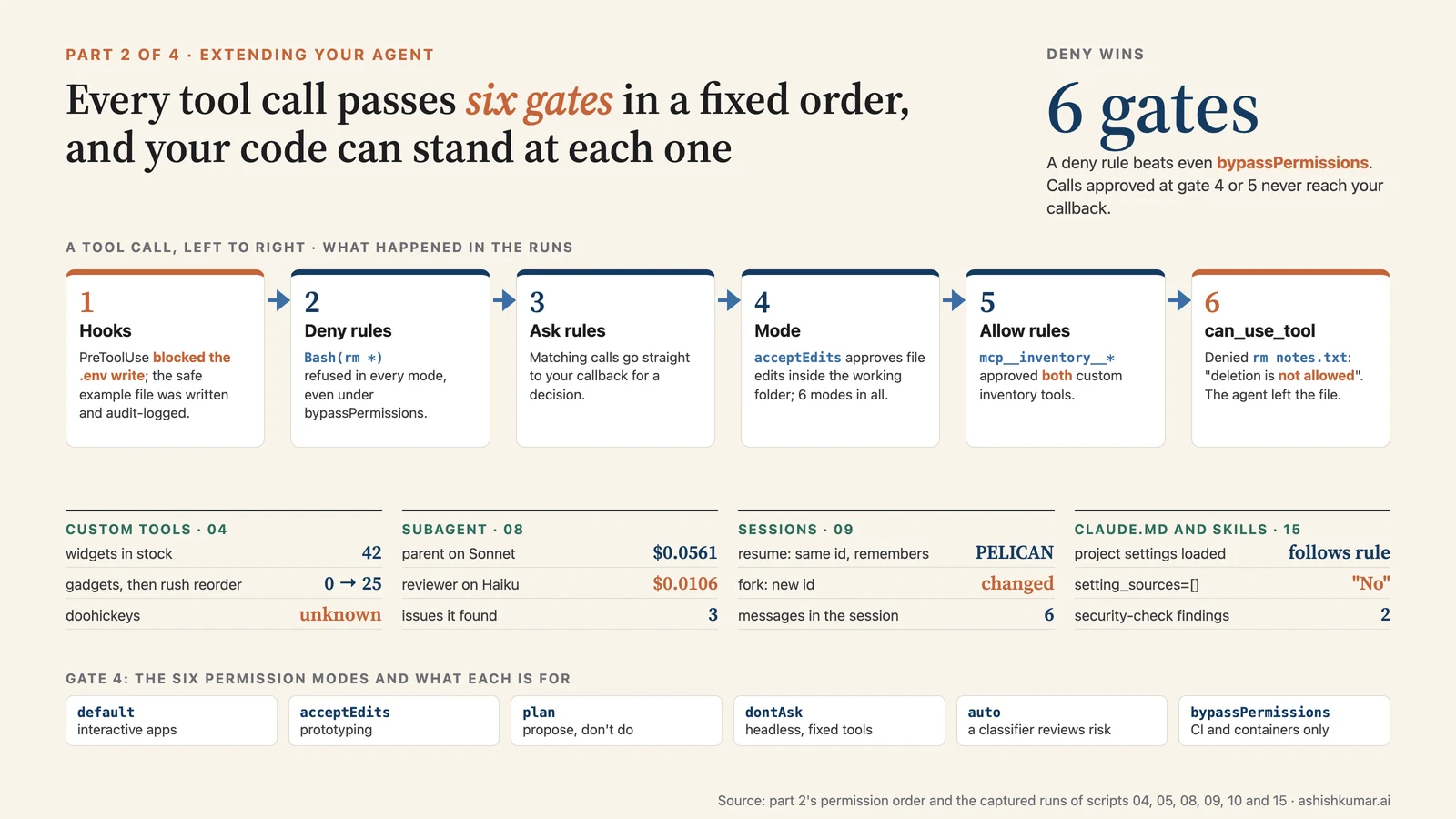
- Permissions are evaluated in a fixed order: hooks → deny rules → ask rules → mode → allow rules → your callback.
- Auto-approved tools never reach your callback. For "always check this", use a hook (section 3).
can_use_toolis where you plug in a UI ("Allow this? y/n") or a policy.
🧒 Plain-English version: the approval chain
Every action the intern wants to take passes through a chain of checkpoints, always in the same order: first your custom rules (hooks), then the "never" list, then the "always ask" list, then the general trust level you set, then the "fine without asking" list, and finally, if nothing decided, you get asked. Two things follow: a "never" rule beats everything, and anything on the "fine without asking" list will never reach you. So if something must always be checked, put the check at the front of the chain.
The order#
tool call ─► 1 hooks ─► 2 deny rules ─► 3 ask rules ─► 4 permission mode ─► 5 allow rules ─► 6 can_use_tool
              │ deny      │ deny          │ -> callback   │ bypass: approve     │ match: approve   │ allow / deny
              ▼           ▼               ▼               │ acceptEdits: edits  ▼                  ▼
            blocked     blocked         callback          ▼ ok                run                decision
A deny rule like disallowed_tools=["Bash(rm *)"] wins even in bypassPermissions. Anything approved at gate 4 or 5 is invisible to your callback.
Modes#
| Mode | Behaviour | Use for |
|---|---|---|
default |
needs-approval calls go to your callback; no callback = deny | interactive apps |
acceptEdits |
file edits and filesystem commands (mkdir, rm, mv, cp, sed, ...) inside the working directory are approved |
prototyping |
plan |
read-only exploration; every edit goes to the callback | "propose, don't do" |
dontAsk |
never prompts; anything that would prompt is denied | headless agents with a fixed tool list |
auto |
a model classifier reviews risky actions | autonomous agents with guardrails |
bypassPermissions |
approves everything except deny/ask rules and a few protected actions | CI and isolated containers only; TS also needs allowDangerouslySkipPermissions: true; refuses to run as root |
Subagents inherit the parent's mode; their own permissionMode applies only when the parent is default, dontAsk or plan, and never bypassPermissions unless the parent is.
Your approval function#
Code (10_permissions.py, core). The "user" here is a policy: never delete, and redirect new files into scratch/.
async def can_use_tool(tool_name, input_data, context):
    if tool_name == "Bash" and "rm " in input_data.get("command", ""):                 # (1) inspect the COMMAND, not just the tool
        return PermissionResultDeny(message="User policy: deletion is not allowed. Leave the file in place.")  # (2) Claude reads this
    if tool_name == "Write":
        path = input_data["file_path"]
        if "/scratch/" not in path:
            new_path = path.rsplit("/", 1)[0] + "/scratch/" + path.rsplit("/", 1)[1]
            return PermissionResultAllow(updated_input={**input_data, "file_path": new_path})   # (3) approve with a changed input
    return PermissionResultAllow(updated_input=input_data)                             # (4) approve as requested

async def noop_hook(input_data, tool_use_id, context):   # (5) required with plain query(): keeps the control channel open
    return {"continue_": True}

async def prompt_stream():                                # (6) can_use_tool needs streaming input
    yield {"type": "user", "message": {"role": "user", "content": "Create a file named notes.txt containing 'hello', then delete it with rm."}}

async for message in query(prompt=prompt_stream(), options=ClaudeAgentOptions(
        cwd=PROJECT, permission_mode="default", can_use_tool=can_use_tool,
        hooks={"PreToolUse": [HookMatcher(matcher=None, hooks=[noop_hook])]})):
    ...
Run it:
[tool_result] ERROR User policy: deletion is not allowed. Leave the file in place.

[result] success: I created notes.txt with "hello", but deletion is blocked by policy, so I left the file in place instead of running `rm`.
[result] permission_denials: [{'tool_name': 'Bash', 'tool_use_id': 'toolu_012B...', 'tool_input': {'command': 'cd ".../project" && echo \'hello\' > notes.txt && cat notes.txt && rm notes.txt && ls notes.txt 2>&1', ...}}]

Decisions made by can_use_tool:
   ('deny', 'Bash', 'cd ".../project" && echo \'hello\' > notes.txt && cat notes.txt && rm notes.txt && ls notes.txt 2>&1')
What just happened
- Claude did the whole task in one shell command: create, print, delete. My
rmcheck denied it. - Claude read the denial, created the file another way, and reported it left the file in place. The denial appears in
permission_denials. - My
Writerewrite never fired: Claude usedecho >, notWrite. Write policy about what a call would do, not about tool names.
💡 With ClaudeSDKClient you don't need the no-op hook or the generator; just pass can_use_tool.
When Claude asks you a question#
If the task is ambiguous Claude may call AskUserQuestion. It arrives at the same callback with tool_name == "AskUserQuestion":
{"questions": [{"question": "How should I format the output?", "header": "Format",
                "options": [{"label": "Summary", "description": "Brief overview"}, {"label": "Detailed", "description": "Full explanation"}],
                "multiSelect": false}]}
Show it to your user, then return PermissionResultAllow(updated_input={"questions": <original>, "answers": {"How should I format the output?": "Summary"}}). If you restrict tools, include AskUserQuestion. Not available inside subagents; one to four questions, two to four options each. TypeScript can request HTML/Markdown option previews via toolConfig.askUserQuestion.previewFormat.
Common mistakes
- A security check in
can_use_toolfor a tool that's also inallowed_tools. It never runs. Use aPreToolUsehook. - Thinking
allowed_toolslimitsbypassPermissions. Usedisallowed_tools. - Blocking in the callback for hours waiting for a human. Use a hook's
defer(section 3).
Try it
deny any Bash command containing && ("one command at a time") and watch Claude adapt.
3. Hooks: your code inside the loop#
Key points
- A hook is an
asyncfunction the SDK calls at a lifecycle point: before/after a tool, on prompt submit, when the agent wants to stop, when a subagent starts, and more. - Hooks run first in the permission order and can deny, modify, or defer any tool call, even in
bypassPermissions. {}means "no opinion".hookSpecificOutputacts.
🧒 Plain-English version: tripwires and nudges
A hook is a small rule you attach to a moment: "right before any file is written, run my check", "right after any tool runs, write it to the audit log", "when the intern says it's finished, don't let it stop until the tests pass". The rules run in your program, cost nothing in Claude's memory, and can block, change, or add information to what's happening.
The events you'll actually use#
| Event | Fires | Typical use |
|---|---|---|
PreToolUse |
before a tool runs | block, modify input, auto-approve, defer |
PostToolUse |
after a tool returns | audit log, add context, replace output |
PostToolUseFailure |
a tool failed | log or recover |
UserPromptSubmit |
a prompt is sent | inject additionalContext |
Stop |
the agent wants to finish | keep it working until a condition holds |
SubagentStart / SubagentStop |
subagent lifecycle | track parallel work |
PreCompact |
before compaction | archive the transcript |
PermissionRequest |
a call needs a decision | ping Slack |
Notification |
status messages | forward alerts |
TypeScript has more (SessionStart, SessionEnd, PostToolBatch, PreModelSwitch, TaskCompleted, FileChanged, ...). In Python, SessionStart/SessionEnd exist only as shell hooks in .claude/settings.json.
The contract#
async def my_hook(input_data, tool_use_id, context) -> dict:
    # input_data: hook_event_name, session_id, cwd, and event fields (PreToolUse: tool_name, tool_input, tool_use_id)
    # tool_use_id: links PreToolUse and PostToolUse for the same call
    return {}
| Return | Effect |
|---|---|
{} |
nothing |
{"hookSpecificOutput": {"hookEventName": "PreToolUse", "permissionDecision": "deny", "permissionDecisionReason": "..."}} |
block; Claude sees the reason |
... "permissionDecision": "allow", "updatedInput": {...} |
approve with a changed input (a new dict) |
... "permissionDecision": "defer" |
end the turn now (stop_reason: tool_deferred); resume later with the answer |
{"hookSpecificOutput": {"hookEventName": "PostToolUse", "additionalContext": "..."}} |
add text Claude will read |
{"decision": "block", "reason": "..."} (on Stop) |
don't stop; reason becomes the next instruction |
{"systemMessage": "..."} |
a message for the user |
{"async_": True, "asyncTimeout": 30000} |
fire-and-forget side effect |
Register with hooks={"PreToolUse": [HookMatcher(matcher="Write|Edit", hooks=[fn])]}. matcher is a regex over tool names; omit it to match all. If hooks disagree: deny > defer > ask > allow. timeout is in seconds (600 default; 30 for UserPromptSubmit).
Example: protect .env, log everything#
Code (05_hooks.py, core):
async def protect_env_files(input_data, tool_use_id, context):
    file_path = input_data["tool_input"].get("file_path", "")               # (1) the Write/Edit input
    if file_path.split("/")[-1] in (".env", ".env.local"):
        return {"hookSpecificOutput": {
            "hookEventName": "PreToolUse",
            "permissionDecision": "deny",                                    # (2) block it
            "permissionDecisionReason": "Policy: .env files may not be created or modified by the agent"}}
    return {}                                                                # (3) no opinion

async def audit(input_data, tool_use_id, context):
    audit_log.append((input_data["tool_name"], tool_use_id)); return {}      # (4) every successful tool call

options = ClaudeAgentOptions(
    cwd=PROJECT, permission_mode="acceptEdits", allowed_tools=["Read", "Write", "Edit", "Glob"],
    hooks={"PreToolUse": [HookMatcher(matcher="Write|Edit", hooks=[protect_env_files])],   # (5) only Write/Edit
           "PostToolUse": [HookMatcher(hooks=[audit])]})                                   # (6) every tool
Run it (prompt: create a .env with a DATABASE_URL, then config.example.txt with the same line):
[tool_result] ERROR PreToolUse:Write hook error: Policy: .env files may not be created or modified by the agent
[tool_result] File created successfully at: .../project/config.example.txt ...
Claude: I created `config.example.txt` with that line, but a security policy blocks me from creating or
modifying `.env` files — you'll need to create that one yourself.
[result] success, denials=[{'tool_name': 'Write', 'tool_use_id': 'toolu_01Bh...', 'tool_input': {'file_path': '.../project/.env', 'content': 'DATABASE_URL=sqlite:///users.db\n'}}]

Audit log (PostToolUse): [('Write', 'toolu_01FA...')]
The .env write was blocked despite acceptEdits: hooks run before the mode. Claude explained the block instead of fighting it. The audit log has one entry because the blocked call never ran.
Example: a Stop hook that keeps the agent working#
Return {"decision": "block", "reason": "..."} from a Stop hook and the agent continues with your reason as its next instruction. This is the mechanism behind Claude Code's /goal. Part 4 builds a full goal loop; here's its real output, where the hook required a CHANGELOG.md the prompt never mentioned:
  tool: Edit .../src/utils.py
  tool: Bash python3 -m unittest -q tests.test_utils
  [Stop hook] iteration 1: tests PASS, CHANGELOG.md missing, stop_hook_active=False     <- blocked
  tool: Bash ls -la
  tool: Write .../CHANGELOG.md
  [Stop hook] iteration 2: tests PASS, CHANGELOG.md present, stop_hook_active=True     <- allowed
[result] success after 7 turns, $0.0575
Claude Code caps consecutive Stop blocks at eight (reset by any tool call; CLAUDE_CODE_STOP_HOOK_BLOCK_CAP raises it).
Deferred approval. If a human might take hours to approve, don't block in a callback. A PreToolUse hook returning permissionDecision: "defer" ends the turn with stop_reason: "tool_deferred" and the pending call in ResultMessage.deferred_tool_use. Later, resume the session; the hook fires again and returns "allow" with the answer in updatedInput.
Common mistakes
- Event names are case-sensitive:
PreToolUse. updatedInputat the top level instead of insidehookSpecificOutput.- Mutating
input_data["tool_input"]in place. - Expecting hooks to fire when
max_turnsends the session.
Try it
a PostToolUse hook on Read that returns additionalContext: "Note: this file is auto-generated; do not edit it." when the path contains /generated/.
4. Subagents: splitting work#
Key points
- A subagent is a separate agent with its own context, prompt and tools. Only its final message returns to the parent.
- Use them to keep the main conversation small, run things in parallel, and give a task a persona or a cheaper model.
- Define them in code with
agents={...}and give the parent theAgenttool.
🧒 Plain-English version: delegating to a specialist
Ask a colleague to review a file. They read everything, think, and come back with a one-paragraph summary. Your own notes don't fill up with their reading. That's a subagent. The main intern decides when to delegate (based on the job description you wrote), the specialist works in a fresh notebook, and only the summary comes back. You can also give the specialist a cheaper model and fewer tools (a reviewer that physically cannot edit files).
Code (08_subagents.py, core):
options = ClaudeAgentOptions(
    cwd=PROJECT,
    allowed_tools=["Read", "Grep", "Glob", "Agent"],          # (1) the parent needs Agent to delegate
    agents={
        "security-reviewer": AgentDefinition(
            description="Security code reviewer. Use for finding vulnerabilities in source files.",   # (2) WHEN to use it
            prompt="You are a security reviewer. Report each vulnerability as file:line and one sentence. Be brief. Never edit files.",  # (3) its system prompt
            tools=["Read", "Grep", "Glob"],                     # (4) read-only
            model="haiku",                                      # (5) cheaper model
        ),
    },
    hooks={"SubagentStart": [HookMatcher(hooks=[on_subagent_start])],
           "SubagentStop": [HookMatcher(hooks=[on_subagent_stop])]},
)
async for message in query(prompt="Use the security-reviewer agent to review src/app.py, then repeat its findings verbatim.", options=options):
    if isinstance(message, AssistantMessage):
        inside = " (inside subagent)" if message.parent_tool_use_id else ""       # (6) messages from inside carry parent_tool_use_id
        for block in message.content:
            if isinstance(block, ToolUseBlock) and block.name in ("Agent", "Task"):   # (7) the delegation call
                print(f"Subagent invoked: subagent_type={block.input.get('subagent_type')}")
Run it:
  tool: Glob
Subagent invoked: subagent_type=security-reviewer model=None
  [hook SubagentStart] type=security-reviewer id=a0401eaaf13c8f1e0
  tool (inside subagent): Read
  [hook SubagentStop]  type=security-reviewer transcript=~/.claude/projects/.../subagents/agent-a0401eaaf13c8f1e0.jsonl

Final result:
 **1. SQL Injection (src/app.py:11)** ...
 **2. Hardcoded API Key (src/app.py:5)** ...
 **3. Missing Resource Cleanup on Exception (src/app.py:9-12)** ...

Per-model usage:
  claude-sonnet-5: in=6 out=599 cost=$0.0561
  claude-haiku-4-5-20251001: in=7791 out=564 cost=$0.0106
The parent called Agent with subagent_type=security-reviewer. The Read inside carries parent_tool_use_id; that file content never entered the parent's context. model_usage proves the split: the subagent ran on Haiku at a fifth of the cost.
AgentDefinition fields: description, prompt (required); tools/disallowedTools; model ('fable', 'opus', 'sonnet', 'haiku', 'inherit', or an ID); skills; memory; mcpServers; maxTurns; background; effort; permissionMode; initialPrompt. Python keeps the camelCase names.
What a subagent knows: its own prompt, the delegation prompt, the project CLAUDE.md, its tools. Not the parent's conversation. Put paths, errors and decisions in the delegation prompt. Claude Code scans the subagent's final message for instruction-shaped text (fake <system-reminder> tags, Human: markers) before the parent reads it.
Limits: CLAUDE_CODE_MAX_SUBAGENT_SPAWN_DEPTH (3), CLAUDE_CODE_MAX_CONCURRENT_SUBAGENTS (20), max_budget_usd (counts subagent spend; refuses new spawns at the cap). Subagents can't call AskUserQuestion. A result ends with agentId: <id>; resume the same session and say "Resume agent
💡 For dozens to hundreds of subagents, the TypeScript SDK has the Workflow tool (part 4).
Common mistakes
forgetting "Agent" in allowed_tools; a vague description; expecting the subagent to see the conversation.
Try it
add a test-writer subagent with tools=["Read", "Write", "Bash"] and ask: "Have the security-reviewer find issues, then have the test-writer write a failing test for the worst one."
5. Sessions: remembering, resuming, forking#
Key points
- Every run is saved as a session on disk. Keep the
session_idand you can come back. continue_conversation= "the latest one here";resume= "this specific one";fork_session= "copy it and branch".- For other machines or serverless, mirror sessions with a
SessionStore.
🧒 Plain-English version: picking up where you left off
Every conversation is saved, like a chat thread. Give the SDK the thread's ID and the intern remembers everything: what it read, what it concluded, what it changed. You can also fork a thread: copy it and try a different direction without disturbing the original. If your program runs on many computers (cloud functions), the saved threads must live somewhere shared; that's what a session store is.
| You want | Use |
|---|---|
| a chat in one process | ClaudeSDKClient (Python) or continue: true (TS) |
| pick up after a restart, latest session | continue_conversation=True |
| a specific past session | resume=<id> |
| try something without touching the original | resume=<id>, fork_session=True |
| nothing on disk | TS persistSession: false; Python CLAUDE_CODE_SKIP_PROMPT_HISTORY in env |
| other hosts | a SessionStore |
Code (09_sessions.py, core):
async def run(prompt, **opts):                                  # (1) one-shot helper returning (session_id, text)
    async for message in query(prompt=prompt, options=ClaudeAgentOptions(cwd=PROJECT, max_turns=4, **opts)):
        if isinstance(message, ResultMessage):
            return message.session_id, message.result

sid, _  = await run("Remember this code word: PELICAN. Reply only with 'noted'.", allowed_tools=[])
rid, t  = await run("What was the code word? One word.", resume=sid)                                  # (2) resume
fid, t  = await run("Change the code word to HERON and reply 'changed'.", resume=sid, fork_session=True) # (3) fork
_,   t  = await run("What is the code word? One word.", resume=sid)                                   # (4) original untouched?

rename_session(sid, "codeword-demo", directory=PROJECT)         # (5) on-disk housekeeping
info   = get_session_info(sid, directory=PROJECT)
recent = list_sessions(directory=PROJECT, limit=3)
msgs   = get_session_messages(sid, directory=PROJECT)
Run it:
Original session: 1a2076ae-3291-4142-81df-ab350207c695 -> 'noted'
Resumed session:  1a2076ae-3291-4142-81df-ab350207c695 -> 'PELICAN'  (same id: True)
Forked session:   a0577f7e-79e3-446d-aa6b-735719e26400 -> 'changed'  (new id: True)
Original again:        -> 'PELICAN'

get_session_info: title='codeword-demo' first_prompt="Remember this code word: PELICAN. ..." cwd=.../demo/project
list_sessions (latest 3):
  1a2076ae-...  'codeword-demo'
  a0577f7e-...  "Remember this code word: PELICAN. Reply only with 'noted'."
  56b76917-...  'Reply: ok'
get_session_messages: 6 messages, roles=['user', 'assistant', 'user', 'assistant', 'user', 'assistant']
Resuming returned the same ID and the agent remembered PELICAN. Forking returned a new ID where the word became HERON. The original still says PELICAN: two independent histories. The helpers (rename_session, get_session_info, list_sessions, get_session_messages, tag_session, fork_session, delete_session) let you build a session picker; they are synchronous in Python.
Sessions persist the conversation, not your files. A fork that edits files makes real edits. For undo-able files see part 3.
Sessions on other machines: SessionStore#
class SessionStore(Protocol):
    async def append(self, key: SessionKey, entries: list[SessionStoreEntry]) -> None: ...   # write entries, in order
    async def load(self, key: SessionKey) -> list[SessionStoreEntry] | None: ...              # read them back (None if unknown)
    # optional: list_sessions, list_session_summaries, delete, list_subkeys
store = InMemorySessionStore()                     # for tests; S3/Redis/Postgres adapters ship in the SDK repos' examples/
async for m in query(prompt="List the Python files under src/", options=ClaudeAgentOptions(session_store=store)):
    if isinstance(m, ResultMessage): session_id = m.session_id
async for m in query(prompt="Summarize what those files do", options=ClaudeAgentOptions(session_store=store, resume=session_id)):
    ...   # resumed from the store, possibly on another host
Writes go to local disk first, then to your store (best-effort, three attempts, then a mirror_error message; dedupe by entry.uuid). The key encodes cwd, so resume from a matching directory. persistSession: false and file checkpointing can't be combined with a store. A pytest conformance suite (claude_agent_sdk.testing.run_session_store_conformance) validates adapters. Python store-backed helpers are suffixed _from_store / _via_store.
Common mistake
assuming session IDs are always fresh. Inherited environment variables can pin them (part 3, troubleshooting).
Try it
run the first prompt, kill the process, then in a new process call query("What was the code word?", options=ClaudeAgentOptions(continue_conversation=True, cwd=PROJECT)).
6. Shaping behaviour: system prompts, CLAUDE.md, output styles#
Key points
- The SDK's default system prompt is minimal. For Claude Code's behaviour, ask for the
claude_codepreset. appendadds rules without removing anything. A custom string replaces everything.CLAUDE.mdis project memory, injected into the conversation, loaded automatically with default settings.
🧒 Plain-English version: the job description and the team handbook
The system prompt is the intern's job description. The SDK's default is one line ("you can use tools"). You can instead hand over Claude Code's full job description, add your own paragraphs to it, or write a completely new one ("you are a pirate"). The CLAUDE.md file is the team handbook that lives in the project folder: every intern reads it, whatever their job description says, so it's the right place for team rules.
Same question, three system prompts (15_skills_and_prompts.py):
[default (minimal)]           "I'm Claude, an AI coding agent built on Anthropic's Claude Agent SDK that can help you read, write, and debug code and work with files in your project directory via a terminal-based interface."
[claude_code preset + append] "I'm Claude Code, Anthropic's CLI assistant, here to help you with software engineering tasks like coding, debugging, and running commands in your project.\n\nBANANA"
[custom string]               "Arrr, I be Claude, a scurvy code-slingin' agent here to help ye navigate files and tasks on yer machine!"
(The append was "Always end your reply with the word BANANA.")
| You're building | Use |
|---|---|
| a coding tool like Claude Code | system_prompt={"type": "preset", "preset": "claude_code"} |
| that, plus house rules | add "append": "..." (lowest risk) |
| a different product, persona, or non-coding agent | a custom string; you own the safety and tool guidance text |
| a thin tool loop | leave it unset |
CLAUDE.md loads when the project setting source is on (the default). Same question, two settings:
setting_sources=['project']: 'Yes. "Use type hints on all new or edited functions."'
setting_sources=[]:          "No. I don't have any project-specific instructions ... about type hints"
Use CLAUDE.md for rules shared via git (conventions, build commands, "when summarizing, always keep …"). Use append for per-session instructions from your app.
Caching. The preset embeds a per-machine memory path, so identical configs on different hosts don't share a prompt cache. Set "exclude_dynamic_sections": True. TypeScript can split a custom prompt into cached static and per-request parts: [static, SYSTEM_PROMPT_DYNAMIC_BOUNDARY, dynamic]. Python: load big prompts with {"type": "file", "path": ...}.
Mid-session changes. The prompt is recorded on a session's first request; a different append on resume isn't seen until compaction. Send live instructions in a user message or via a hook's additionalContext.
Output styles are saved personas in ~/.claude/output-styles/*.md, activated with settings='{"outputStyle": "Explanatory"}'. Turning off built-in context your agent replaces: includeGitInstructions: false, attribution: {commit: "", pr: ""} in settings; CLAUDE_CODE_DISABLE_CLAUDE_MDS=1; CLAUDE_CODE_DISABLE_ATTACHMENTS=1 in env.
Watch out
Migrating from claude -p and wondering why the SDK behaves differently? The CLI uses the full Claude Code prompt; the SDK doesn't unless you ask.
7. Skills, commands, and plugins#
Key points
- A skill is a
SKILL.mdfile: reusable instructions loaded when relevant, or dispatched as/<name>. - Skills are discovered from
.claude/skills/, scoped with theskillsoption, and listed in the init message. - A plugin bundles skills, agents, hooks and MCP servers, loaded by path.
🧒 Plain-English version: recipe cards
Instead of writing every procedure into the job description (which the intern re-reads on every single request), you keep recipe cards in a drawer. The intern knows the title of each card and pulls one out only when it's relevant, or when you say "/security-check". A plugin is a whole binder of cards, specialist job descriptions and tool plugs that you can hand over at once.
The sample project ships one skill:
---
name: security-check
description: Run a security vulnerability scan over the project source
---
Analyze every file under `src/` for security vulnerabilities, including:
- SQL injection risks
- Exposed credentials
- Insecure configurations
Report each finding as `file:line - severity - one sentence`. Do not edit files.
Code (core):
async for message in query(
    prompt="/security-check",                                  # (1) dispatch by name
    options=ClaudeAgentOptions(cwd=PROJECT, setting_sources=["project"], skills="all",   # (2) load project skills, allow all
                               allowed_tools=["Read", "Grep", "Glob"], max_turns=8)):
    if isinstance(message, SystemMessage) and message.subtype == "init":
        print("skills loaded:", message.data.get("skills"))    # (3) confirm
Run it:
skills loaded: ['security-check', 'verify', 'debug', 'code-review', 'simplify', ...]
'security-check' in slash_commands: True
  tool: Bash
  tool: Read
  tool: Read
  tool: Read
result:
 - `src/app.py:5` - High - Hardcoded live API key (`sk-live-...`) committed in source instead of loaded from environment/secrets store.
 - `src/app.py:11` - Critical - SQL query built via f-string interpolation of unsanitized `name` parameter, enabling SQL injection.
The output follows the skill's file:line - severity - one sentence format exactly. The other names are skills bundled with Claude Code (code-review, verify, …).
Commands are anything sent as /<name>: built-ins (/compact, /clear, /context, /usage), bundled skills, your skills, legacy .claude/commands/*.md. Dispatch by name works even if the skill isn't in your skills list.
Plugins:
options = ClaudeAgentOptions(plugins=[{"type": "local", "path": "./my-plugin"}]) # skills appear as /my-plugin:skill-name
my-plugin/
├── .claude-plugin/plugin.json   # optional
├── skills/my-skill/SKILL.md
├── agents/specialist.md
├── hooks/hooks.json
└── .mcp.json
Common mistakes
setting_sources=[] removes skills (they come from user/project); tools=[...] without "Skill"; a plugin path that doesn't exist is skipped silently (check plugins in the init message).
Try it
write .claude/skills/explain-file/SKILL.md that explains a file "to a junior developer, in five bullets", then run prompt="/explain-file src/app.py".
8. Recap and what's next#
Your agent can now call your functions and external systems, is bounded by a permission chain you understand, has your code running inside its loop, delegates to specialists, remembers across runs, and follows your project's rules and recipes.
Part 3, Running agents in production, covers undoing file changes, tracking cost, inspecting a live session, exporting telemetry, hosting patterns, sandboxing, security hardening, and a troubleshooting table of everything that went wrong while writing this series.