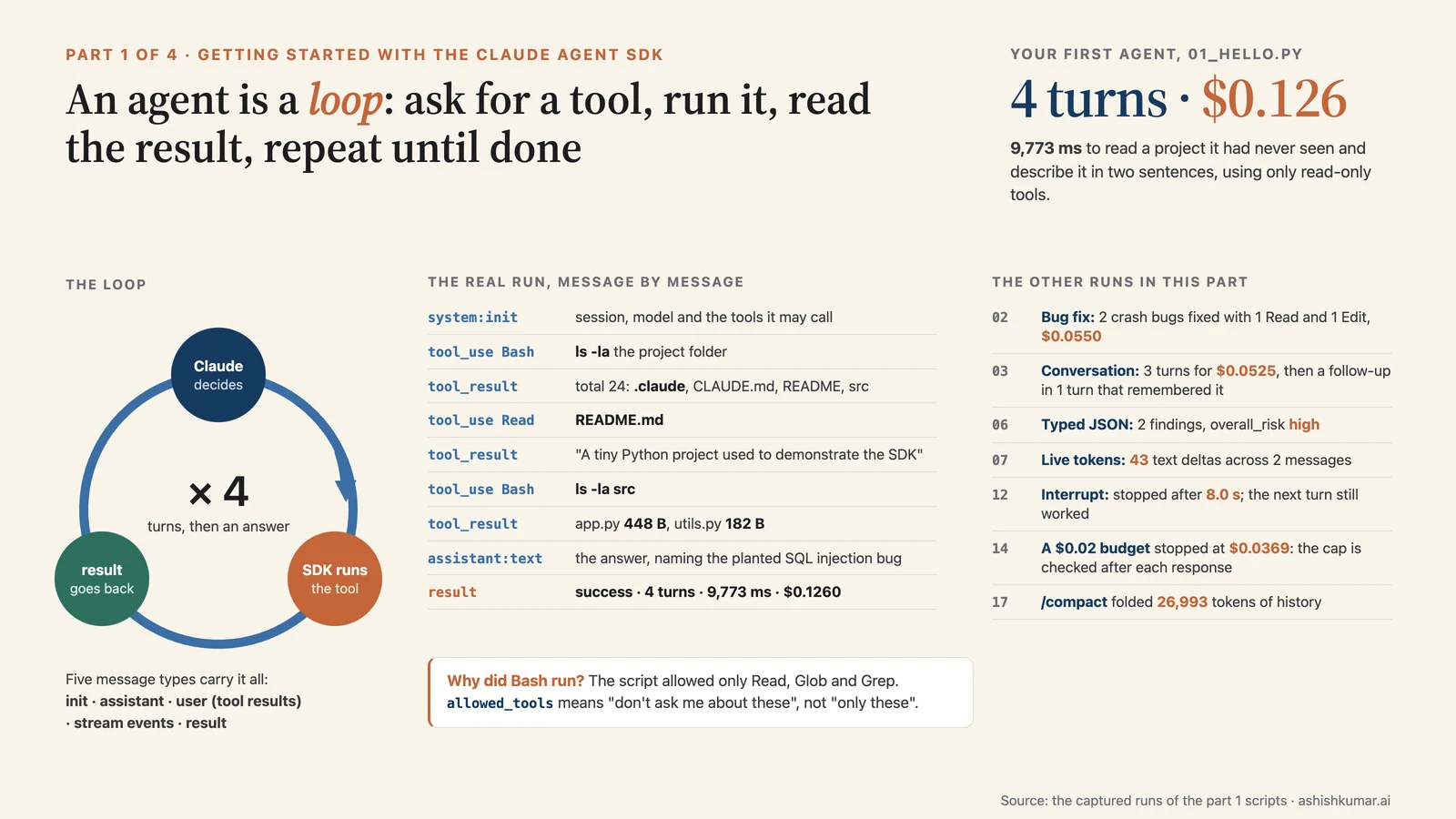
Part 1 of 4. Start here if you are new to agents. Next: Extending your agent. The series overview lists all four parts.
Versions.
claude-agent-sdk0.2.159 (Python, bundles Claude Code CLI 2.1.281) and@anthropic-ai/claude-agent-sdk0.3.301 (TypeScript, CLI 2.1.301). Every script and its captured output is inexamples/.
Contents#
- What is an agent, and what is this SDK?
- The one idea you must get: the agent loop
- Setup in five minutes
- Your first agent
- An agent that fixes bugs
- Configuring your agent: the options object
- Conversations: multi-turn, streaming input, interrupting
- Getting answers out: results, errors, live tokens, JSON
- Recap and what's next
1. What is an agent, and what is this SDK?#
Key points
- An agent is a program where the AI decides which steps to take, by using tools, until a task is done.
- The Claude Agent SDK is Claude Code packaged as a library: Anthropic's own coding agent, controlled from your code.
- It is neither the plain Claude API client nor Anthropic's hosted Managed Agents. Pick by who runs the loop and who hosts it.
🧒 Plain-English version: what is an "agent"?
Imagine you hire a very capable intern and give them a laptop. You don't dictate every keystroke. You say "find the bug in the login page and fix it", and the intern reads the code, tries things, runs the tests, and comes back when it's done. Along the way they may ask you "can I delete this file?".
An AI agent is that intern made of software. The "brain" is a large language model (Claude). The "hands" are tools: read a file, edit a file, run a command, search the web, call one of your company's systems. The agent works in a loop: look at the situation, pick a tool, use it, look at the result, repeat, until the job is done.
The Claude Agent SDK is a kit that gives your own program that whole intern, pre-built. Anthropic already built the intern for their product Claude Code (a command-line coding assistant). The SDK lets you put that same intern inside your app, with your rules about what it may touch.
When you call a chat model you send text and get text back. An agent also has tools and calls them in a loop: think, call a tool, read the result, think again, until done. Writing that loop yourself, with permissions, retries, memory management and all the edge cases, is a lot of work. The SDK gives you the loop that powers Claude Code as a library. Under the hood it starts the Claude Code program as a child process and talks to it, which is why the "agent" is a real process with a working directory, a shell and files on disk.
| You want to | Use | What you get |
|---|---|---|
| Embed an agent with built-in tools in your app, on your own machines | Agent SDK (this series) | Claude Code's loop, tools, permissions, sessions, hooks, controlled from Python/TypeScript |
| Chat with Claude in a terminal while coding | Claude Code CLI | The interactive terminal app |
| Call the model directly and write every tool yourself | Client SDK (anthropic, @anthropic-ai/sdk) |
Raw API access, no built-in tools |
| Let Anthropic host the whole agent and its sandbox | Managed Agents | A hosted harness you talk to over REST |
💡 Two things that confuse newcomers: the Client SDK's Tool Runner also "runs a loop", but only over tools you write and with no filesystem. And Managed Agents is the only option where Anthropic hosts the agent; with the Agent SDK, you host it.
One rule from the terms: don't let end users sign in with their own claude.ai account to power your product unless Anthropic approved it. Use API keys.
2. The one idea you must get: the agent loop#
Key points
- A turn = Claude asks for tools → the SDK runs them → results go back to Claude. Turns repeat until Claude answers without tools.
- Your program sees the loop as a stream of messages. You read them; you don't run the tools.
- Five message types cover everything: init, assistant, user (tool results), stream events, result.
🧒 Plain-English version: the loop
Think of a game of 20 questions where Claude is the one asking. Each round Claude says "let me look at this file" or "let me run this command". Your program (through the SDK) does that and hands back the answer. Claude thinks, asks the next thing, and so on. When Claude has what it needs it stops asking and gives you its final answer, plus a receipt: how many rounds it took and what it cost.
Your program's job during all this is mostly to watch. The SDK sends you a note for every event ("Claude is reading README.md", "here's what the file said", "Claude says: …", "done, cost 13 cents"). You decide which notes to show your users.
 your prompt
     │
     ▼
 ┌─────────────────────────────┐
 │ Claude thinks               │◄──────────────────────────────┐
 │ "I need to read utils.py"   │                               │
 └──────────────┬──────────────┘                               │
                │ tool call(s)                                 │ tool results
                ▼                                              │
 ┌─────────────────────────────┐                               │
 │ SDK runs the tool(s)        │───────────────────────────────┘
 └─────────────────────────────┘
          ... repeat (each repeat is one TURN) ...
                │
                ▼ no more tool calls
 ┌─────────────────────────────┐
 │ final text answer           │
 │ + ResultMessage (cost, id)  │
 └─────────────────────────────┘
| Message type (Python class) | When | What's inside |
|---|---|---|
SystemMessage with subtype="init" |
once, at the start | session ID, model, which tools exist, MCP server status, skills |
AssistantMessage |
each time Claude produces a block | a TextBlock (words), a ToolUseBlock (a tool call), or a ThinkingBlock |
UserMessage |
after each tool runs | the ToolResultBlock that gets sent back to Claude |
StreamEvent |
only if you ask for live tokens | raw streaming chunks |
ResultMessage |
once, at the end | subtype (success or which error), result text, session_id, num_turns, total_cost_usd |
💡 Python checks the type with isinstance(message, ResultMessage). TypeScript checks a string, message.type === "result", and Claude's content is one level deeper at message.message.content.
3. Setup in five minutes#
Key points
- Install one package; a Claude Code binary comes bundled with it.
- Put your API key in the environment of the process. The SDK does not read
.envfiles. - Work inside a project folder; the agent gets access to that folder.
🧒 Plain-English version: what you're installing and why a key
You install a small library in your programming language. Hidden inside is the actual Claude Code program, so there's nothing else to download. The API key is like a company credit card number for Claude: every request is billed to it, so it must never be pasted into code that gets shared. You store it in the computer's "environment", a place programs can read secrets from without the secret being in the code.
# Python, with uv (recommended)
uv init && uv add claude-agent-sdk

# Python, with pip
python3 -m venv .venv && source .venv/bin/activate
pip install claude-agent-sdk

# TypeScript
npm init -y && npm pkg set type=module
npm install @anthropic-ai/claude-agent-sdk zod
npm install --save-dev tsx
export ANTHROPIC_API_KEY=sk-ant-...
Common mistake
keeping the key in a .env file and expecting the SDK to load it. It won't. Load it yourself (e.g. python-dotenv) before calling the SDK, or export it in your shell. Not logged in and Invalid API key almost always mean this.
If your company uses a cloud provider, set one of these and the SDK follows: CLAUDE_CODE_USE_BEDROCK=1 (Amazon Bedrock), CLAUDE_CODE_USE_VERTEX=1 (Google Cloud), CLAUDE_CODE_USE_FOUNDRY=1 (Microsoft Foundry), CLAUDE_CODE_USE_ANTHROPIC_AWS=1 (Claude Platform on AWS), or ANTHROPIC_BASE_URL=... for a gateway.
The sample project. Every example runs against the same tiny Python project (examples/sample-project). It has bugs on purpose:
sample-project/
├── CLAUDE.md                 # project rules the agent will read: "use type hints", "be brief"
├── README.md
├── .claude/skills/security-check/SKILL.md   # a reusable "skill" (part 2)
├── src/app.py                # a hardcoded API key and an SQL injection bug
├── src/utils.py              # two functions that crash on edge cases
└── tests/test_utils.py       # 5 tests; 3 fail until utils.py is fixed
# src/utils.py, as shipped
def calculate_average(numbers):
    total = 0
    for num in numbers:
        total += num
    return total / len(numbers)        # crashes on an empty list


def get_user_name(user):
    return user["name"].upper()        # crashes if user is None or has no "name"
About the outputs you'll see. The model name, session IDs, costs and tool list in the raw output depend on your Claude Code version and configuration, so yours will differ in those details. Long lists are shortened with
.... Everything else is exactly what you'll get.
4. Your first agent#
Key points
query(prompt, options)is the whole API for a one-shot agent.allowed_toolspre-approves tools. It does not stop the agent from using others.- Read
ResultMessagefor the answer and the cost.
🧒 Plain-English version: what this program does
We ask the intern one question about a small project: "what does this project do?". We tell it which tools it may use without asking us (reading files and searching), and we cap it at five rounds so it can't run away. Then we print every note the SDK sends us so we can watch it work. The interesting part is not the answer; it's seeing the loop happen.
Code (01_hello.py):
import asyncio
from claude_agent_sdk import ClaudeAgentOptions, query
from demo_util import PROJECT, show          # (1) tiny helpers: the project path, and a message printer

async def main():                             # (2) the SDK is async, so everything lives in an async function
    options = ClaudeAgentOptions(
        cwd=PROJECT,                          # (3) the folder the agent works in
        allowed_tools=["Read", "Glob", "Grep"],   # (4) these tools run without asking for permission
        max_turns=5,                          # (5) a safety cap: at most 5 tool round-trips
    )
    async for message in query(               # (6) start the loop; it yields messages as they happen
        prompt="What does this project do? Answer in two sentences.",
        options=options,
    ):
        show(message)                         # (7) print each message in a compact form

asyncio.run(main())                           # (8) run the async function
show() is a 40-line helper in demo_util.py that prints [type] content for each message.
Run it (python3 01_hello.py):
[system:init] session=de3a42e9-... model=claude-sonnet-5 cli=2.1.281 mode=default
              tools=['Task', 'Bash', 'Edit', 'Glob', 'Grep', 'NotebookEdit', 'Read', 'Skill', 'ToolSearch', 'WebFetch', 'WebSearch', 'Write', ...]
[assistant:tool_use] Bash({'command': 'ls -la ".../demo/project"', 'description': 'List project directory contents'})
[user:tool_result] total 24\ndrwxr-xr-x 4 root root 4096 Oct 16 06:10 .\n...CLAUDE....
[assistant:tool_use] Read({'file_path': '.../demo/project/README.md'})
[user:tool_result] 1	# Sample project\n2	\n3	A tiny Python project used to demonstrate the Claude Agent SDK...
[assistant:tool_use] Bash({'command': 'ls -la ".../demo/project/src"', 'description': 'List src directory'})
[user:tool_result] total 16\n...app.py\n...utils.py
[assistant:text] This project is a tiny Python 3.13 demo for the Claude Agent SDK, with `src/utils.py` providing
                 helper functions and `src/app.py` implementing a toy user lookup. The lookup intentionally
                 contains a known SQL injection bug for demonstration purposes.
[result] subtype=success turns=4 duration=9773ms cost=$0.1260 session=de3a42e9-...
What just happened
[system:init]: the session started. You get its ID (keep it to resume later), the model, and every tool the agent could use. The list is much longer than the three I allowed.[assistant:tool_use] Bash(ls ...): Claude's first move was to list the directory. I didn't allowBash! Read on.[user:tool_result]: the SDK ranlsand this is what went back to Claude. Every tool call is followed by its result.- Two more turns: read the README, list
src. [assistant:text]: a block with no tool call. That ends the loop.[result]: 4 turns, under 10 seconds, about 13 cents,subtype=success.
So why did Bash run? Because allowed_tools means "don't ask me about these"; it does not mean "only these". Every tool in the init list is available. In default permission mode a read-only command like ls needs no approval, so it ran. If the agent had tried to delete a file, that call would have needed approval, and with no way to approve (part 2, permissions) it would have been denied. To remove a tool, use tools=[...] or disallowed_tools.
The same program in TypeScript, showing the two differences (string type checks and message.message.content):
import { query } from "@anthropic-ai/claude-agent-sdk";

for await (const message of query({
  prompt: "What does this project do? Answer in two sentences.",
  options: { cwd: PROJECT, allowedTools: ["Read", "Glob", "Grep"], maxTurns: 5 },
})) {
  if (message.type === "assistant") {                 // string check instead of isinstance
    for (const block of message.message.content) {    // one level deeper than Python
      if (block.type === "text") console.log(block.text);
      else if (block.type === "tool_use") console.log(`tool: ${block.name}`);
    }
  } else if (message.type === "result" && message.subtype === "success") {
    console.log(message.result, message.total_cost_usd);
  }
}
Common mistakes
- Forgetting
asyncio.run(main())and wondering why nothing happens. - Expecting
allowed_toolsto restrict the agent. - Printing only
message.resultand missing that it'sNoneon error subtypes (section 8).
Try it
change the prompt to "List the functions defined in src/utils.py" and watch which tools the agent chooses. Then set max_turns=1 and see what happens (section 8 explains the error).
5. An agent that fixes bugs#
Key points
- Add
Editto the tools and setpermission_mode="acceptEdits"and the agent can change files without asking. - The agent read
CLAUDE.mdand followed its rules without being told. - An agent's summary of what it did is not proof. Verify (part 4 makes this automatic).
🧒 Plain-English version: letting the intern edit
Now we let the intern change files. "acceptEdits" is a trust setting: "you may edit files in this folder without asking me each time, but anything riskier still needs my OK". We ask it to fix the crashes in one file. It does, and tells us what it did. The lesson at the end: the intern's report said the job was done, but one of the two fixes was only half right. Good managers check the work; part 4 shows how to make the checking automatic.
Code (02_fix_bugs.py, core):
async for message in query(
    prompt="Review src/utils.py for bugs that would cause crashes. Fix any issues you find.",
    options=ClaudeAgentOptions(
        cwd=PROJECT,
        allowed_tools=["Read", "Edit", "Glob"],  # (1) Edit is now pre-approved
        permission_mode="acceptEdits",           # (2) and file edits need no confirmation
        max_turns=10,
    ),
):
    if isinstance(message, AssistantMessage):
        for block in message.content:
            if hasattr(block, "text"):                       # (3) a TextBlock: Claude explaining itself
                print(block.text)
            elif isinstance(block, ToolUseBlock):            # (4) a tool call: show which file it touches
                print(f"Tool: {block.name} -> {block.input.get('file_path', '')}")
    elif isinstance(message, ResultMessage):
        print(f"Done: {message.subtype} (cost ${message.total_cost_usd:.4f})")
Run it:
Tool: Read -> .../project/src/utils.py
Tool: Edit -> .../project/src/utils.py
Fixed two crash bugs: `calculate_average` divided by zero on an empty list, and `get_user_name`
raised `KeyError` for a missing `"name"` key — both now guard against those cases, with type hints
added per project convention.
Done: success (cost $0.0550)

--- diff against the original file ---
-def calculate_average(numbers):
+def calculate_average(numbers: list[float]) -> float:
+    if not numbers:
+        return 0.0
     total = 0
     ...
-def get_user_name(user):
-    return user["name"].upper()
+def get_user_name(user: dict) -> str:
+    return user.get("name", "").upper()
What just happened
- One
Read, oneEdit, two turns, about 5 cents. - "with type hints added per project convention": the agent followed the rule in
CLAUDE.md. I never mentioned it. Default options load the project'sCLAUDE.mdautomatically (part 2). - Look at the second fix.
user.get("name", "")handles a missing key, butget_user_name(None)still crashes becauseNonehas no.get. The summary says "fixed"; the code says "half fixed". Make the agent prove it with tests or a checker rather than trusting its report. Part 4 builds exactly that loop, and in that run the agent did fix theNonecase because tests demanded it.
Common mistakes
- Running this in a folder with uncommitted work you care about. Use a copy, or git.
- Assuming
acceptEditsapproves everything else. It doesn't:rm -rfoutside the working directory, network calls and MCP tools still go through the permission flow.
Try it
add "Bash" to allowed_tools and change the prompt to "Write unit tests for src/utils.py, run them, and fix any failures." Count the turns.
6. Configuring your agent: the options object#
Key points
- Everything is configured through one object:
ClaudeAgentOptions(Python) /Options(TypeScript). All fields are optional. - Fields group into: where and what model, prompting and settings, tools and permissions, sessions and output.
- Two fields behave very differently across languages:
env(merge in Python, replace in TypeScript) andsystem_prompt(default is minimal, not Claude Code's).
🧒 Plain-English version: the settings panel
Every agent has one settings panel. It answers questions like: which folder may it work in? which model (brain size) should it use, and how hard should it think? what's the maximum number of rounds or dollars before it must stop? which tools may it use freely, which need approval, which are off limits? should it remember a previous conversation? You don't need to understand every switch today. Skim the tables so you know they exist; later sections point back to them.
Where it runs, which model, how hard it thinks#
| Field | What it does | When you'd set it |
|---|---|---|
cwd |
the folder the agent works in | always, beyond a toy |
add_dirs (TS additionalDirectories) |
extra folders the tools may touch | the agent needs a sibling repo |
model |
"sonnet", "opus", "haiku", "fable" or a full ID |
pin a model; pick a cheaper one |
fallback_model |
backup model when the primary is overloaded | production |
effort |
"low" … "max" reasoning depth |
"low" for lookups, "high"/"xhigh" for refactors |
thinking |
{"type":"adaptive"}, {"type":"enabled","budget_tokens":N}, {"type":"disabled"} |
show or suppress thinking |
max_turns |
cap on tool round trips (0 = unlimited) |
always, as a safety net |
max_budget_usd |
stop when the estimated spend reaches this | always, in production |
task_budget |
{"total": N} tokens the model paces itself against |
long autonomous tasks |
env |
environment variables for the subprocess | gateways, timeouts, feature flags |
cli_path (TS pathToClaudeCodeExecutable) |
use a specific Claude Code binary | you installed Claude Code separately |
stderr |
callback receiving the CLI's stderr | debugging a crash |
extra_args |
raw CLI flags, e.g. {"replay-user-messages": None} |
checkpointing (part 3) |
betas |
API beta flags | "context-1m-2025-08-07" |
TS only: abortController, spawnClaudeCodeProcess |
cancel; custom spawning |
What it's told and what it loads#
| Field | What it does |
|---|---|
system_prompt |
a string, {"type":"preset","preset":"claude_code","append":"..."}, or {"type":"file","path":...} (Python). Default is a minimal prompt (part 2) |
setting_sources |
which of "user", "project", "local" filesystem settings load. Omitted = all; [] = none |
settings |
a settings file path or inline JSON overriding the above |
skills |
"all", a list of names, or [] (part 2) |
plugins |
[{"type":"local","path":"./my-plugin"}] |
agents |
subagent definitions (part 2) |
verbatim_prompts |
don't expand slash commands |
What it may do#
| Field | What it does |
|---|---|
tools |
which built-in tools exist: a list, [] for none |
allowed_tools |
which tools run without asking (names or rules like "Bash(npm *)") |
disallowed_tools |
a bare name removes a tool; a rule like "Bash(rm *)" denies matching calls everywhere |
permission_mode |
"default", "acceptEdits", "plan", "dontAsk", "bypassPermissions", "auto" |
can_use_tool |
your approval function |
mcp_servers |
external or in-process tool servers |
hooks |
your callbacks inside the loop |
sandbox |
OS-level sandboxing of shell commands (part 3) |
TS only: allowDangerouslySkipPermissions, permissionPrompts, toolConfig |
Remembering and reporting#
| Field | What it does |
|---|---|
continue_conversation (TS continue) |
resume the latest session in cwd |
resume |
resume a specific session ID; add fork_session=True to branch |
session_store |
mirror transcripts to your database/object store (part 2) |
enable_file_checkpointing |
track edits so you can undo (part 3) |
output_format |
{"type":"json_schema","schema":{...}} for typed JSON (section 8) |
include_partial_messages |
stream tokens live (section 8) |
include_hook_events, forward_subagent_text |
more events in the stream |
TS only: persistSession: false |
nothing written to disk |
A typical production-ish configuration:
options = ClaudeAgentOptions(
    cwd="/path/to/repo",
    model="claude-opus-5-5",
    fallback_model="claude-sonnet-5-5",
    effort="high",
    allowed_tools=["Read", "Glob", "Grep"],
    max_turns=8,
    max_budget_usd=2.0,
    env={"ANTHROPIC_BASE_URL": "https://gateway.example.com", "API_TIMEOUT_MS": "120000"},
)
const options = {
  cwd: "/path/to/repo",
  model: "claude-opus-5-5",
  fallbackModel: "claude-sonnet-5-5,claude-haiku-5-5",
  effort: "high",
  allowedTools: ["Read", "Glob", "Grep"],
  maxTurns: 8,
  maxBudgetUsd: 2,
  env: { ...process.env, ANTHROPIC_BASE_URL: "https://gateway.example.com" },  // spread process.env!
};
Common mistakes
- TypeScript
envreplaces the environment. Forget...process.envand the subprocess losesPATHand your API key. Python merges. - Looking for
temperatureormax_tokens. They don't exist here; useeffortand budgets. - Setting
max_budget_usd=0to mean "unlimited". The CLI rejects it. Leave it unset.
7. Conversations: multi-turn, streaming input, interrupting#
Key points
query()with a string is one shot. For a conversation useClaudeSDKClient(Python) or stream input (TypeScript).ClaudeSDKClientkeeps the session for you; the second question "remembers" the first.- Streaming input unlocks images, queued messages, interrupts, and changing settings mid-run.
🧒 Plain-English version: email vs phone call
query("...") is like sending one email: you ask, you wait, you get a reply, and the conversation is over. ClaudeSDKClient is a phone call: the line stays open, you can ask follow-ups ("and how would I fix that?") and the intern remembers what you just discussed. You can also interrupt ("stop, change of plan") and send pictures.
Multi-turn with ClaudeSDKClient#
Code (03_multi_turn.py, core):
async with ClaudeSDKClient(options=options) as client:          # (1) opens the connection; closes it at the end
    await client.query("Which function in src/app.py has a SQL injection bug? Name it only.")
    async for message in client.receive_response():            # (2) read until this turn's ResultMessage
        print_response(message)

    await client.query("Show me the one-line fix for that function, as a code snippet only.")  # (3) same session
    async for message in client.receive_response():
        print_response(message)
Run it:
Claude: `find_user`
[done: success, turns=3, cost=$0.0525]

Claude: ```python
    rows = conn.execute("SELECT * FROM users WHERE name = ?", (name,)).fetchall()
[done: success, turns=1, cost=$0.0587]
🔍 Turn one took three tool round trips (find and read the file). Turn two took **one** and used no tools: "that function" was resolved from memory, and the file was already in context. The client holds the session; you did nothing.

| Method | Use |
|---|---|
| `query(prompt)` | send a message (a string, or an async generator of messages) |
| `receive_response()` | iterate messages until the next `ResultMessage` |
| `receive_messages()` | iterate forever (for UIs) |
| `interrupt()` | stop the current turn |
| `set_permission_mode(mode)`, `set_model(model)` | change settings mid-session |
| `get_context_usage()`, `get_mcp_status()`, `get_server_info()` | inspect (part 3) |
| `rewind_files(uuid)` | undo file edits (part 3) |

### Streaming input: images and queued messages

An **async generator** of message dicts is the "stream". You can `await` between items (user input, a file arriving) and attach images.

```python
async def message_generator():
    yield {"type": "user", "message": {"role": "user", "content": "Analyze this codebase for security issues"}}
    await asyncio.sleep(2)                                  # wait for anything you like
    with open("diagram.png", "rb") as f:
        image_data = base64.b64encode(f.read()).decode()
    yield {"type": "user", "message": {"role": "user", "content": [
        {"type": "text", "text": "Review this architecture diagram"},
        {"type": "image", "source": {"type": "base64", "media_type": "image/png", "data": image_data}},
    ]}}

async with ClaudeSDKClient(options) as client:
    await client.query(message_generator())
    async for message in client.receive_response():          # stops at the FIRST result; loop again for the second
        ...
In TypeScript pass the generator as prompt: generateMessages() to query(), each item shaped { type: "user", message: { role: "user", content }, parent_tool_use_id: null }.
Interrupting#
Code (12_interrupt.py, core):
await client.query("Count from 1 to 60, one number per second, using `sleep 1` in bash between numbers.")
await asyncio.sleep(8)
await client.interrupt()                                    # (1) stop it
async for message in client.receive_response():             # (2) ALWAYS drain the interrupted turn first
    if isinstance(message, ResultMessage):
        print(message.subtype, message.terminal_reason)
await client.query("Just say hello instead.")               # (3) now continue
Run it:
interrupt() sent after 8.0s
  tool call: Bash({'command': 'for i in $(seq 1 60); do echo "$i"; sleep 1; do)
interrupted turn: subtype=error_during_execution terminal_reason='aborted_tools' after 8.0s
next turn: success -> 'Hello!'
An interrupted turn ends with error_during_execution / aborted_tools. Expected, not a bug. The next query worked.
Slash commands are just prompts#
/compact (summarise history to free context) and /clear (start fresh) are sent like text (17_streaming_input.py):
>>> /compact
[compact_boundary] trigger=manual pre_tokens=26993
>>> /clear
[conversation reset] new_conversation_id=4ac7c754-...
>>> What did we talk about before? Answer in one sentence.
Claude: This session just started, so there's no prior conversation to refer back to.
Common mistakes
break-ing out ofreceive_response()early. Let it finish, or drain it.- Sending a new
query()right afterinterrupt()without draining. - A generator that raises: in Python the session stalls silently. If a streaming session hangs, suspect your generator.
Try it
build a 10-line REPL: read a line with input(), send it with client.query, print the text blocks, loop. You now have a chat agent with memory.
8. Getting answers out: results, errors, live tokens, JSON#
Key points
- Always check
ResultMessage.subtype.resulttext exists only onsuccess. - A one-shot
query()raises an exception after an error result. Wrap it intryif your program must continue. - For typed data, use
output_formatwith a JSON Schema (Pydantic/Zod generate it).
🧒 Plain-English version: the receipt, and getting a form instead of an essay
When the intern finishes, you get a receipt: did it succeed, or did it stop because it ran out of rounds or budget? How much did it cost? Which conversation was this (so you can come back to it)? If it stopped for a bad reason, your program is also told loudly (an exception) so you can't miss it.
Sometimes you don't want an essay, you want a filled-in form: "list every security problem with the file name, the line number and the severity". Structured output is exactly that: you hand over the blank form (a schema) and the SDK guarantees the answer fills it in correctly.
Reading the result#
subtype |
Meaning | result text? |
|---|---|---|
success |
finished normally | yes |
error_max_turns |
hit max_turns |
no |
error_max_budget_usd |
hit max_budget_usd |
no |
error_during_execution |
an error or interrupt ended the loop | no |
error_max_structured_output_retries |
couldn't produce valid JSON | no |
All carry session_id, num_turns, total_cost_usd, usage, model_usage, permission_denials, stop_reason (why the model stopped: end_turn, max_tokens, refusal, ...) and terminal_reason (why the SDK stopped: completed, max_turns, budget_exhausted, aborted_tools, ...).
Errors#
Code (14_errors.py, core):
try:
    async for message in query(prompt=..., options=ClaudeAgentOptions(cwd=PROJECT, allowed_tools=["Read", "Glob"], **opts)):
        if isinstance(message, ResultMessage):
            print(f"ResultMessage: subtype={message.subtype} terminal_reason={message.terminal_reason!r}")
except CLINotFoundError as e:       # (1) no claude binary at all
    print(f"CLINotFoundError: {e}")
except ResultError as e:            # (2) the run ended with an error result. Catch BEFORE ProcessError
    print(f"ResultError: subtype={e.subtype} terminal_reason={e.terminal_reason!r}: {e}")
except ProcessError as e:           # (3) the subprocess died without a result
    print(f"ProcessError: exit_code={e.exit_code}")
Run it (three deliberate failures):
=== max_turns=1 ===
ResultMessage: subtype=error_max_turns is_error=True turns=2 cost=$0.0367 terminal_reason='max_turns'
  result field: None
ResultError raised after the result: subtype=error_max_turns terminal_reason='max_turns'
  message: Claude Code returned an error result: Reached maximum number of turns (1) (exit code: 1)

=== max_budget_usd=0.02 ===
ResultMessage: subtype=error_max_budget_usd is_error=True turns=1 cost=$0.0369 terminal_reason='budget_exhausted'
  result field: None
ResultError raised after the result: subtype=error_max_budget_usd terminal_reason='budget_exhausted'

=== bad cli_path ===
CLINotFoundError: Claude Code not found at: /nonexistent/claude
What just happened
- With
max_turns=1the agent was cut off. You received theResultMessageand then the loop raisedResultError. Both happen by design: log the result, still fail loudly. - The budget run spent $0.0369 against a $0.02 cap. The cap is checked after each response, so overshoot by one response is normal. Leave headroom.
- A wrong binary path fails before anything runs.
Python exception tree: ClaudeSDKError → CLIConnectionError → CLINotFoundError; ClaudeSDKError → ProcessError → ResultError; ClaudeSDKError → CLIJSONDecodeError. TypeScript throws plain Errors starting Claude Code returned an error result: or Claude Code process exited with code N.
Live tokens (streaming output)#
Set include_partial_messages=True to also receive StreamEvents wrapping raw API streaming events. Text arrives as text_delta; tool input as input_json_delta.
Code (07_streaming.py, core):
async for message in query(prompt="Read README.md and summarize it in one sentence.", options=options):
    if isinstance(message, StreamEvent):
        event = message.event
        if event.get("type") == "content_block_start" and event["content_block"].get("type") == "tool_use":
            sys.stdout.write(f"\n[Using {event['content_block']['name']}...]"); in_tool = True       # (1) a tool call begins
        elif event.get("type") == "content_block_delta":
            delta = event["delta"]
            if delta.get("type") == "text_delta" and not in_tool:
                sys.stdout.write(delta["text"]); sys.stdout.flush()                                  # (2) print words as they arrive
            elif delta.get("type") == "input_json_delta":
                sys.stdout.write(".")                                                                # (3) a dot per chunk of tool input
        elif event.get("type") == "content_block_stop" and in_tool:
            sys.stdout.write(" done\n"); in_tool = False
Run it:
[Using Read...].............................. done
This is a tiny demo Python project for the Claude Agent SDK, containing helper functions and a toy app with a known SQL injection bug.

--- Complete (success) ---
Stream event counts: {'message_start': 2, 'content_block_start': 3, 'content_block_delta': 43, 'content_block_stop': 3, 'message_delta': 2, 'message_stop': 2}
Two message_starts = two API responses (one for the tool call, one for the answer). The dots are the file path of the Read call streaming in. This is the "typing" effect for a chat UI.
Typed JSON output#
Code (06_structured_output.py, core):
class Finding(BaseModel):
    file: str; line: int; severity: str; description: str

class SecurityReport(BaseModel):
    findings: list[Finding]; total_count: int; overall_risk: str

async for message in query(
    prompt="Audit every file under src/ for security problems and report them.",
    options=ClaudeAgentOptions(cwd=PROJECT, allowed_tools=["Read", "Glob", "Grep"], max_turns=8,
        output_format={"type": "json_schema", "schema": SecurityReport.model_json_schema()}),   # (1) the schema
):
    if isinstance(message, ResultMessage) and message.subtype == "success" and message.structured_output:  # (2) check BOTH
        report = SecurityReport.model_validate(message.structured_output)                                   # (3) a typed object
Run it:
{
  "findings": [
    {"file": "src/app.py", "line": 5, "severity": "high",
     "description": "Hardcoded live-looking API key committed directly in source code instead of loaded from environment/secret store."},
    {"file": "src/app.py", "line": 11, "severity": "high",
     "description": "SQL injection: user-controlled `name` is interpolated via f-string directly into the SQL query instead of using a parameterized query."}
  ],
  "total_count": 2,
  "overall_risk": "high"
}
The agent used tools freely (Glob, Read) and then produced JSON matching the schema. That's the difference from the plain API's structured output: the agent can research first.
Common mistakes
- Reading
message.resulton an error subtype (it'sNone). - Treating
successwithstructured_output=Noneas success. It isn't; check both. - In TypeScript, forgetting
z.toJSONSchema(Schema, { target: "draft-7" }).
Try it
change severity: str to Literal["low", "medium", "high"] and watch the schema (and the output) tighten.
9. Recap and what's next#
You can now: start an agent with query(), read its message stream, let it edit files safely, configure it, hold a conversation with ClaudeSDKClient, interrupt it, handle every kind of result and error, stream tokens, and get typed JSON back.
Part 2, Extending your agent, covers how to give it your own tools and external MCP servers, decide what it may do (permissions), put your code inside the loop (hooks), split work across subagents, remember across runs (sessions), and shape its behaviour with system prompts, CLAUDE.md, skills and plugins.